24
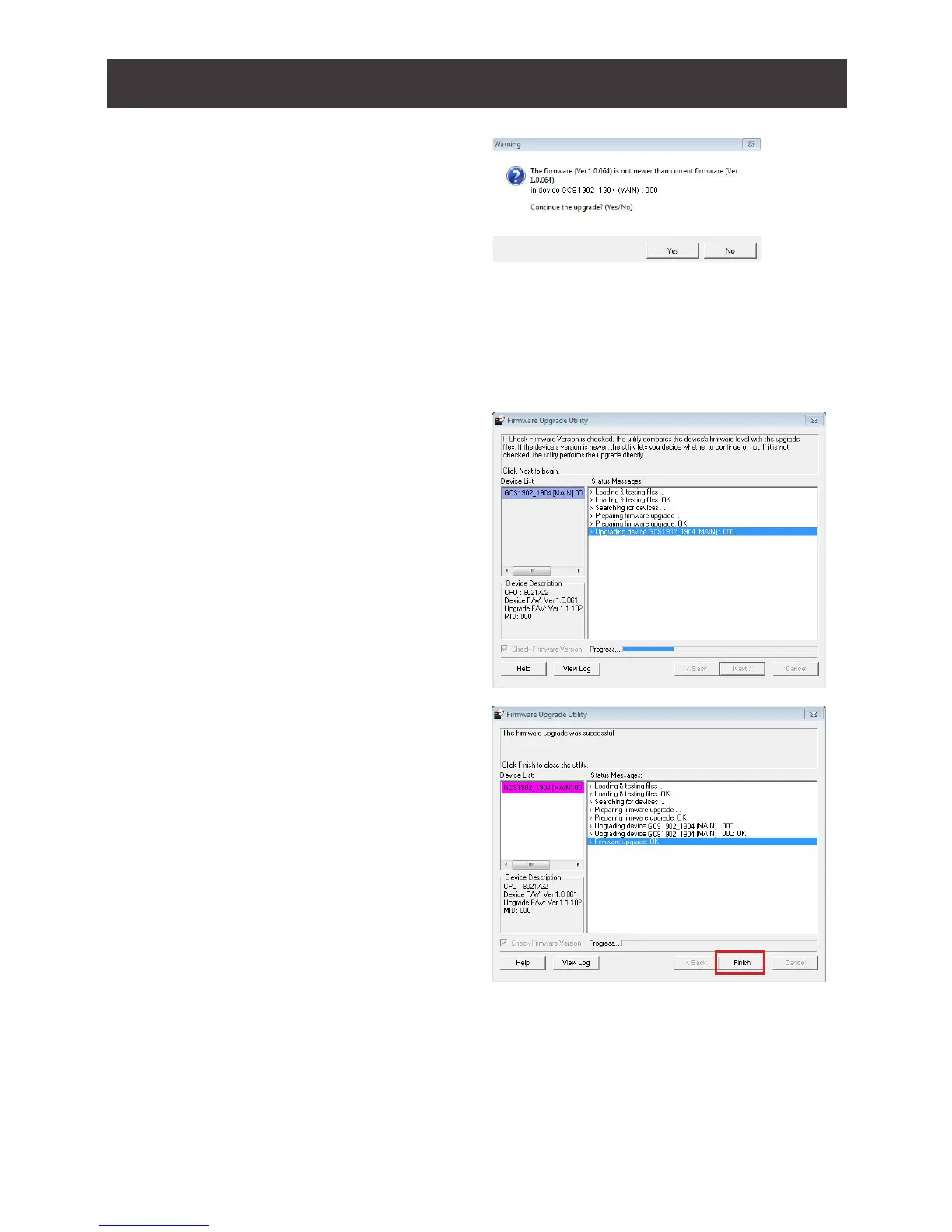
6. If you enabled Check Firmware
Version, the Utility compares the
device’s rmware level with that of the
upgrade les. If the device’s version
is higher than the upgrade version,
a dialog box below will give you the
option to Continue or Cancel.
8. As the Firmware Upgrade proceeds,
a status message will appear in the
Status Messages panel, and the
progress toward completion is shown
on the Progress bar
9. After the upgrade has completed, a
screen appears to inform you that
the procedure was successful. Click
Finish to close the Firmware Upgrade
Utility.
7. If you did not enable Check Firmware Version, the Utility installs the upgrade les
without checking whether they are of higher level, or not.
10. After a successful completion, the GCS1902/1904 will exit the Firmware Upgrade
Mode and resets itself.
Firmware Upgrade Fail
If the Upgrade Succeeded screen does not appear, this means that the upgrade failed to
complete successfully. If this occurs, repeat the upgrade procedure from the beginning (see
Before Starting Firmware Upgrade).



 To Next Page