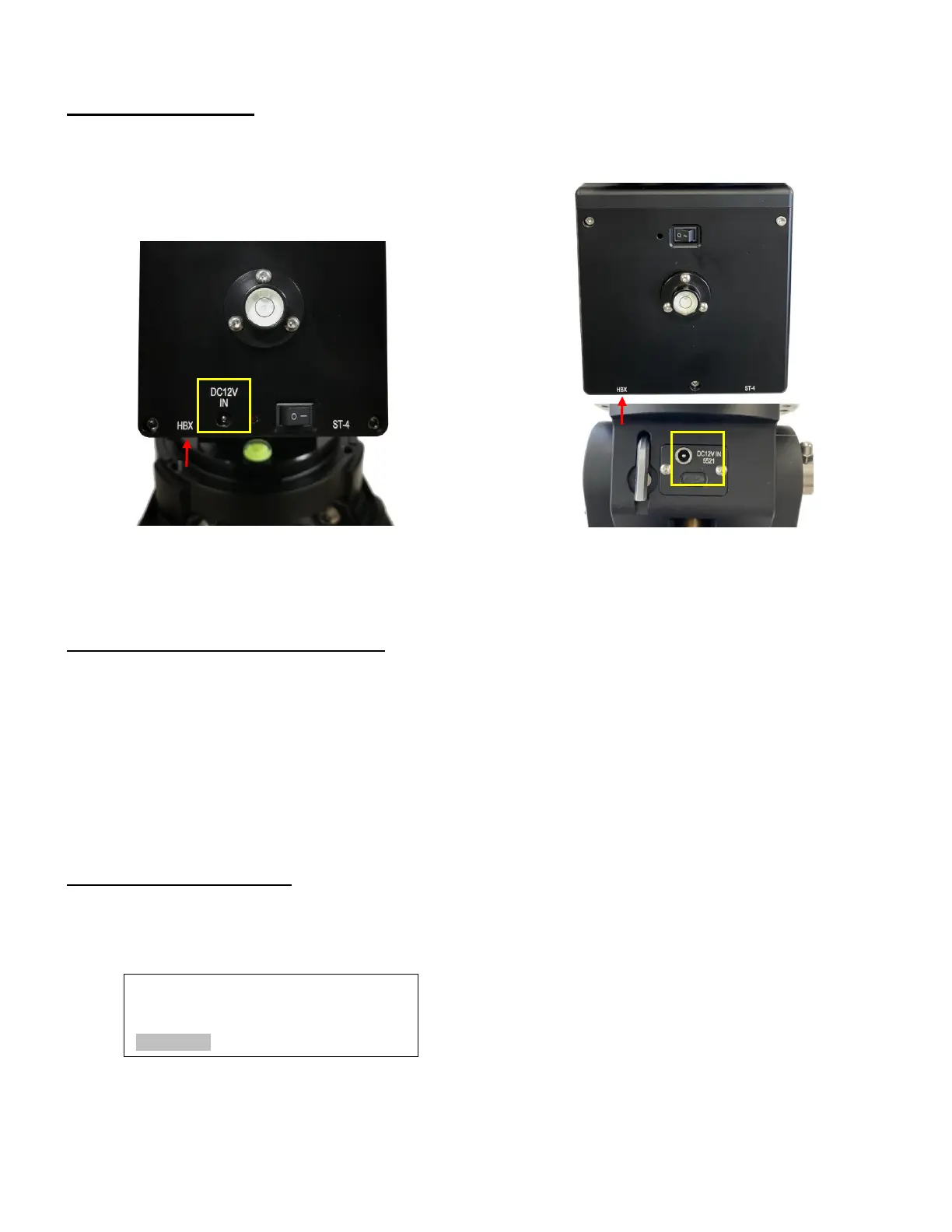
Step 5. Connect cables
Connect the Go2Nova® 8409 Hand Controller to the HBX port on the mount back. Plug in a 12V DC
power supply to the DC12V IN socket.
Figure 12. DC power and HBX ports
STEP 6. Set the mount to Zero Position
The Zero Position is the mount GOTO reference. Without set the mount zero position properly, it
may cause large GOTO error or even cause the scope to hit the tripod leg. The simplest way to find the
mount Zero Position of the EQ mode is using the zero position sensors. Press MENU=>Zero Position
=>Search Zero Position, then press ENTER.
The Zero Position of a EQ mount is defined as the telescope being on top of the mount head and
pointing to the North Pole (in northern hemisphere), with CW shaft mounting hole pointing to the ground. If
one would like to register the Zero Position manually, power on the mount and use hand controller to slew
the mount to Zero Position. Press MENU=>Zero Position =>Set Zero Position. Press ENTER to confirm.
STEP 7. Set hand controller
An HAE mount does not equip with a GPS receiver. Hence one needs to manually enter the GPS
location or sync it from the App
To set up the controller, turn the mount power ON. Press MENU=> “Settings”:
Press ENTER and select “Set Time and Site”
Select and Slew
Sync. to Target
Alignment
Settings



 To Next Page