2.3.1. Set up iMate Time
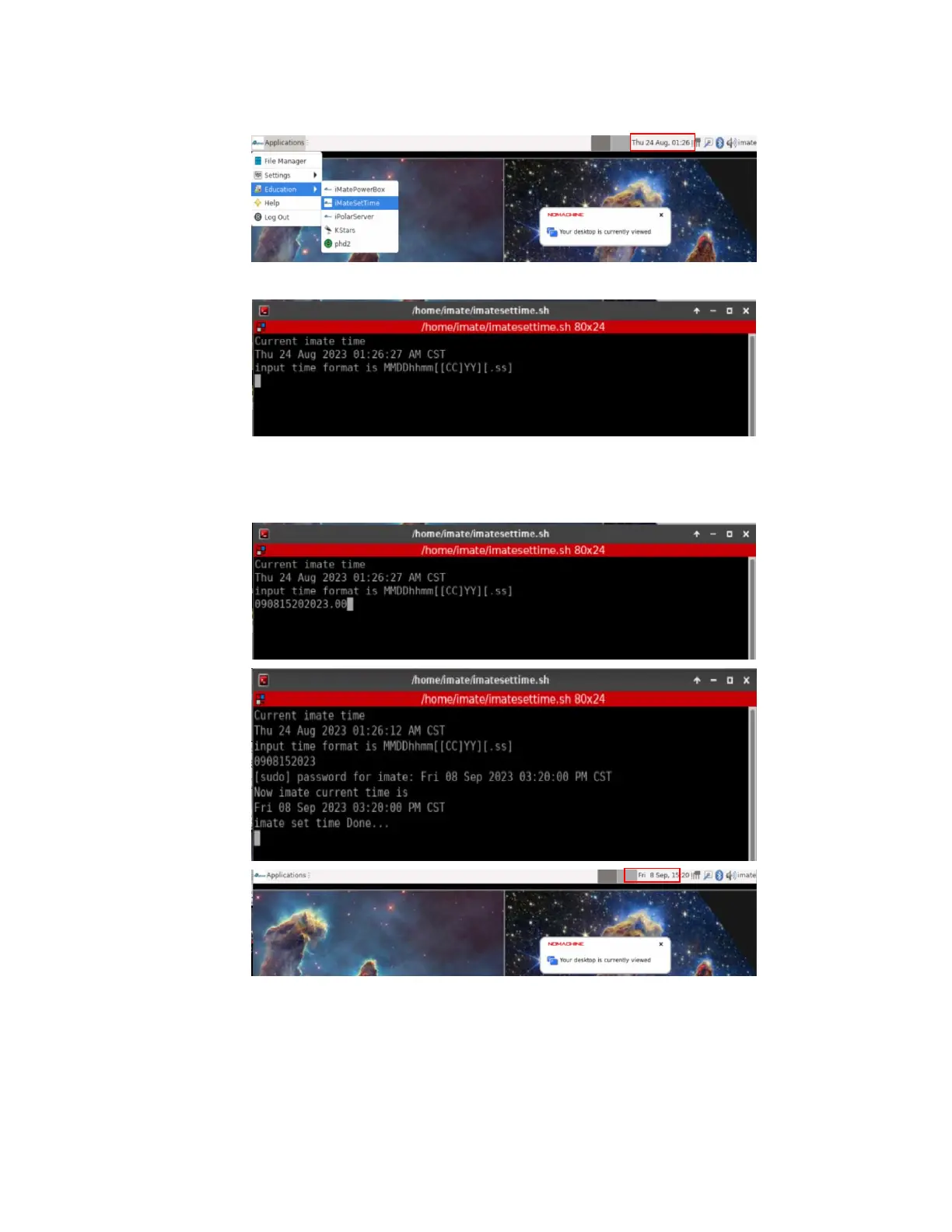
Connect the iMate. The initial time shown here is 8/24/2023 01:26. From iOptron Applications pull
down menu to select Education =>iMateSetTime. This will bring up the imatesettime screen.
Enter the time in the format MMDDhhmmYYYY.00 or MMDDhhmmYY. Here we entered
090815202023.00, or 0908152023 for Sept 8, 2023, 15:20. Click Enter from your keyboard to confirm.
The iMate time won’t be kept when the mount is power off.
2.3.2. Set up iMate Site Info (GPS location)
From KStars main screen, click on Geographic (global) button to set geographic location. Enter
“Boston” in City filter and select “Boston, Massachusetts, USA”. Choose correct UTC offset, which is -5
hours, and DST rules, which is US. Click OK to save it. You may also manually enter
The location info will be kept in the KStar.



 To Next Page