GB
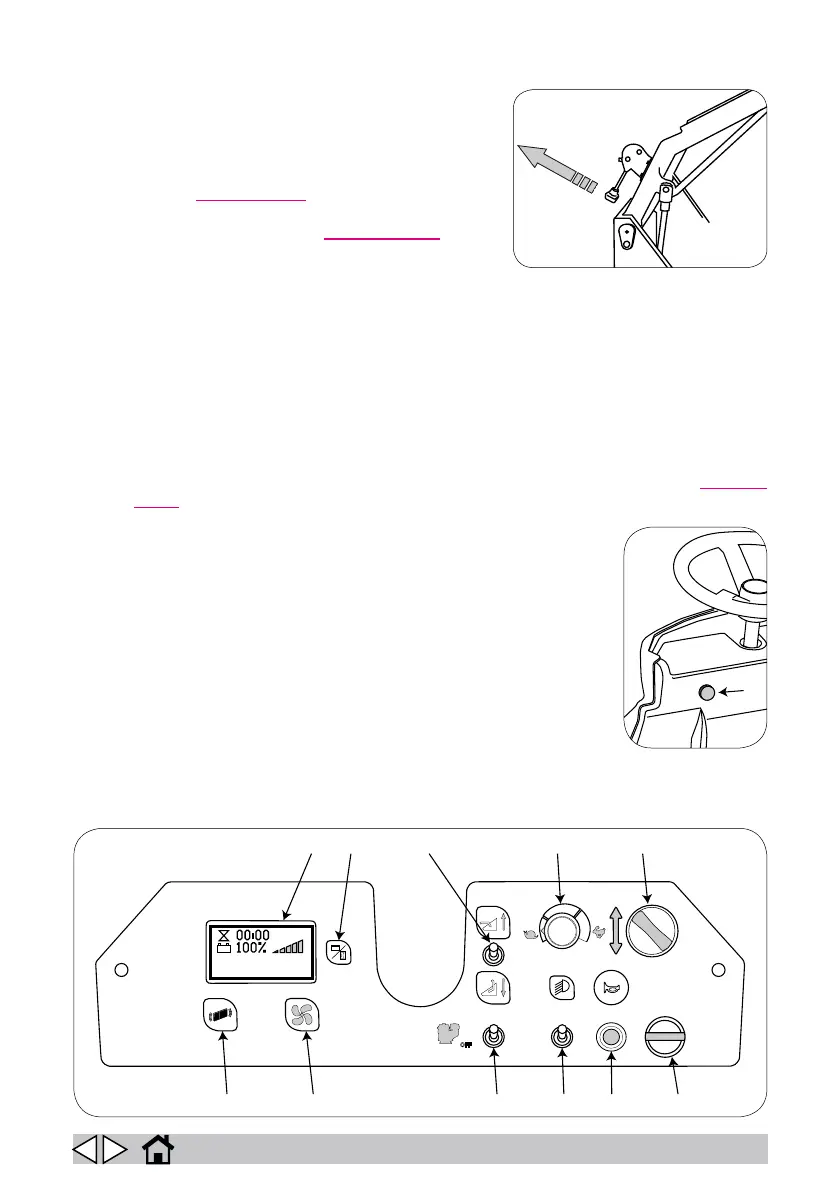
► Bin tipping lever (top unloading) (g. 7): Pull this
lever to rotate the bin and empty its contents.
► Display (1, g. 8): This displays the current battery
charge level expressed as a percentage, logos for
active functions, an hour counter showing the total
hours of use of the machine and any active alarms,
see the “Display alarms ” section.
► Menu button (2, g. 8): On the Battery version, this
button is only active in the “Technical menu”. On the
Dual Power version, it serves to display the hours of
functioning of the engine.
► Bin up/down switch (3, g. 8): Lifts or lowers the debris bin.
► Speed control (4, g. 8): Regulates the forward and reverse speed of the machine.
► Direction selector (5, g. 8): Turn this selector to engage forward or reverse travel.
► Main switch (6, g. 8): Switches power to all machine functions on/off.
► Horn button (7, g. 8): Press to sound the horn.
► Light switch (8, g. 8): Turns the lights (OPTIONAL) on and off.
► Engine start switch (9, g. 8): Starts and shuts down the engine.
► Suction switch (10, g. 8): Switches suction on and off.
► Filter shaker button (11, g. 8): Press and hold this button for 30 seconds to shake and
clean the suction lter. As soon as the shaker motor starts, the suction and drive motors
are switched off. You can select the “automatic lter shaker” function from the “Technical
menu”. When this function is active, the lter shaker is automatically
switched on at the end of the set interval.
► Bin up/down movement enabling button (1, g. 29): Press this
button to enable bin movement by the bin up/down switch.
7
29
0
1
START
00:00
100%
1 2 3 4 5
6 7 8 9 10 11
8
21


 To Next Page