C
HAPTER
8
| Spanning Tree Algorithm
Configuring Global Settings for STA
– 209 –
◆ Time Left – The time remaining before the shutdown expires.
◆ Release Mode – Configures the interface for automatic or manual
loopback release. (Default: Auto)
◆ Release – Allows an interface to be manually released from discard
mode. This is only available if the interface is configured for manual
release mode.
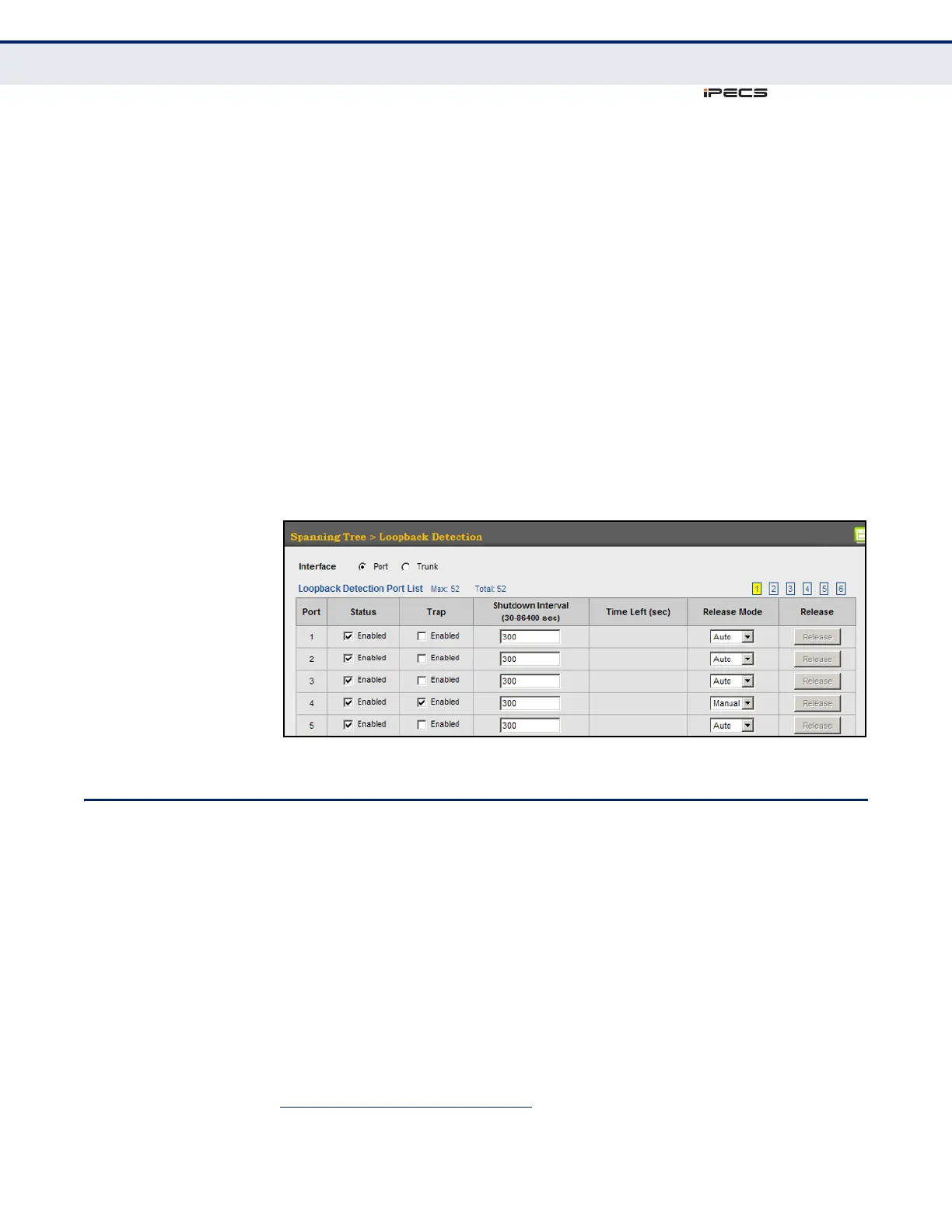
WEB INTERFACE
To configure loopback detection:
1. Click Spanning Tree, Loopback Detection.
2. Click Port or Trunk to display the required interface type.
3. Modify the required loopback detection attributes.
4. Click Apply
Figure 94: Configuring Port Loopback Detection
CONFIGURING GLOBAL SETTINGS FOR STA
Use the Spanning Tree > STA (Configure Global - Configure) page to
configure global settings for the spanning tree that apply to the entire
switch.
CLI REFERENCES
◆ "Spanning Tree Commands" on page 817
COMMAND USAGE
◆ Spanning Tree Protocol
2
Uses RSTP for the internal state machine, but sends only 802.1D
BPDUs. This creates one spanning tree instance for the entire network.
If multiple VLANs are implemented on a network, the path between
2. STP and RSTP BPDUs are transmitted as untagged frames, and will cross any VLAN
boundaries.



 To Next Page