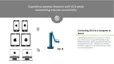
Connecting to Your Computer via USB
You can use VZ-X with your computer (Mac/PC/Chromebook) via USB. You may use it with IPEVO Visualizer or other compatible third
party software. If your computer is connected to a projector, you can then project the live image from VZ-X to a large screen. To use
VZ-X with your computer, please:
1
Connect the included Micro-USB cable to the Micro-USB port of VZ-X. Then, connect the other end of the cable to the USB port of your
computer.
2
Check the Mode Switch of VZ-X. Make sure you’ve switched it to USB/HDMI mode.
3
Turn VZ-X on using the Power Switch.
4
Launch IPEVO Visualizer or any compatible third party software of your choice. A live image should appear on your computer. VZ-X is
now ready for use.
11



 To Next Page