EasyManua.ls Logo

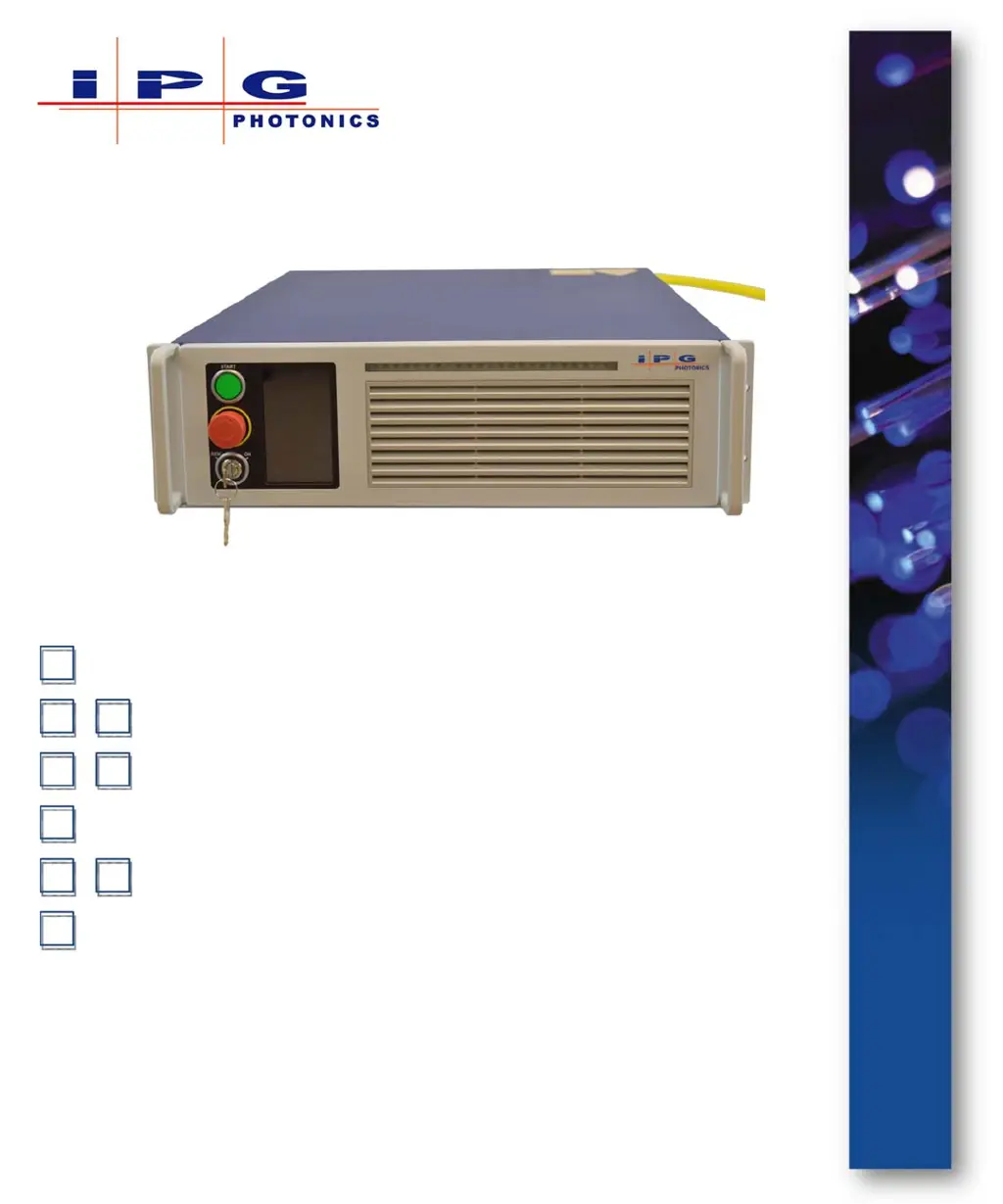
IPG Photonics YLR-400 - User Manual

IPG Photonics YLR-400
188 pages
Print Icon
To Next Page IconTo Next Page
Loading...
HP Switch Software
Part Number: P21-010106, YLR-Series SLED 3.0
Published: April 2015
Revision: B
DCO: 956
Management and Configuration Guide
YLR-Series User Guide
and Configuration Guide

Table of Contents

Questions and Answers

  • N
    Nicholas McguireAug 19, 2025
    What to do if IPG Photonics Measuring Instruments show High Back Reflection error?
    • J
      Joseph JohnstonAug 19, 2025
      If the Measuring Instruments by IPG Photonics display a 'High Back Reflection' error, it means the back reflected power has exceeded the pre-installed maximal applicable level. First, check that the focus position is correctly adjusted and that there are no surfaces that could cause high back reflection. Then, reset the error using the RS-232 command (“RERR”) or the touch-screen display on the front panel.
  • A
    Alicia WatsonAug 21, 2025
    Why do IPG Photonics Measuring Instruments show Overheat error?
    • S
      Samantha GrayAug 22, 2025
      If you see a 'Overheat' error on your IPG Photonics Measuring Instruments, it indicates that the case temperature of the laser is too high. Check if the outside conditions are within the specified range and ensure sufficient airflow. The error message should disappear once the case temperature drops back within the operating range.
  • J
    josephpetersAug 25, 2025
    What to do if IPG Photonics Measuring Instruments show Power Supply Failure 2 error?
    • D
      Diana LivingstonAug 25, 2025
      If your IPG Photonics Measuring Instruments display a 'Power Supply Failure 2' error, it means that while the internal main power supply is on and voltage is applied to the laser module, the voltage value is outside the expected range. Try resetting the error and ensure the internal main power supply is switched on. If the error continues, contact IPG Photonics for assistance.
  • K
    Katelyn WilsonAug 26, 2025
    What to do if IPG Photonics Measuring Instruments show Power Supply Failure error?
    • K
      knightheatherAug 26, 2025
      If your IPG Photonics Measuring Instruments displays a 'Power Supply Failure' error, it indicates that, despite the internal main power supply being switched on, no voltage is being applied to the laser module. Try resetting the error. If the error persists, contact IPG Photonics for assistance.
  • D
    David SpencerAug 28, 2025
    What to do if IPG Photonics Measuring Instruments show Module Disconnected error?
    • M
      Mark WhiteAug 28, 2025
      If your IPG Photonics Measuring Instruments show a 'Module Disconnected' error, it means that digital data communication with the laser module inside the device is broken. Try resetting the error. If the error appears again, contact IPG Photonics for assistance.
  • S
    Sheri VillanuevaAug 30, 2025
    What to do if IPG Photonics Measuring Instruments show Duty Cycle Too High error?
    • J
      James NguyenAug 30, 2025
      If your IPG Photonics Measuring Instruments shows 'Duty Cycle Too High' error, the duty cycle is the percentage of how long the laser is in the “on” state in the given modulated period. Check the modulation signal and try to reset the error. If it appears again, contact IPG Photonics for assistance.
  • L
    Latoya JonesSep 1, 2025
    What to do if IPG Photonics Measuring Instruments show Internal Communication Error?
    • N
      novakchristineSep 1, 2025
      If your IPG Photonics Measuring Instruments display a 'Internal Communication Error', it occurs when there is no connection to the Controller Area Network (CAN). Try to reset the error. If it appears again, contact IPG Photonics for assistance.
  • T
    Tony EvansSep 3, 2025
    What to do if IPG Photonics Measuring Instruments show High Pulse Energy error?
    • P
      Patrick ShepardSep 3, 2025
      If your IPG Photonics Measuring Instruments show a 'High Pulse Energy' error, check the modulation signal. Try to reset the error. If it appears again, contact IPG Photonics for assistance.
  • C
    coopervictoriaSep 5, 2025
    What to do if IPG Photonics Measuring Instruments show Pulse Too Long error?
    • S
      Sharon JacksonSep 6, 2025
      If your IPG Photonics Measuring Instruments display a 'Pulse Too Long' error, check the modulation signal. Try to reset the error. If it appears again, contact IPG Photonics for assistance.
  • P
    parkerterriSep 7, 2025
    What to do if IPG Photonics Measuring Instruments show Average Power Too High error?
    • J
      Joel Patel MDSep 8, 2025
      If your IPG Photonics Measuring Instruments display a 'Average Power Too High' error, check the modulation signal. Try to reset the error. If it appears again, contact IPG Photonics for assistance.

Summary

1 Overview of the YLR-Series Fiber Lasers

Safety Information and Conventions

Explains safety symbols, conventions, and general safety instructions.

Safety Features and Compliance to Government Requirements

Details safety features and compliance with regulatory standards and government requirements.

General Safety Instructions

Provides essential safety recommendations and precautions for operating the laser.

Optical Safety

Details crucial safety measures related to optical hazards and eye protection.

Electrical Safety

Outlines essential safety precautions concerning electrical hazards and connections.

Environmental Safety

Covers environmental considerations and precautions for safe operation.

2 Using Your Device

Electrical Power and Connections

Details connecting electrical power, interface wires, and external circuits.

Interlock Safety Circuit

Explains the functionality and operation of the interlock safety circuit.

Initial Power-Up Sequence

Guides through initial power-up and explains the key switch operation.

3 Computer Interface;Commands

Interface Commands

Lists and describes the commands used for controlling the laser via computer interface.

4 Pulse Shaping

Connection and Configuration

Details connecting via Ethernet/RS-232 and configuring the Pulse Shaper.

5 Troubleshooting

Error Messages and Solutions

Lists common error messages and their corresponding possible solutions.

A Web User Utility

B Service

C Optical Fiber Connector Inspection and Cleaning

Inspection and Cleaning Procedures

Details the step-by-step process for inspecting and cleaning fiber optic connectors.

IPG Photonics YLR-400 Specifications

General IconGeneral
Wavelength1070 nm
Output Power400 W
CoolingWater-cooled
Power Stability±1%
Mode of OperationCW

Related product manuals