EasyManua.ls Logo

iPower GXS4300iD - User Manual

Default Icon
40 pages
Print Icon
To Next Page IconTo Next Page
Loading...
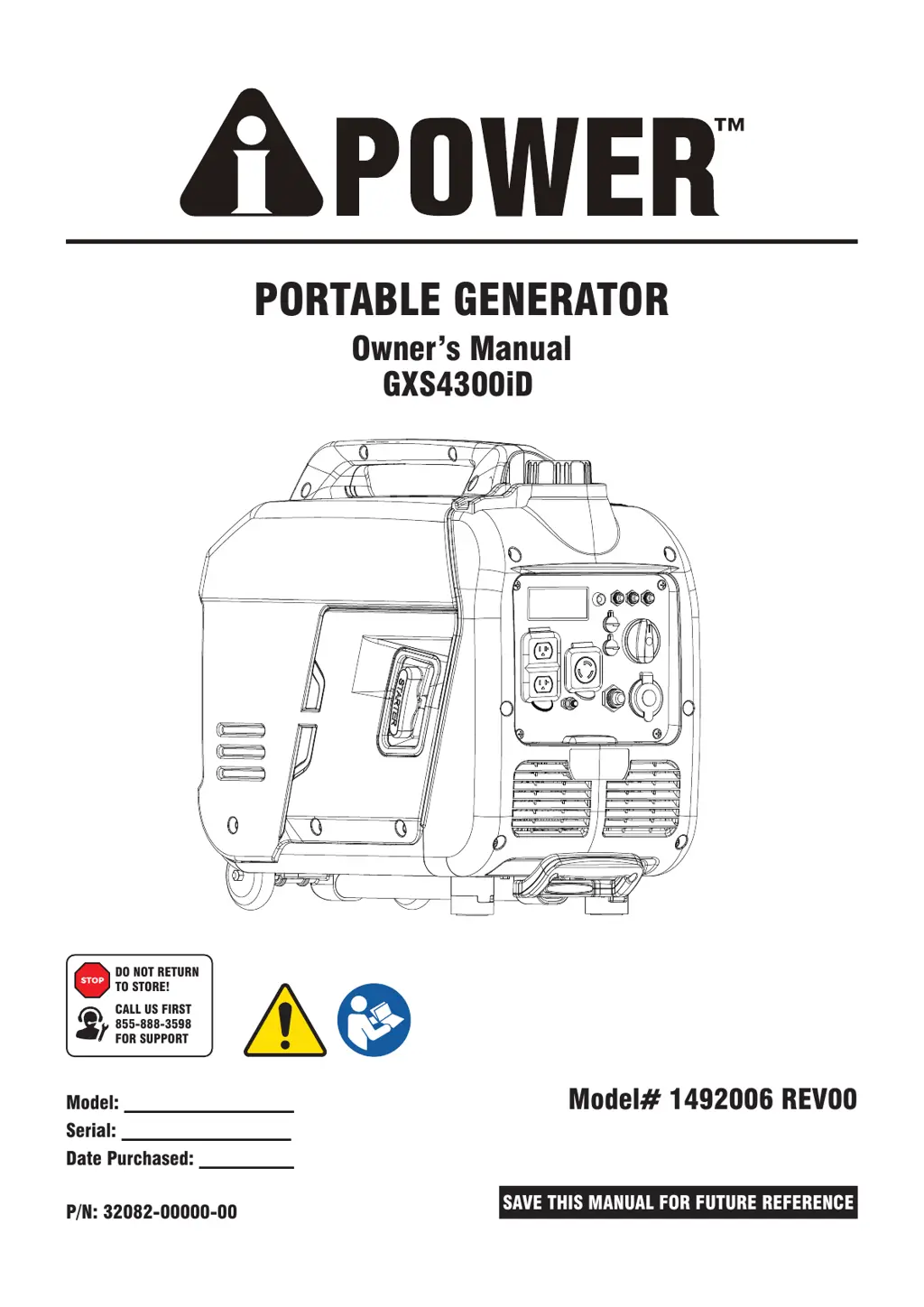
PORTABLE GENERATOR
Owner’s Manual
P/N: 32082-00000-00
Model:
Serial:
Date Purchased:
Model# 1492006 REV00
SAVE THIS MANUAL FOR FUTURE REFERENCE
DO NOT RETURN
TO STORE!
CALL US FIRST
855-888-3598
FOR SUPPORT
GXS4300iD

Other manuals for iPower GXS4300iD

Questions and Answers

  • C
    Calvin SmithAug 13, 2025
    What to do if my iPower Portable Generator has no AC output?
    • E
      ericksonalexandraAug 13, 2025
      If your iPower Portable Generator's engine runs but there's no AC output, it could be due to several reasons. First, check the AC load and reset the circuit breaker if it's open. Also, inspect for poor connections or defective cord sets and repair if necessary. Ensure the connected device is in good condition by testing with another device. If your generator has a GFCI outlet, check if it's open and press the reset button after correcting any ground faults.
  • J
    Joseph JohnstonAug 18, 2025
    Why does my iPower GXS4300iD shut down while running?
    • J
      Jennifer YoungAug 19, 2025
      If your iPower Portable Generator shuts down while running, consider these potential causes: Ensure the fuel tank is full. Clean or replace the air cleaner. Check the oil level and fill to the correct level or place the generator on a level surface. If the generator shut off due to CO accumulation and a blinking red indicator light, follow all safety instructions on the CO Action Label. If you are using gasoline or propane/LPG, make sure that the fuel tank is full with gasoline or replace LPG cylinder/ check propane/LPG supply.
  • A
    Andrea YoungAug 25, 2025
    How to troubleshoot power loss in my iPower GXS4300iD?
    • A
      Alicia JonesAug 25, 2025
      If your iPower Portable Generator lacks power, consider these possible causes: Reduce the load if it's too high. Replace the air filter if it's dirty. Clean or replace the fuel filter if it's clogged or dirty. Clean or replace the spark arrester screen if it's clogged or dirty. Drain the gas tank and carburetor and fill with fresh fuel if the fuel is bad.
  • C
    Craig RobbinsAug 28, 2025
    What to do if my iPower GXS4300iD Portable Generator bogs down under load?
    • J
      Joseph HallAug 28, 2025
      If your iPower Portable Generator runs fine without a load but bogs down when you connect something, there are a few things to check. First, disconnect any electrical load that might have a short circuit. Reduce the load if the generator is overloaded. Clean or replace the fuel filter if it's clogged or dirty. Connect another device that is in good condition.
  • L
    Lynn BondSep 2, 2025
    Why does my iPower GXS4300iD engine hunt or falter?
    • T
      Tina RiveraSep 2, 2025
      If your iPower Portable Generator engine hunts or falters, try setting the choke to the halfway position until the engine runs smoothly. Replace the fuel filter if it is clogged or dirty.
  • A
    Amanda ToddNov 7, 2025
    Why won't my iPower GXS4300iD Portable Generator start?
    • M
      Melanie CunninghamNov 7, 2025
      If your iPower Portable Generator doesn't start, runs poorly, or shuts down, there are several possible causes: * Ensure the engine switch is in the ON (l) position and the fuel valve is also in the ON (l) position. * Check the oil level and fill the crankcase to the correct level, or place the generator on a level surface. * Clean or replace the air filter. * Make sure the fuel tank is full and the fuel isn't stale; if it is, drain the tank and carburetor and refill with fresh fuel. * Verify the spark plug wire is connected, and replace the spark plug if it's bad. * Drain the gas tank and carburetor and fill with fresh fuel to remove any water. * If the engine is flooded, wait 5 minutes before attempting to restart it. * If the generator shut off due to CO accumulation an...

Summary

Introduction and Safety Guidelines

Owners Manual Introduction

Guide to understanding the owner's manual and its importance.

Generator Safety Precautions

Critical safety guidelines, hazard definitions, and warnings for generator operation.

Safe Fuel Handling

Safety protocols for handling and using gasoline and propane/LPG fuels.

Generator Setup, Features, and Specifications

Unpacking and Parts List

Instructions for unpacking the generator and verifying included components.

Generator Controls and Features

Identification of generator's external controls, handles, and wheels.

Control Panel Details

Detailed explanation of control panel indicators, outlets, and switches.

Generator Technical Specifications

Key technical data and operating parameters for the GXS4300iD model.

Generator Operation Procedures

Engine Oil and Fueling

Procedures for adding engine oil and fueling the generator with gasoline.

Starting and Operating the Generator

Steps for locating, starting, and selecting fuel for the generator.

Connecting Electrical Loads

Guidelines for safely connecting and managing electrical loads.

Stopping the Generator Safely

Procedures for safely shutting down the generator and its systems.

Advanced Features and Troubleshooting

CO Watch-Guard System

Explanation of the Carbon Monoxide detection and auto shutoff system.

Fuel Sense and Parallel Operation

Automatic fuel switching and connecting multiple generators for increased power.

Troubleshooting Generator Issues

Solutions for common problems encountered during generator operation.

Maintenance and Warranty Information

Maintenance Schedule and Engine Care

Recommended service intervals and engine servicing procedures.

Generator Storage and Draining

Guidelines for storing the generator and draining its fuel system.

Warranty and Service Information

Details on the product warranty, coverage, and how to obtain service.

iPower GXS4300iD Specifications

General IconGeneral
ModelGXS4300iD
TypeInverter Generator
Starting Wattage4300W
Running Wattage3500W
Fuel TypeGasoline
Engine Type4-stroke OHV
Engine Displacement212cc
AC Output120V
Starting SystemElectric Start
DC Output12V, 8.3A
Outlets2 x 120V 20A, 1 x 12V DC

Related product manuals