-SENSOR-HD-00-SWITCH-(IO)-00-(R)(1) Installation Manual | Released
3 Connecting IRMA 6 (optionally with angled M12 connectors)
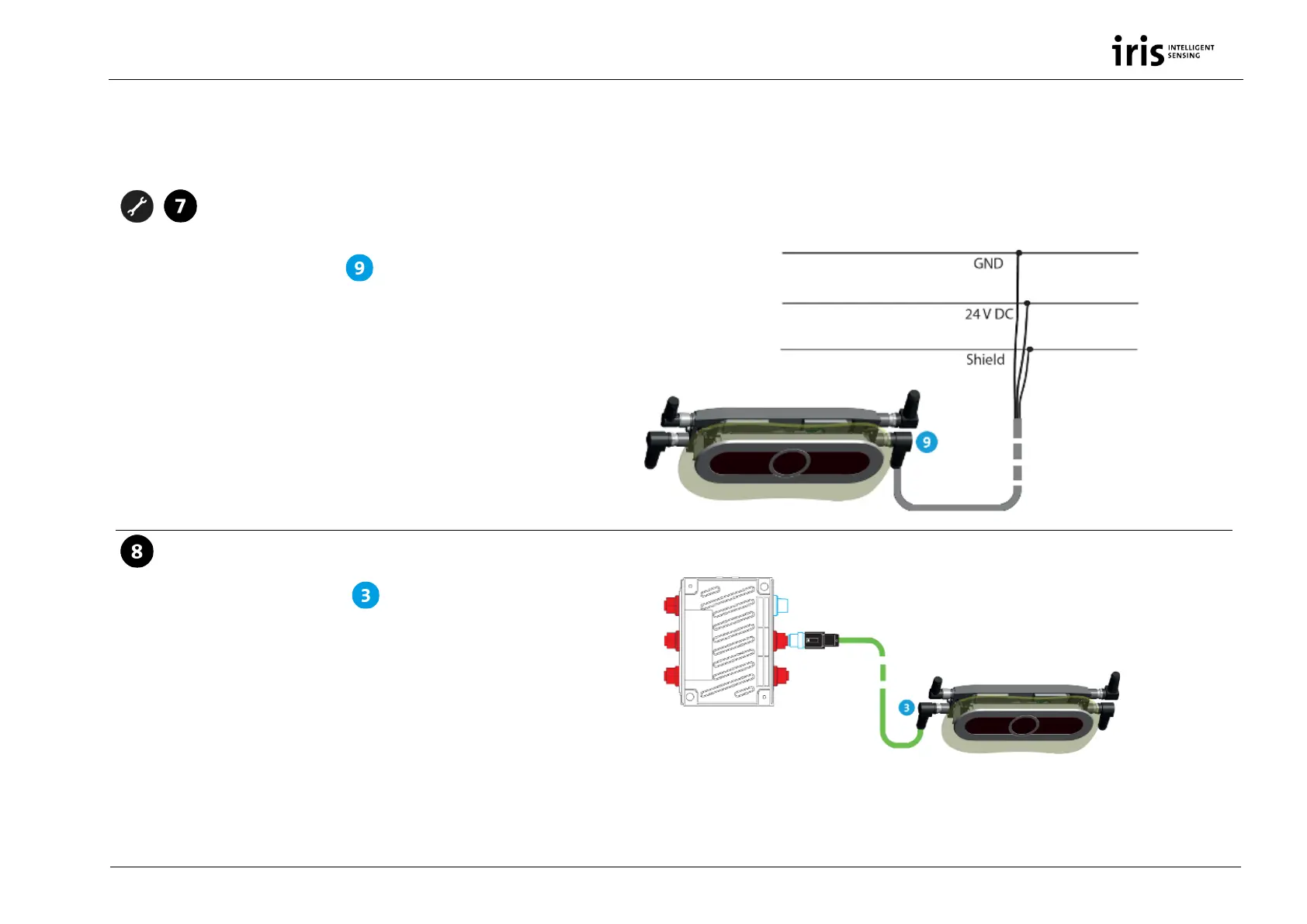
Connect IRMA 6 to power supply
Connect IRMA 6 from component
to the on-board power supply via the wire strands of the power
supply cable K-M12POW-B-oE-04-2m.
Mind the correct connection points (+, - and shield) in the
connection block of the vehicle and See section "Ensuring
power supply", p. 14 for time relay for 30 min overrun power.
Connect IRMA 6 with Ethernet
Connect IRMA 6 from component
with the switch via the
M12 system Ethernet cable K-M12CAT5-XX-xm. Via Ethernet
the connection to the OBU and to the service PC is made.
Only possible with service PCs having an Ethernet interface.
1061818736_p
M12 power supply
connector (m)
M12 Ethernet


 To Next Page