-SENSOR-HD-00-SWITCH-(IO)-00-(R)(1) Installation Manual | Released
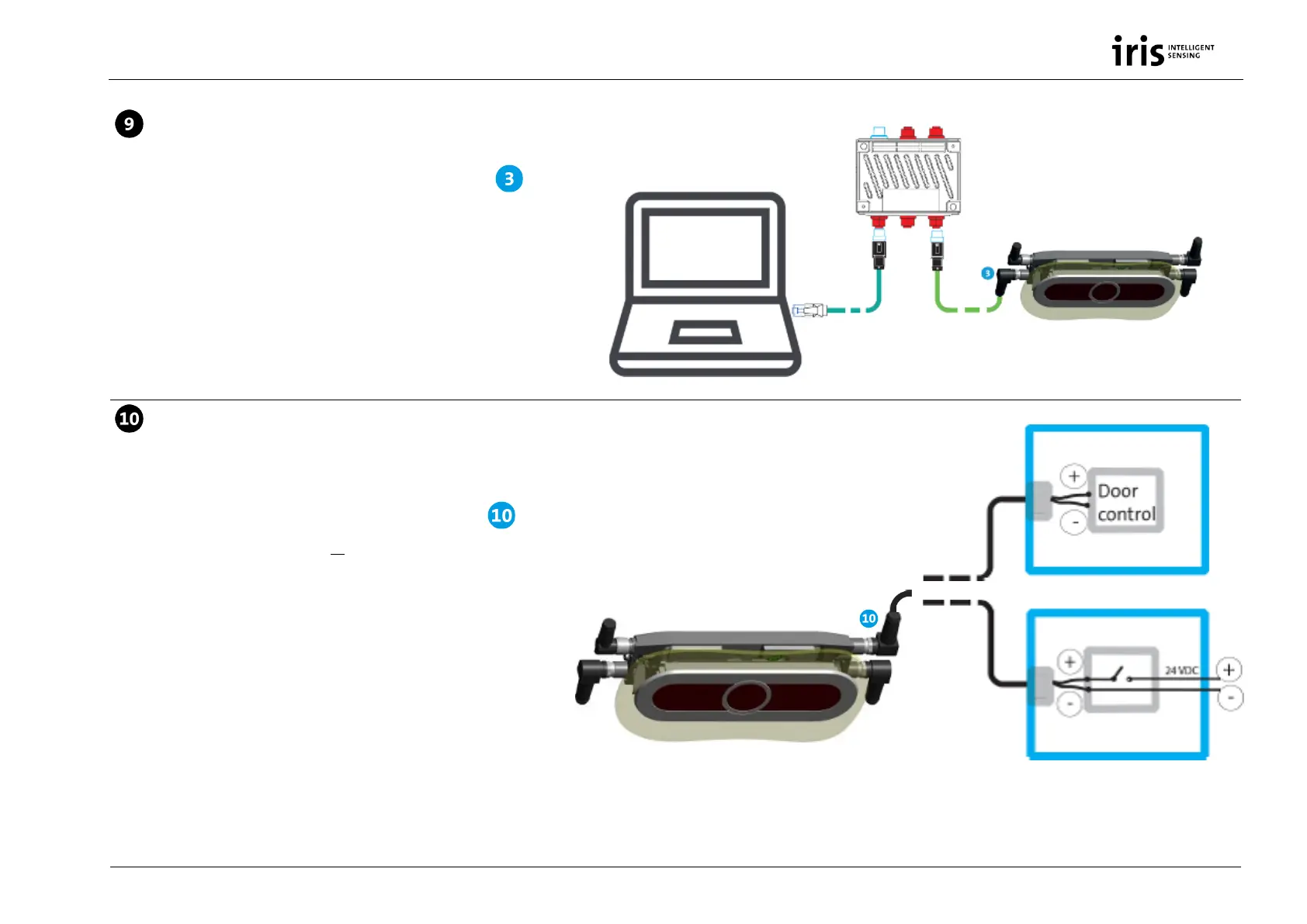
Connect IRMA 6 to PC
Connect IRMA 6 with the PC via switch from component with
the M12 system Ethernet cable K-M12CAT5-XX-xm and the
outgoing adapter cable KQ-M12CAT5-RJ45-01-xm for service
purposes (update, configuration).
Only possible with service PCs having an Ethernet interface.
Connect IRMA 6 to door contact (on
demand)
Connect the wire strands of the cable from component either
directly to the door control unit or establish a circuit with the wire
strands via a limit switch (external power supply from vehicle
required).
See cabling diagram for wiring overview of IRMA 6 in the vehicle,
see Fig. 3, p. 13.
Adapter cable
KQ-M12CAT5-RJ45-01-xm
M12 door contact


 To Next Page