7Roomba® Vac 2 Essential robot + AutoEmpty™ dock Owner’s Guide
EN
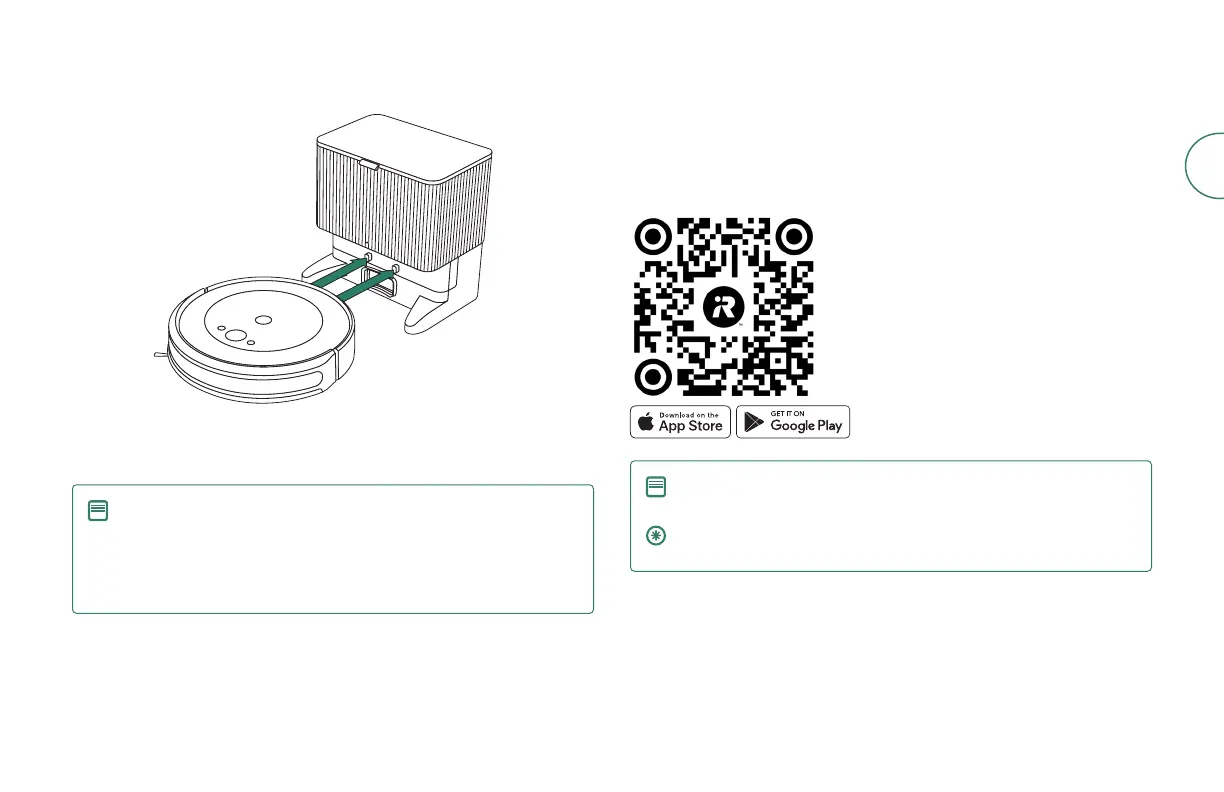
5 Wake up the robot
Place your robot in front of the dock, then slide it toward the dock, lining up the
metal charging contacts. After a few minutes, a sound will let you know it’s awake.
NOTE: Your robot comes with a partial charge, but we recommend
that you charge the robot for 4 hours prior to starting the rst
cleaning job.
To remove your robot from the dock, slide the robot towards you and
then lift.
6 Download the iRobot Home App
Scan the QR code with the camera on your mobile device or nd the iRobot Home
App in your app store.
• Follow step-by-step instructions to set up your robot.
• Set an automatic cleaning schedule and customize cleaning preferences.
• Access to tips, tricks, and answers to commonly asked questions.
NOTE:
5.0 GHz Wi-Fi is not compatible with this robot
IMPORTANT: Read enclosed safety information guide rst before
using your robot.













 To Next Page