Roomba Customer Support Booklet
Can’t find the answer to your support question? Call Roomba Customer Support at 1-877-855-8593 or email us at
roomba-support@irobot.com
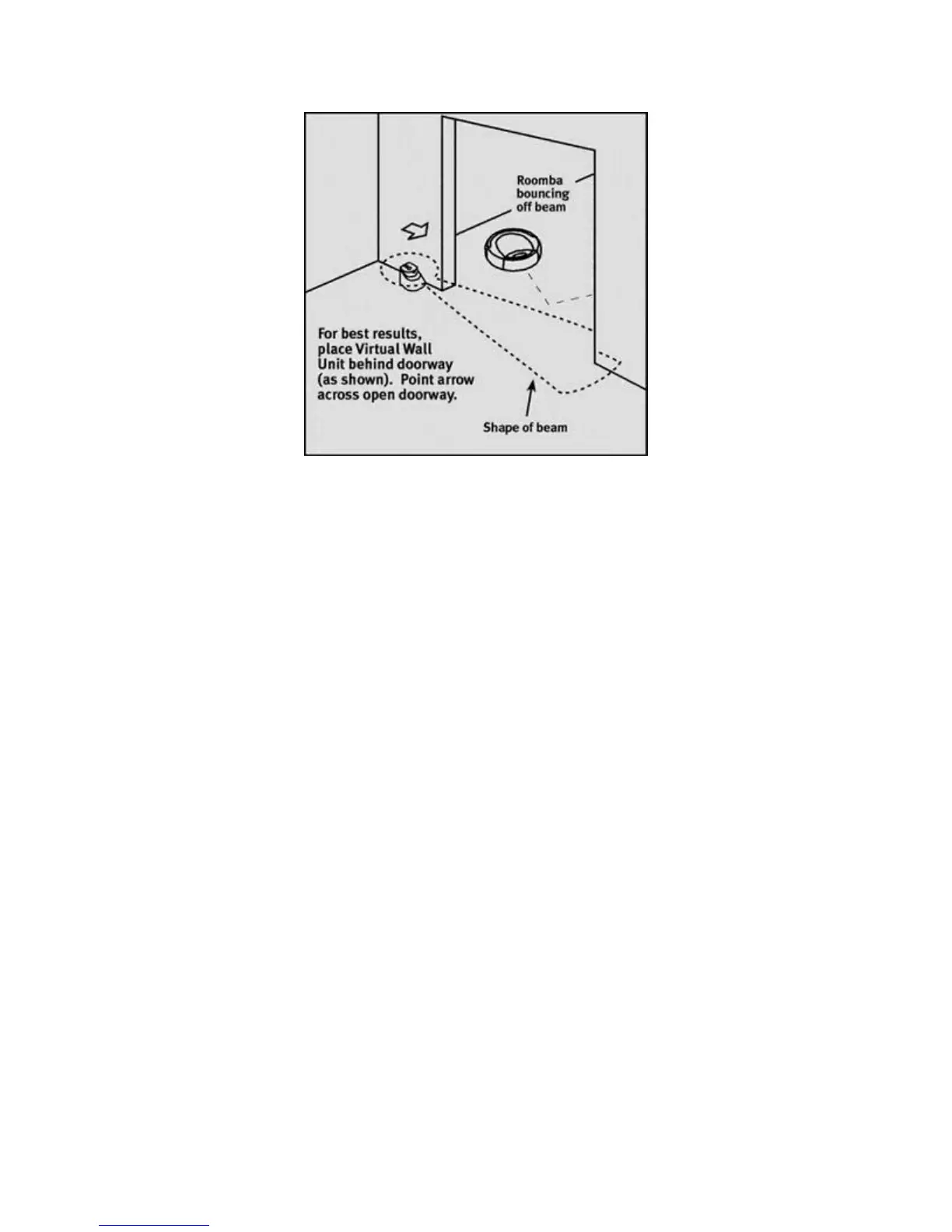
Virtual Wall Unit beam shape and placement hints
Note the shape of the beam, which resembles a large keyhole (see Figure), so
Roomba will be sure not to bump into the Virtual Wall Unit and reposition it by
accident. Sometimes, the best positioning for the unit is next to the door frame, in
the next room, pointing across the doorway (as shown in Figure).
I lost my Roomba while it was cleaning. Could it be in a different room?
Listen for Roomba's beeping sound. Roomba is unlikely to have wandered too
far. Check in the next room under furniture. A Virtual Wall Unit may be used to
constrain Roomba in a room or a given area of a room, but note that the Virtual
Wall Unit will automatically shut off 90 minutes after it is turned on, to conserve
battery power.
Purchasing more Virtual Wall Units
Some large openings require that more than one Virtual Wall Unit be used. Extra
Virtual Wall Units may be purchased by contacting your nearest Roomba retailer,
or visit www.roombavac.com for purchase options.
Solving Problems with the Virtual Wall Unit
What is the Virtual Wall Unit?
The Virtual Wall Unit is a small device that invisibly blocks open doorways and
other openings so Roomba cleans where you want.



 To Next Page