Roomba Customer Support Booklet
Can’t find the answer to your support question? Call Roomba Customer Support at 1-877-855-8593 or email us at
roomba-support@irobot.com
General Procedures
Removing and emptying Roomba's Particle Bin
Emptying Roomba’s Particle Bin is a simple two-step process. Be sure to empty
the Particle Bin before each use. Here's how to do it:
Step 1: Emptying the Main Bin
1. Turn Roomba’s Main Power Switch to the Off position.
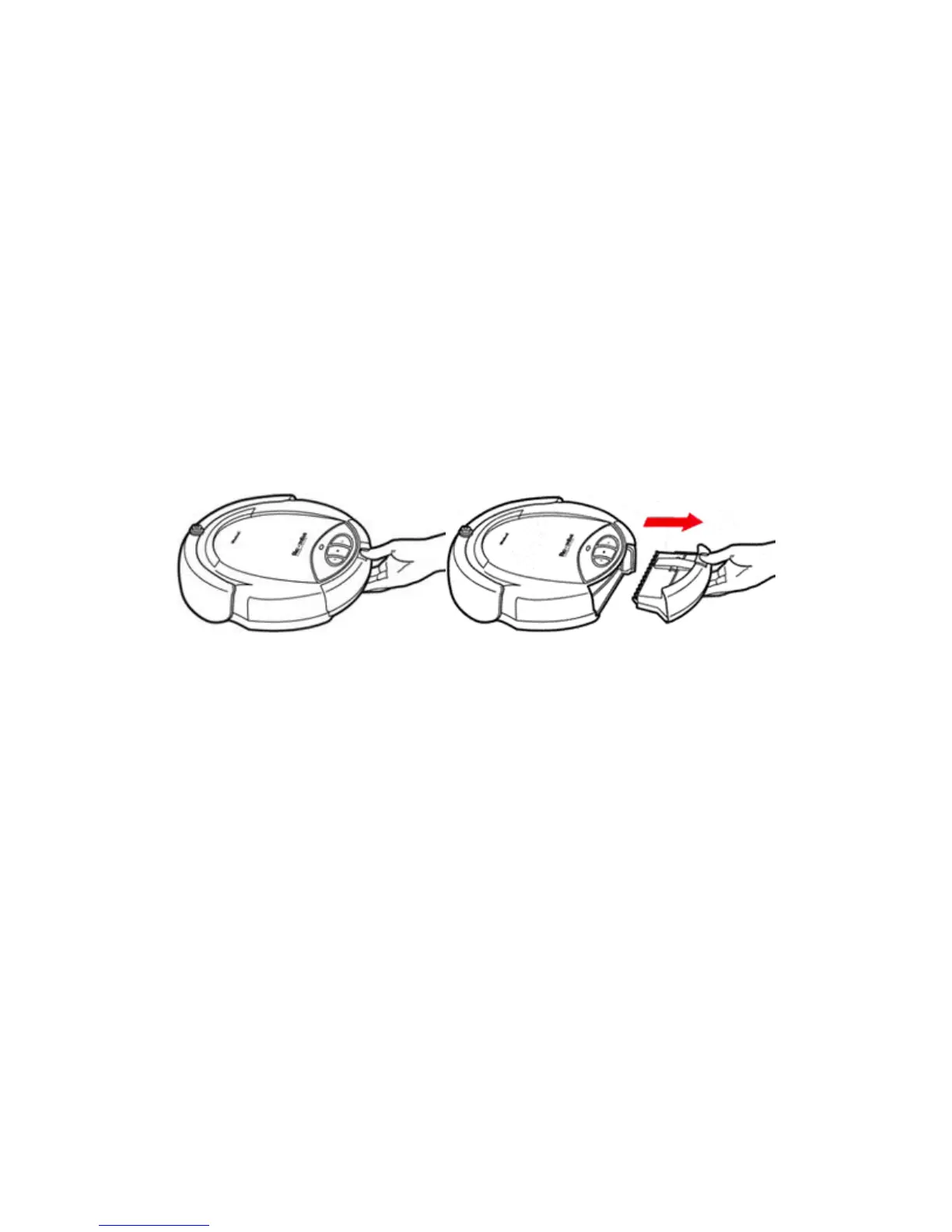
2. Press down on the Particle Bin’s Release Tab while
simultaneously pulling the Particle Bin straight back and out of
Roomba (see Figure 1a-b).
Figure 1a-b: Removing Roomba’s Particle Bin. Press the Release Tab
(Figure 1a) and Pull the Particle Bin out (Figure 1b). The Filter Door is on
the underside of the Particle Bin.
3. Empty the Main Bin into a trash receptacle.
Step 2: Emptying the Particle Bin’s Filter Chamber
1. Flip the Particle Bin over to access the Filter Door.
2. Release the small Tab on the Filter Door and pull the Filter Door
upward (Figure 2).



 To Next Page