Doc. SIE10166 Rev. 10 Page 11 of 28
The CB is open prior to test start: CBA1000 issues the Close command; as the contact closes, the
test current passes through the contact, and CBA1000 measures the contact resistance variations
during the close movement.
. Test current, resistance ranges and other characteristics: as for the static resistance measurement.
. Unlike the static resistance measurement, the test result is not a table of resistance measurements:
it is the resistance profile during the test, along with voltage and current profiles.
2.10 TEST SET CONTROL
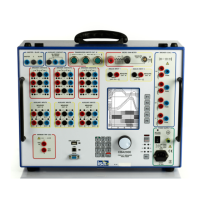
. The control is local, via keypad, selectors and display: no PC control is necessary.
. Keypad: 12 keys, numeric plus alphabet: it allows inputting all test references. The arrangement is
the same as portable phones.
. Two dedicated pushbuttons for test start and sequence selection.
. Numeric encoder with pushbutton for menu selection (see below the selections list).
. As the test is started, a buzzer warns the operator.
. The graphical display has the following main features:
- Type: transflective LCD;
- Pixels: 320x 240;
- Backlight color: white;
- View area: 122 x 92 mm;
- Displays: menu selections prior to test start; then, current waveforms, contact inputs (main –
resistance), auxiliary inputs, analog input (those enabled). For dynamic resistance, it is
possible to display the resistance profile, along with voltage and current profiles.
. Interfaces to PC: RS232, 57600 baud; USB.
. Memory size: 128 Mbytes (approx. 250 results).
. Maximum record length: 200 s.
. Capability of saving and re-calling up to 48 test settings.
2.11 PC SOFTWARE
The dedicated TDMS software has the following main features.
. Download of test sequences.
. Download of test results.
. Test sequences and test results can be viewed, edited in the missing descriptions, saved, printed,
exported.
. Possibility of viewing, overlaying and gluing more results, for an easy test result comparison.
. Possibility to pre-set test sequences and to download them into the test set.
. Two cursors to select measurement points and intervals.
. Zoom in and out feature.
. Enhanced measurement features for movement – speed – acceleration control.
The software will be upgraded for free until a new version is released. Upgrading is simple: just
connect to the ISA WEB site, and download the latest version. This applies also to the test set
resident program.
2.12 MENU SELECTIONS
Appendix A lists the features that are menu selected. The menu is operated by means of the MENU
control knob, that incorporates a switch. The menu is entered pressing the knob and selecting the
Shop for Power Metering products online at:
1.877.766.5412
www.PowerMeterStore.ca



 To Next Page