iMC-B / iMC-V Operating Instruction
page - 19
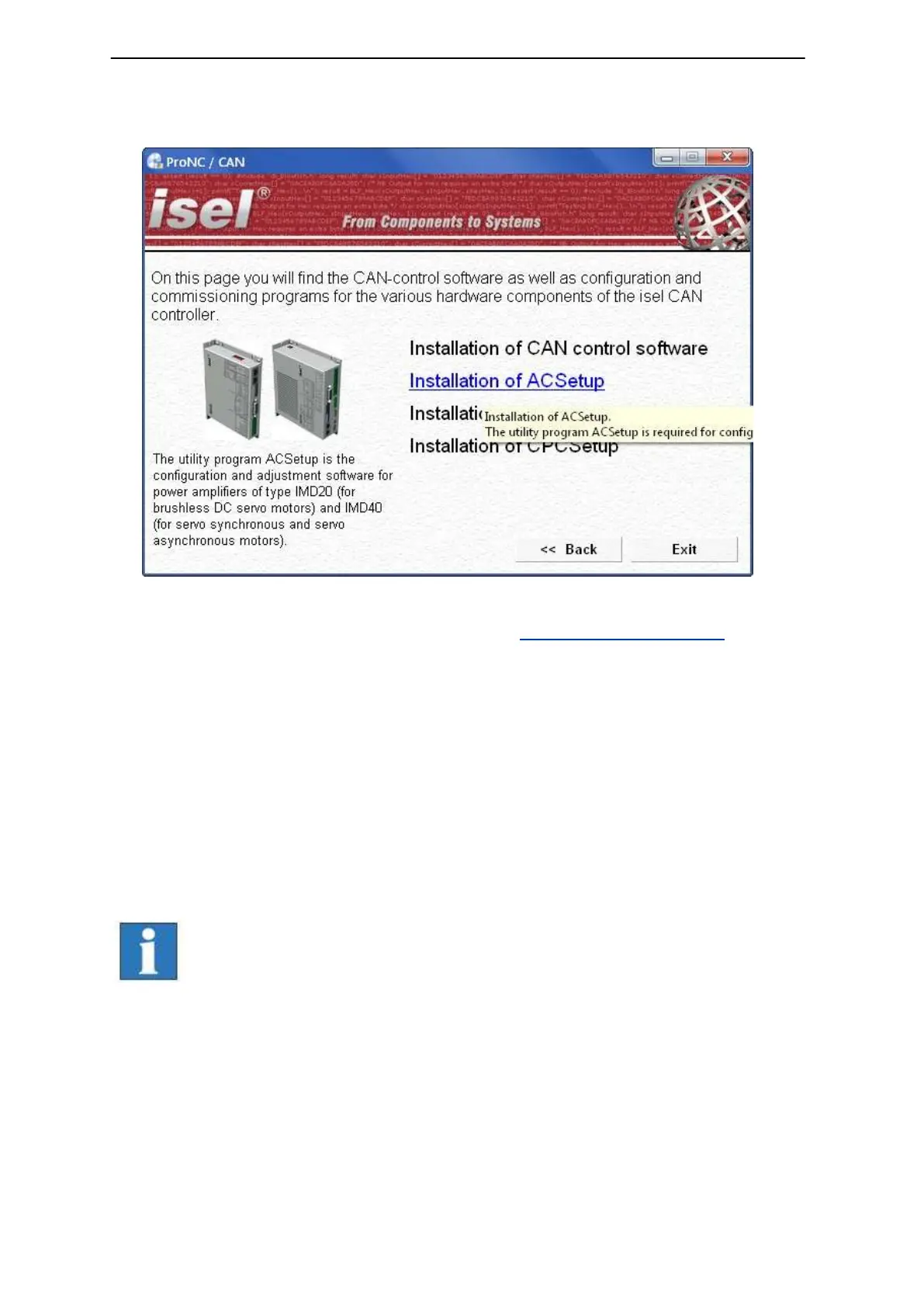
3. Click on the entry “Installation of control software“. The following window will be
shown:
Choose now the setup software depending on your motor type and click on the
entry to start the installation. (in this example “Installation of ACSetup“)
Follow the instructions of the setup assistant.
After finishing the installation click on button “Exit“ to close the Auto-Start-menu.
Start DCSetup.exe / ACSetup.exe via the desktop shortcut or via the start menu
entry:
Start Programs ACSetup ACSetup / DCSetup
Information on parameterization of motor power amplifiers iMD10 you
will find in the manual /1/ DC-Servo positioning module with
CANopen interface UVE8112 / iMD10. Therefore open the file
“dcsetup_eng.pdf “ via shortcut in the start menu.
Information on parameterization of motor power amplifiers iMD20 you
will find in the manual /2/ AC-Servo positioning module with
CANopen interface iMD20 / iMD40. Therefore open the file
“acsetup_eng.pdf “ via shortcut in the start menu.



 To Next Page