User’s Manual WM3M4 &WM3M4C
This way is Communication port set automatically as it was during last access.
To communicate with new device, following steps should be followed:
Connect a device to a communication interface
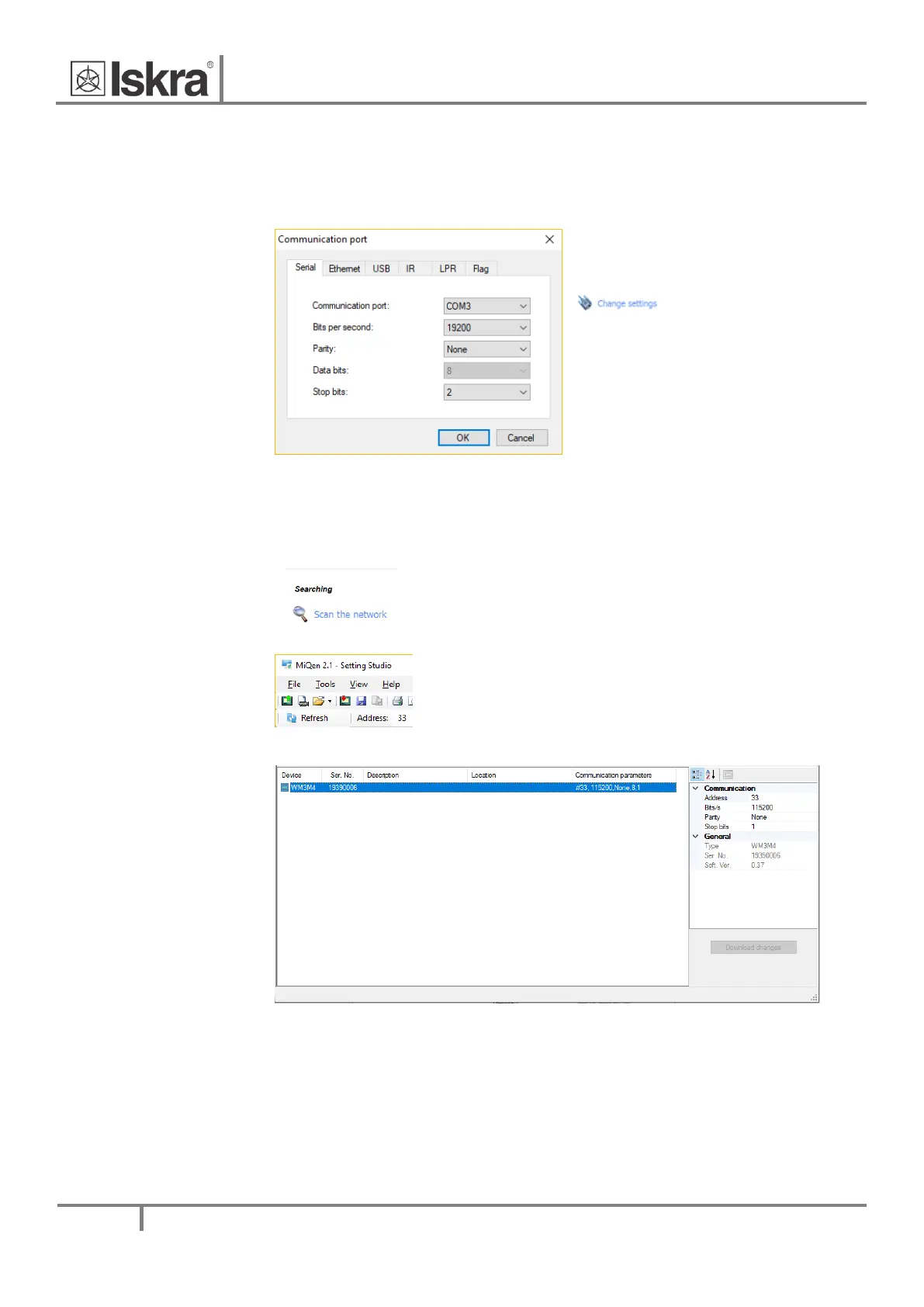
Set Communication port parameters
Under the Communication port, current
communication parameters are displayed. To
change those parameters click on the
button. A Communication port
window opens with different communication
interfaces.
The WM3M4 & WM3M4C energy meters
supports only serial communication, so only
serial communication parameters can be set.
Figure 12: Communication port window
Start communicating with a device
Click on the REFRESH button and devices information will be displayed.
When a device is connected to a network and a certain device is required, it is
possible to browse a network for devices. For this purpose choose Scan the
network.
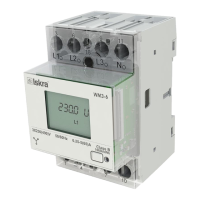
Factory default MODBUS address for all devices is 33. Therefore it is
required to change MODBUS address number of the devices if they are
connected in the network so each device will have its unique address
number.
Figure 13: Display of device's adress settings in the MiQen software


 To Next Page