22
MCP-Z Process/Ismatec SA/14.07.00/CB/GP
settings
1
2
3
rpm
Time
Time
PUMP
DISP
PAUSE
Volume
PROGRAM
Flow rate
TOTAL
Dosieren nach Zeit
Die Dosierzeit kann von
0.1s–999h eingegeben werden.
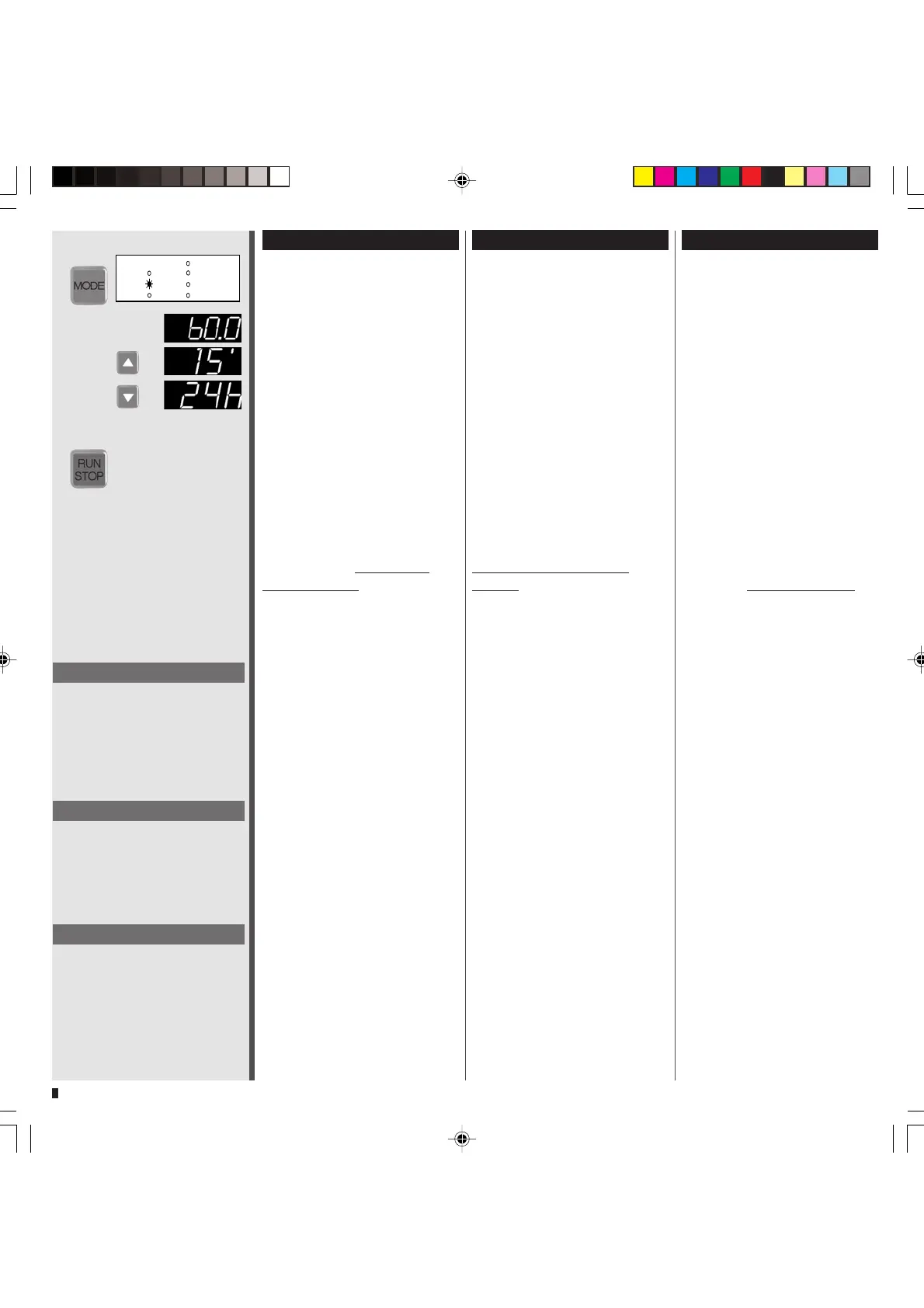
1 Mit der MODE-Taste auf
DISP Time
2 Mit den
Tasten gewünsch-
te Zeit eingeben
❖❖
❖❖
❖ Suchlauf beschleunigt sich,
wenn
oder
Taste
gedrückt bleibt.
Sekunden: 0.1–899.9 (in 0.1s Schritten)
Minuten: 15’–899’ (in 1min Schritten)
Stunden: 15h–999h (in 1h Schritten)
3 Mit RUN/STOP starten
❖❖
❖❖
❖ Mit den
Tasten kann die
Dosierzeit auch
während des
Dosiervorganges verändert
werden.
❖❖
❖❖
❖ Während des Dosiervorganges
können mit der MODE-Taste die
folgenden Werte abgelesen
werden:
– Drehzahl (PUMP rpm)
– Fließrate (PUMP Flow rate)
– total gefördertes Volumen
(TOTAL)
❖❖
❖❖
❖ Die Drehzahl bzw. Fließrate
kann dabei mit den
Tasten
während des Dosiervorganges
verändert werden.
❖❖
❖❖
❖ Je nach Pumpenkopf und An-
wendung können sehr kurze
Dosierzeiten zu nicht reproduzier-
baren Dosiervolumen führen.
Dispensing by time
The dispensing time can be
entered from 0.1s to 999h.
1 Change the mode to
DISP Time
2 Enter the required dispensing
time with the
keys
❖❖
❖❖
❖ The display accelerates
when pressure on the
or
key is maintained.
Seconds: 0.1–899.9 (in 0.1s steps)
Minutes: 15'–899' (in 1min steps)
Hours: 15h–999h (in 1h steps)
3
Start the pump with RUN/STOP
❖❖
❖❖
❖ With the
keys the
dispensing time can be changed
even during the dispensing
process.
❖❖
❖❖
❖ During the dispensing process
the following values can be
retrieved by pressing the MODE-
key:
– speed (PUMP rpm)
– flow rate (PUMP Flow rate)
– totally dispensed volume
(TOTAL)
❖❖
❖❖
❖ With the
keys the speed
and flow rate can be changed
even during the dispensing
process.
❖❖
❖❖
❖ Depending on the pump-head
and the application, a very short
dispensing time can result in
dispensing volumes which are
not repeatable.
Dosage selon le temps
La durée de dosage peut être
définie de 0.1s â 999 h
1 Passer avec la touche MODE
sur DISP Time
2 Introduire la durée désirée au
moyen des touches
❖❖
❖❖
❖ La procédure de recherche
s’accélère lorsque l’on main-
tient les touches
ou
enfoncées.
Secondes: 0.1–899.9 (en pas de 0.1s)
Minutes: 15'–899' (en pas de 1min)
Heures: 15h–999h (en pas de 1h)
3 Mettre en route avec RUN/STOP
❖❖
❖❖
❖ Le temps de dosage peut être
modifié avec les touches
également pendant le dosage.
❖❖
❖❖
❖ Pendant la procédure de
dosage, il est possible de lire les
valeurs suivantes avec la touche
MODE:
– nombre de tours (PUMP rpm)
– débit (PUMP Flow rate)
– volume total refoulé
(TOTAL)
❖❖
❖❖
❖ Le nombre de tours et le
débit peuvent être modifiés
pendant le dosage avec les
touches
❖❖
❖❖
❖ Selon la tête de pompe et
l'application, des temps de
dosage très courts peuvent
mener à des volumes de dosage
non reproductibles.
Hinweis
Mit RUN/STOP kann die Dosierung
unterbrochen und danach wieder
fortgeführt werden.
Mit RESET kann eine unterbrochene
Dosierung endgültig gestoppt
werden.
Please note
With RUN/STOP a dispensing cycle
can be interrupted and resumed.
With RESET an interrupted
dispensing cycle can be definitely
stopped.
Remarque
RUN/STOP permet d’interrompre la
distribution avant de la reprendre
ensuite.
RESET permet de cesser définiti-
vement une distribution.


 To Next Page