23
MCP-Z Process/Ismatec SA/14.07.00/CB/GP
settings
1
2
3
rpm
Time
Time
PUMP
DISP
PAUSE
Volume
PROGRAM
Flow rate
TOTAL
Dosieren nach Volumen
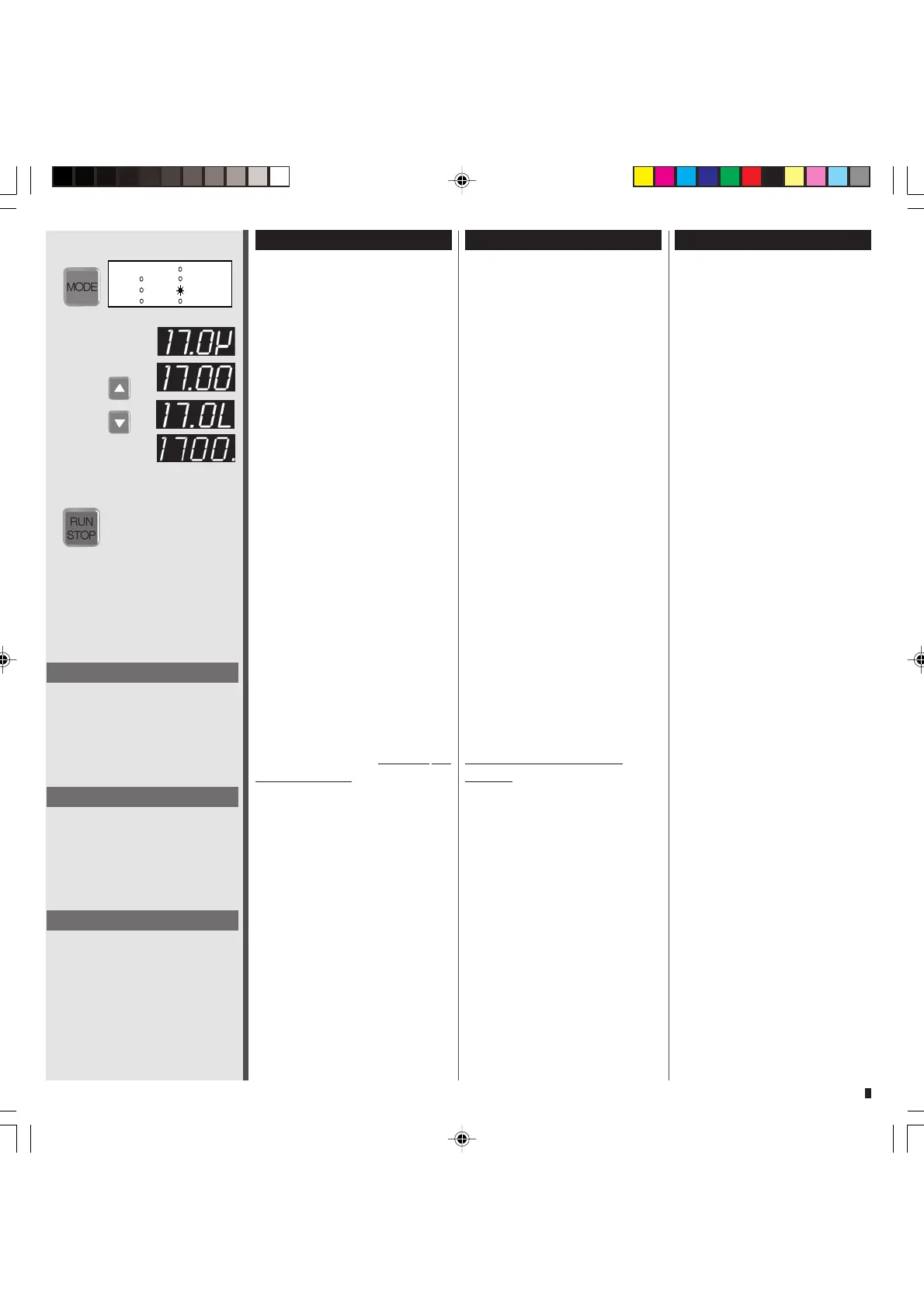
1 Mit der MODE-Taste auf
DISP Volume
2 Mit den
Tasten gewünsch-
tes Dosiervolumen eingeben.
Vier Display-Anzeigen sind
möglich:
Mikroliter: z.B. 17.0 µl= 17.0µ
Milliliter: z.B. 1700 ml = 17.00
Liter: z.B. 17.0 l = 17.0L
Liter: z.B. 1700 l = 1700.
(Anzeige in Liter ab 9999 ml)
❖❖
❖❖
❖ Für eine präzise Dosierung
empfehlen wir, die Pumpe zu
kalibrieren (Seite 24)
3 Mit RUN/STOP starten.
Kurz vor Ende der Dosierung
verlangsamt die Pumpe die
Drehzahl, so dass eine kon-
trollierte, tropfengenaue
Dosierung erreicht wird.
❖❖
❖❖
❖ Die Dosiergeschwindigkeit
kann in den Betriebsarten PUMP
rpm oder PUMP Flow rate ein-
gestellt werden.
❖❖
❖❖
❖ Über die
Tasten kann das
Dosiervolumen auch
während des
Dosiervorganges verändert
werden. Der neu eingegebene
Sollwert erscheint kurz im
Display.
❖❖
❖❖
❖ Während des Dosiervorganges
können über die MODE-Taste die
folgenden Werte abgelesen
werden:
– Drehzahl (PUMP rpm)
– Fließrate (PUMP Flow rate)
– total gefördertes Volumen
(TOTAL)
❖❖
❖❖
❖ Die Drehzahl bzw. Fließrate
kann dabei mit den
Tasten
während des Dosiervorganges
verändert werden.
Dispensing by volume
1 Change the mode to
DISP Volume
2 Use the
keys for entering
the required dispensing
volume. Four display readings
are available:
Microlitre: e.g. 17.0 µl= 17.0µ
Millilitre: e.g. 1700 ml = 17.00
Litre: e.g. 17.0 l = 17.0L
Litre: e.g. 1700 l = 1700.
(Display in litres from 9999 ml)
)
❖❖
❖❖
❖ For dispensing accurately
we recommend you to
calibrate the pump (page 24)
3
Start the pump with RUN/STOP.
The pump reduces the rotation
speed shortly before the end
of the dispensing cycle
providing controllable and
drop-precise dispensing cycles.
❖❖
❖❖
❖ The dispensing speed can be
adjusted in the modes PUMP rpm
and PUMP flow rate.
❖❖
❖❖
❖ With the
keys the dispen-
sing volume can be changed
even during the dispensing
process. The newly entered set
point appears shortly in the
display.
❖❖
❖❖
❖ During the dispensing process
the following values can be
retrieved with the MODE key:
– Rotation speed (PUMP rpm)
– Flow rate (PUMP Flow rate)
– totally dispensed volume
(TOTAL)
❖❖
❖❖
❖ With the
keys the rotation
speed or flow rate can be
changed even during the
dispensing process.
Dosage selon le volume
1 Passer avec la touche MODE
sur DISP Volume
2 Saisir le volume de dosage
souhaité avec les touches
Quatre affichages sont
possibles:
Microlitres: p.e. 17.0 µl= 17.0µ
Millilitres: p.e. 1700 ml = 17.00
Litres: p.e. 17.0 l = 17.0L
Litre: e.g. 1700 l = 1700.
(Affichage en litres dès 9999 ml)
❖❖
❖❖
❖ pour un dosage précis,
il est recommandé de calibrer
la pompe (page 24)
3 Mettre en route avec RUN/STOP
Juste avant la fin du dosage,
la pompe réduit le nombre de
tours de manière à obtenir un
dosage contrôlé et exact
❖❖
❖❖
❖ La vitesse de dosage peut être
réglée dans les modes PUMP rpm
ou PUMP Flow rate.
❖❖
❖❖
❖ Avec les touches
le
volume de dosage peut égale-
ment être modifié en cours de
dosage. La nouvelle valeur saisie
apparaît brièvement sur l’affi-
chage.
❖❖
❖❖
❖ Pendant la procédure de
dosage, les valeurs suivantes
peuvent être lues avec la touche
MODE.
– Nombre de tours (PUMP rpm)
– Débit (PUMP Flow rate)
– volume total refoulé
(TOTAL)
❖❖
❖❖
❖ Le nombre de tours et le débit
peuvent être modifiés pendant la
procédure de dosage avec les
touches
.
Hinweis
Mit RUN/STOP kann die Dosierung
unterbrochen und danach wieder
fortgeführt werden.
Mit RESET kann eine unterbrochene
Dosierung endgültig gestoppt
werden.
Please note
With RUN/STOP a dispensing cycle
can be interrupted and resumed.
With RESET an interrupted
dispensing cycle can be definitely
stopped.
Remarque
RUN/STOP permet d’interrompre la
distribution avant de la reprendre
ensuite.
RESET permet de cesser définiti-
vement une distribution.


 To Next Page
 Loading...