25
MCP-Z Process/Ismatec SA/14.07.00/CB/GP
1
2
3
4
1
2
3
4
rpm
Time
Time
PUMP
DISP
PAUSE
Volume
PROGRAM
Flow rate
TOTAL
rpm
Time
Time
PUMP
DISP
PAUSE
Volume
PROGRAM
Flow rate
TOTAL
Default-Kalibration Fließrate
1 Mit der MODE-Taste auf
PUMP Flow rate.
2 CAL-Taste drücken
(Anzeige blinkt).
3 RESET-Taste drücken
(Anzeige blinkt).
4 Mit der CAL-Taste speichern
❖❖
❖❖
❖ Setzt gleichzeitig auch das
Volumen auf den Default-Wert
zurück.
Default-Kalibration Volumen
1 Mit der MODE-Taste auf
DISP Volume.
2 CAL-Taste drücken
(Anzeige blinkt).
3 RESET-Taste drücken
(Anzeige blinkt).
4 Mit CAL-Taste speichern.
❖❖
❖❖
❖ Setzt gleichzeitig auch die
Fließrate auf den Default-Wert
zurück.
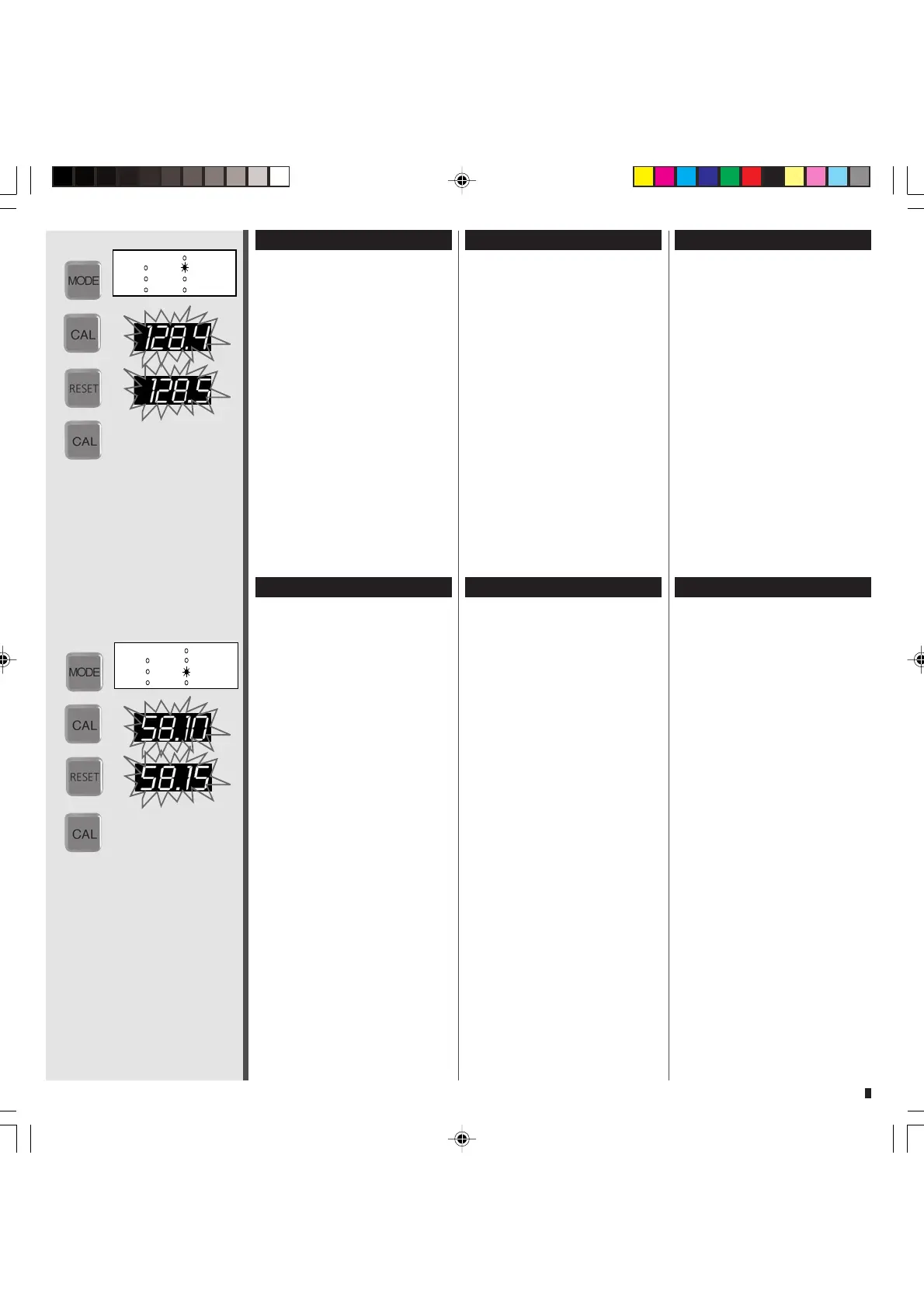
Default calibration of flow rate
1 Change the mode to
PUMP Flow rate.
2 Press the CAL button
(displayed value blinks).
3 Press the RESET button
(displayed value blinks).
4 Confirm with the CAL button
❖❖
❖❖
❖ At the same time, the volume
is also reset to the default value.
Default calibration of volume
1 Change the mode to
DISP Volume.
2 Press the CAL button
(displayed value blinks).
3 Press the RESET button
(displayed value blinks).
4
Confirm with the CAL button.
❖❖
❖❖
❖ At the same time, the flow
rate is also reset to the default
value.
Calibration par défaut
(débit)
1 Passer avec la touche MODE
sur PUMP Flow rate
2 Presser la touche CAL
(l’affichage clignote)
3 Presser la touche RESET
(l’affichage clignote)
4 Mémoriser avec la touche CAL
❖❖
❖❖
❖ Le volume est également
remis à sa valeur par défaut.
Calibration par défaut
(volume)
1 Passer avec la touche MODE
sur DISP Volume
2 Presser la touche CAL
(l’affichage clignote)
3 Presser la touche RESET
(l’affichage clignote)
4 Mémoriser avec la touche CAL
❖❖
❖❖
❖ Le débit est également remis
à sa valeur par défaut.


 To Next Page