24
MCP-Z Process/Ismatec SA/14.07.00/CB/GP
settings
3
5
1
2
4
6
rpm
Time
Time
PUMP
DISP
PAUSE
Volume
PROGRAM
Flow rate
TOTAL
settings
Volumen kalibrieren
1 Mit MODE-Taste auf
DISP Volume.
❖❖
❖❖
❖ Mit den
Tasten das
Dosiervolumen eingeben
2 Mit RUN/STOP starten.
❖❖
❖❖
❖ Pumpe stoppt automatisch
❖❖
❖❖
❖ Kurz vor Ende der Dosie-
rung verlangsamt die Pum-
pe die Drehzahl, so dass
eine kontrollierte, tropfen-
genaue Dosierung erreicht
wird
❖❖
❖❖
❖ Dosierte Flüssigkeit nach
Volumen oder Gewicht
bestimmen
3 Im gleichen Modus (DISP
Volume) die CAL-Taste
drücken (Anzeige blinkt).
4 Mit den
Tasten effektiv
dosiertes Volumen eingeben.
5 Mit der CAL-Taste speichern.
❖❖
❖❖
❖ Pumpe kalibriert sich und
kehrt automatisch auf den
ursprünglich vorgege-benen
Sollwert zurück
6 Mit RUN/STOP starten
❖❖
❖❖
❖ Je nach Anwendungsbe-
dingungen kann mehrmaliges
Kalibrieren nötig sein.
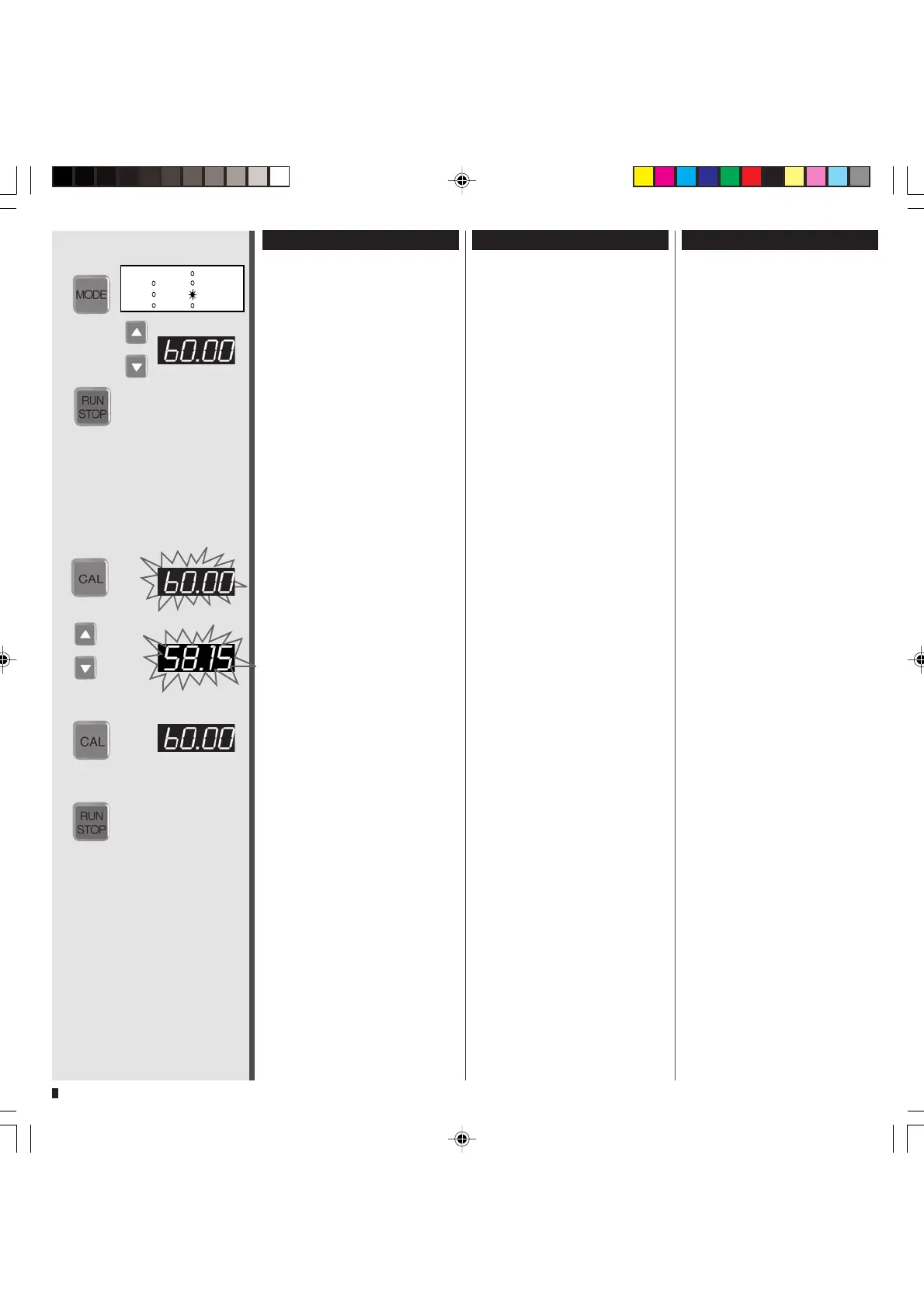
Calibrating the volume
1 Change the MODE to
DISP Volume.
❖❖
❖❖
❖ Use the
keys for
entering the required
dispensing volume
2
Start the pump with RUN/STOP.
❖❖
❖❖
❖ Pump stops automatically
❖❖
❖❖
❖ The pump reduces the
rotation speed shortly before
the end of the dispensing
cycle providing controllable
and drop-precise dispensing
volumes
❖❖
❖❖
❖ Measure the dispensed
liquid by volume or weight
3 Stay in the same mode (DISP
Volume) and press the CAL-
key (display blinks).
4 Enter the effectively dispensed
volume with the
keys.
5 Save the entered value with
the CAL key.
❖❖
❖❖
❖ Pump is calibrated and
returns automatically to the
initially entered set point
6 Start the pump with
RUN/STOP
❖❖
❖❖
❖ Depending on the application
conditions repeated calibration
may be necessary.
Calibration du volume
1 Passer avec la touche MODE
sur DISP Volume
❖❖
❖❖
❖ Saisir le volume de dosage
souhaité avec les touches
2
Mettre en route avec RUN/STOP
❖❖
❖❖
❖ La pompe s’arrête
automatiquement
❖❖
❖❖
❖ Juste avant la fin du do-
sage, la pompe réduit le
nombre de tours de manière à
obtenir un dosage contrôlé et
exact
❖❖
❖❖
❖ Déterminer le liquide dosé
selon le volume ou le poids
3 Presser sur la touche CAL dans
le même mode (DISP Volume)
(l’affichage clignote)
4 Saisir le volume effectivement
dosé avec les touches
5 Mémoriser avec la touche CAL
❖❖
❖❖
❖ La pompe est calibrée et
retourne automatiquement à
la valeur préréglée
initialement
6
Mettre en route avec RUN/STOP
❖❖
❖❖
❖ En fonction des conditions
d’application, il peut être né-
cessaire de calibrer plusieurs fois.


 To Next Page