4 PREPARATION OF THE
PRODUCT FOR USE
4.1 HOW TO INSTALL THE PRODUCT
4.1.1 Unpacking the product and checking the contents
To unpack the product:
1. Open the outer packaging. Inside you will nd a white box.
2. Turn packaging and lift outer packaging.
3. Open inner packaging.
4. Take out the cover. Remove the tape of the cover. Spread the cover on the clean oor.
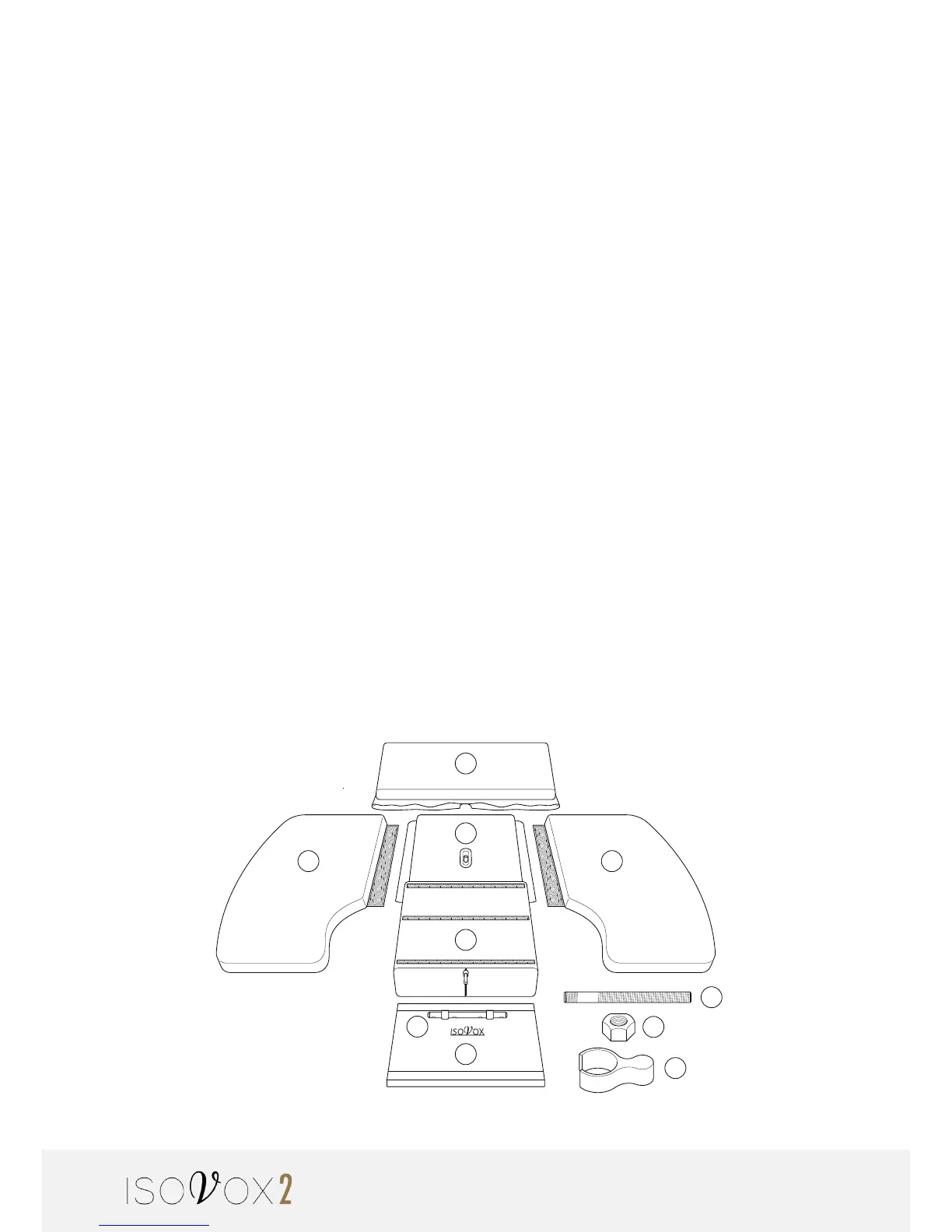
5. Put the product parts on the oor cover according to the illustration. Make sure the
packaging contains the following items:
a. Roof with back cover
b. Left side
c. Right side
d. Base plate
e. Main absorber
f. Front screen/vocal enhancer
g. Mic holder (ex on – ex off)
h. Nut for securing the mic pole
i. Mic pole
j. LED light
A
D
E
F
J
B C
G
I
H


 To Next Page