- 9 -
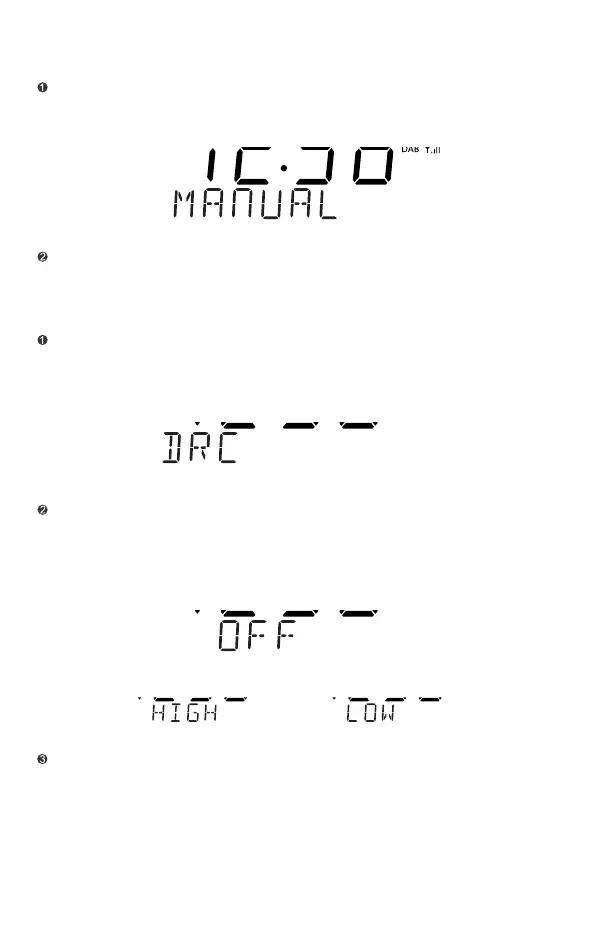
When the clock is in DAB mode.Press and hold the "MENU/INFO" button to enter
the menu(FULL SCAN will shows on the display), then press“TUNE+”or"TUNE-"
until the display shows MANUAL,press"SELECT" to enter the service menu.
Press"TUNE-"or"TUNE+" to highligt the desired channel.
Manual Tuning DAB
When the clock is in DAB mode.Press and hold the "MENU/INFO" button to enter
the menu(FULL SCAN will shows on the display), then press“TUNE+”or"TUNE-"
until the display shows DRC,press"SELECT" to enter the setting menu.
Press"SELECT" to confirm the setting.
Note:Not all DAB broadcasts are able to use the DRC function.If the broadcast
does not support DRC, then the DRC setting in the radio will have no effect.
Press"TUNE-"or "TUNE+" to select the required DRC setting (OFF/LOW/
HIGH)
OFF:DRC is off, broadcast DRC will be ignored.
HIGH:DRC level is used as sent by broadcaster.
LOW:DRC level is set to 1/2 that sent by broadcaster.
Dynamic Range Control(DRC)Setting of DAB


 To Next Page