- 6 -
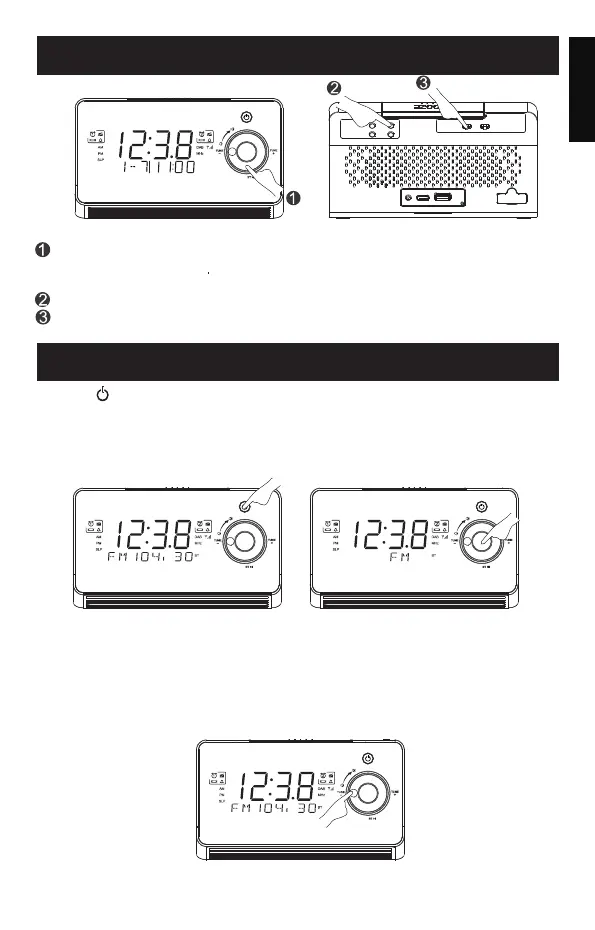
SNOOZE/REPEAT
To deactivate the alarm completely, Push the AL1/AL2 slide switch to
OFF.
When the alarm goes off, press "SNOOZE" button to doze for another 9
minutes. You can repeatedly press "SNOOZE" for more dozings during
the 60-minute cycle.
Press "AL1" or "AL2" button to stop the alarm from sounding.
PLAYING THE FM RADIO
Press " " button to open the clock radio and press"M" button to
switch to the radio mode. The frequency of "MHz " will appear on the
display. For better reception, fully extend and adjust the position of
the antenna.Below are the 5 instructions (A to D) to operate the radio.
A: Adjust the "MHz "
In the radio mode, when the "MHz" digits appear on the display, press
"TUNE-" or "TUNE+" button to adjust the MHz frequency.
B: Auto-search/scan FM stations
Press "TUNE-" or "TUNE+" buton for 2 seconds and release. The search/
scan will stop at the next available lower or higher station.
English
M
MENU/ INFO
SCAN/
SET
AL1
AL2
PRESET
SELECT
AL1
OFF
AL2
ON OFFON
M
MENU/ INFO
SCAN/
M
MENU/ INFO
SCAN/
M
MENU/ INFO
SCAN/


 To Next Page