- 5 -
SETTING THE WAKEUP ALARMS
Press TUNE+" " button or wait for 40 seconds to exit the alarm setting.
If you need to turn off the AL1 complately, Push the AL1 slide swith to OFF。
9
To set the Alarm 2, repeat the above steps 1 to 9.
10
Push the AL1 switch slide to ON to turn on the alarm1.
Push the AL2 switch slide to ON to turn on the alarm2.
Press and hold "AL1" button for 3 seconds and the "HOUR" digits will blink.
Circulate the silver rotating knob to adjust the hour.
Press " " again and the "CURRENT VOLUME LEVEL" digits will blink. The TUNE+
volume levels range from 1 to 16, with level 16 being the loudest.
circulate the silver rotating knob to adjust to your desired alarm volume level.
Press " " again and the "DAY(S) OF THE WEEK" texts (1-7) will blink.TUNE+
Press circulate the silver rotating knob to select the alarm day mode(You can set
the alarm days in the following 3 options:
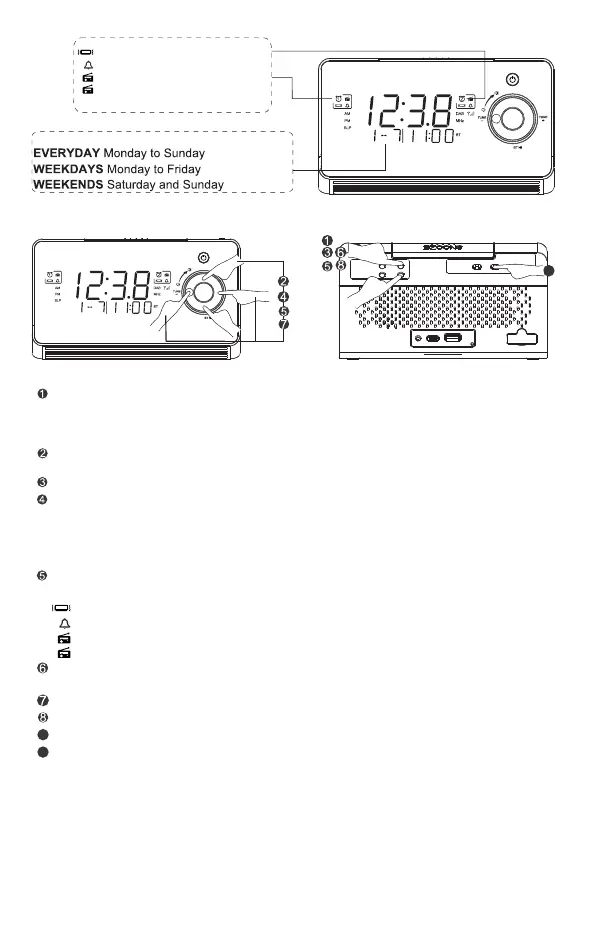
Option 1: Everyday Monday to Sunday
Option 2: Weekdays Monday to Friday
Option 3: Weekends Saturday and Sunday
Press TUNE+ circulate the silver rotating " " again,the alarm ringtone will blink, press
knobselect your desired ringtone:
:Wake to Vibration
Wake to Buzzer(BB) :
Wake to radio :
Wake to DAB radio :
Press the " " button, the MINUTE digits blinks on the display, then circulate TUNE+
the silver rotating knob to adjust the minute.
Note 1: If no operation is performed while the alarm is sounding, the alarm will
stop after 60 minutes.
Note 2: The last radio station you listened to will play when you choose"Wake
to radio" for your alarm ringtone.
(four alarm ringtones are available)
Setting Alarms for the Day(s) of the Week
:Wake to Vibration
:Wake to Buzzer(BB)
: Wake to radio
:Wake to DAB radio
M
MENU/ INFO
SCAN/
SET
AL1
AL2
PRESET
SELECT
AL1
OFF
AL2
ON OFFON
9
M
MENU/ INFO
SCAN/


 To Next Page