SNO OZE/ / /S TO.
▲
▲
LED
▲/ME M.
MODE
-
+
VOL
TIM E ZONE
PM
SLP
SNO OZE/ / /S TO.
▲
▲
LED
▲/ME M.
MODE
-
+
VOL
TIM E ZONE
PM
SLP
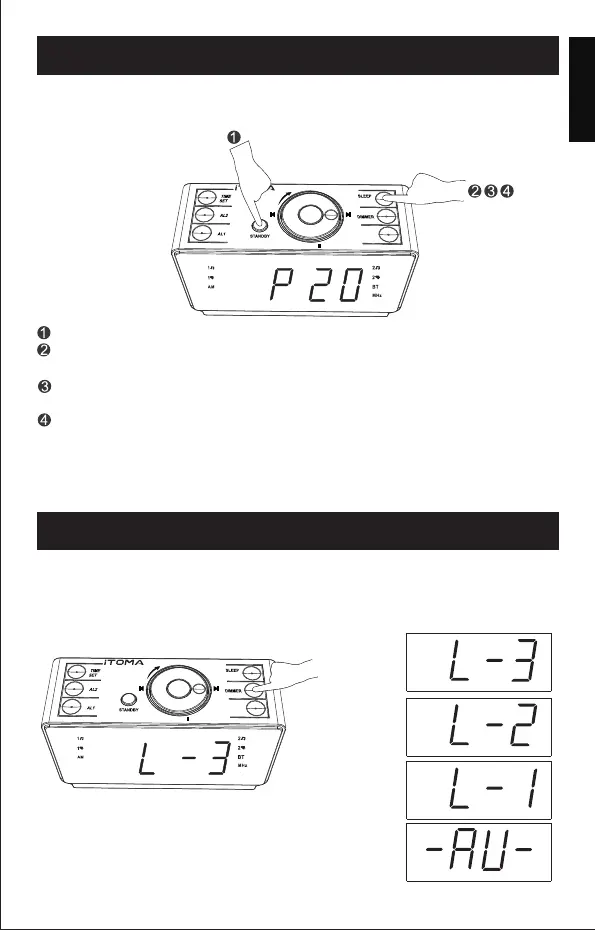
USING THE SLEEP TIMER
You can fall asleep to the radio using the sleep timer, which is set up in
10-minute increments (The sleep timer duration ranges from 10 minutes
to 90 minutes). After reaching the desired duration, the radio will turn off
automatically.
Press "STANDBY " to turn on the clock radio.
Press "SLEEP" and the "10" digits will appear on the display which
indicates the sleep timer has been set for 10 minutes.
To change the sleep timer duration, keep pressing "SLEEP" button until
your desired duration appears.
To deactivate the sleep timer, keep pressing "SLEEP" until "OFF"
appears on the display, or press "STANDBY" to turn off the sleep timer
directly.
DIMMER CONTROL
To adjust the display brightness, keep pressing "DlMMER" button until
your desired brightness level appears. Brightness is available in 4 levels
and can be adjusted even when the radio or Bluetooth connection is in use.
- 10 -
Press “DIMMER”button,you can adjust the brightness level as below:
Highlighted
Medium
Low dark
Automatic
recognition brightness
Note: When setting the Sleep Timer, the indicator " " flashes and it
appears on the screen untill the sleeping time ends.
English
DST
DST
SLP


 To Next Page