Bluetooth
RF Master
1 - Precautions of use
» Only battery exchange is allowed. No components or electronic devices included in the
Bluetooth RF Master can be repaired or adjusted by the user.
» Avoid mechanical shocks and electrostatic discharges
» Do not immerse.
» Avoid long sun exposure or heat exposure for a long time, like behind a car glass window.
» Do not handle the Bluetooth RF Master with the antenna.
» Respect the climatic range specified below.
» Caution: Risk of explosion if battery is replaced by an incorrect type.
» Caution: Dispose of used batteries according to the instructions.
2 - Using the Bluetooth RF Master
Antenna assembly
Warning
In order to be compliant with CE recommendation, the user is not allowed to use other radio equipment (antenna) than the one
provided by Itron or the optional external antenna reference no RFMASTERMAGANT.
The antenna is mounted and locked by turning it turn clock wise.
3 - Connection to the reading terminal
Use the BT connection application on your reading terminal to pair BT RF Master to your device (see User Guide for more
details). The default code pin of the BT RF Master is “0000”.
4 - Operating the BT RF Master
Once all the above steps are completed, run the radio reading software on the reading terminal.
Thanks to the belt clip located on the rear side of the BT RF Master protection bag, it is easy to fix on a belt, on a pocket side.
USER GUIDE
User guide
EN

 Need help?
 General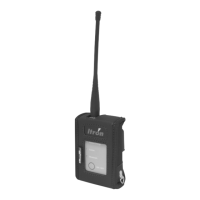

 To Next Page