24
ENGLISH
Faults - Causes - Remedies
Starter does not start, no fault displayed
• Check that the run command input(s) have been actuated in accordance with the chosen control mode.
• When the drive is switched on, at a manual fault reset, or after a stop command, the motor can only be
powered once the "forward" and "reverse" commands have been reset. If they have not been reset, the drive
will display "rdY" or “nSt” but will not start.
Faults displayed
The cause of the fault must be removed before resetting.
Faults SOF, OHF, OLF, OSF, ObF, and PHF can be reset via a logic input if this function has been configured.
Faults OHF, OLF, OSF, ObF, and PHF can be reset via the automatic restart function, if this function has been
configured. All faults can be reset by switching the drive off then on again.
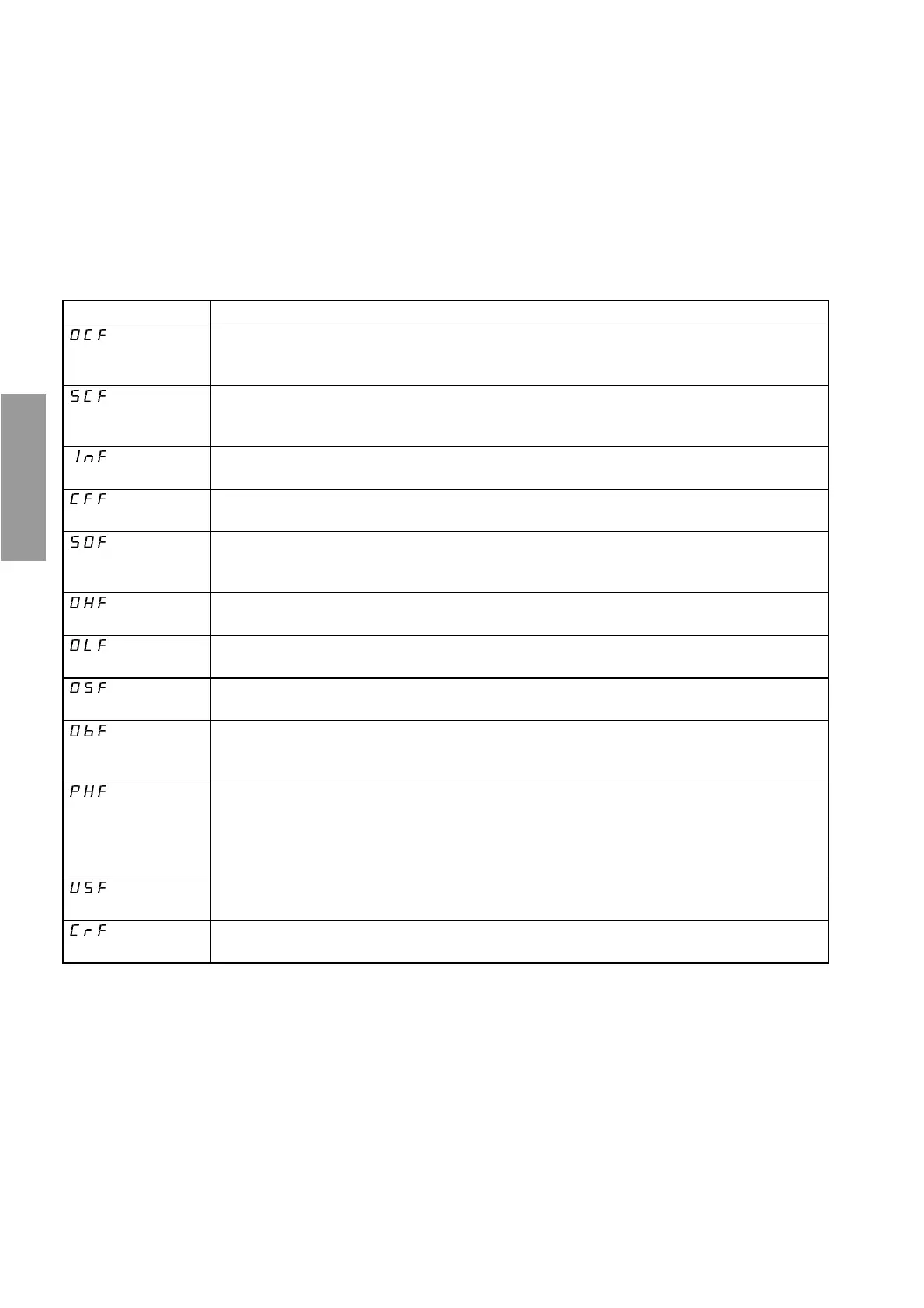
Fault Remedy
overcurrent
• Ramp too short, check the settings.
• Inertia or load too high, check the size of the motor/drive/load.
• Mechanical locking, check the state of the mechanism.
motor short-circuit,
insulation fault
• Check the cables connecting the drive to the motor, and the insulation of the motor.
internal fault
• Check the environment (electromagnetic compatibility).
• Replace the drive.
configuration fault
• Return to factory settings or call up the backup configuration, if it is valid. See
parameter FCS in the FUn menu.
overspeed
• Instability, check the motor, gain and stability parameters.
• Driving load too high, add a braking module and resistor and check the size of the
motor / drive / load.
drive overload
• Check the motor load, the drive ventilation and the environment. Wait for the drive to
cool before restarting.
motor overload
• Check the setting of the motor thermal protection, check the motor load. Wait for the
drive to cool before restarting.
overvoltage
• Check the line voltage.
overvoltage
during deceleration
• Braking too harsh or driving load. Increase the deceleration time, add a braking
resistor if necessary and activate the brA function if it is compatible with the
application.
line phase failure
This protection only operates with the drive on load.
• Check the power connection and the fuses.
•Reset.
• Check the line supply / drive compatibility.
• If there is an unbalanced load, inhibit the fault via IPL = nO (FUn menu).
undervoltage
• Check the voltage and the voltage parameter.
charging circuit
• Replace the drive.


 To Previous Page