20
Step 2:
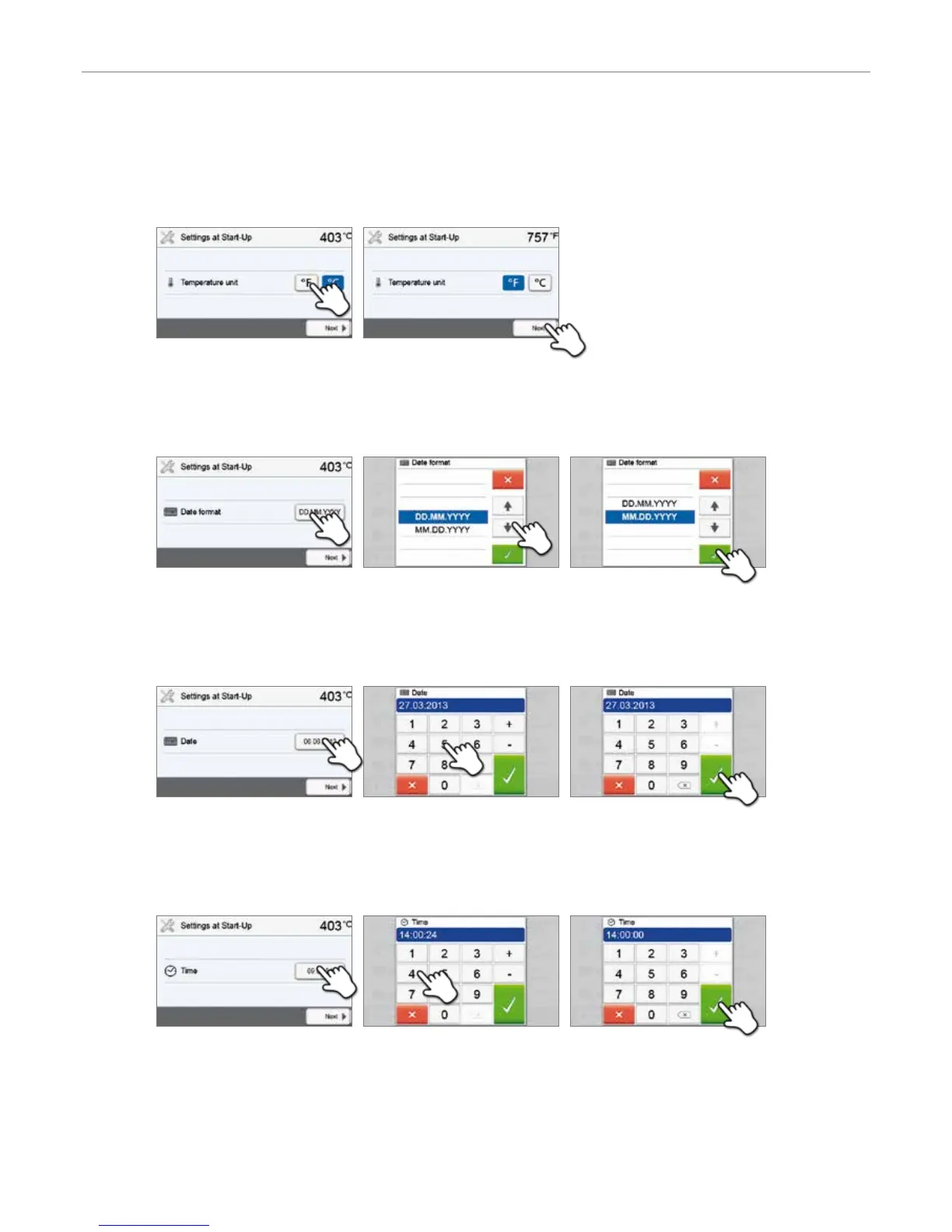
Select the temperature unit
Select the desired temperature unit.
The [Next] button is used to reach the next entry screen.
Step 3:
Select the date format
Select the date format.
Confirm the entry with the green button. The [Next] button is used to reach the next entry screen.
Step 4:
Enter the date
Set the date (day, month, year).
Confirm the entry with the green button. The [Next] button is used to reach the next entry screen.
Step 5:
Enter the time
Set the time (hours, minutes, seconds).
Confirm the entry with the green button. The [Next] button is used to reach the next entry screen.
The initial start-up and entry of the basic settings are now complete. The furnace will now automatically conduct a self-
test. The performance of all furnace components is automatically checked.
4. Installation and Initial Start-Up


 To Next Page