21
4.5.2 Start screen and self-test
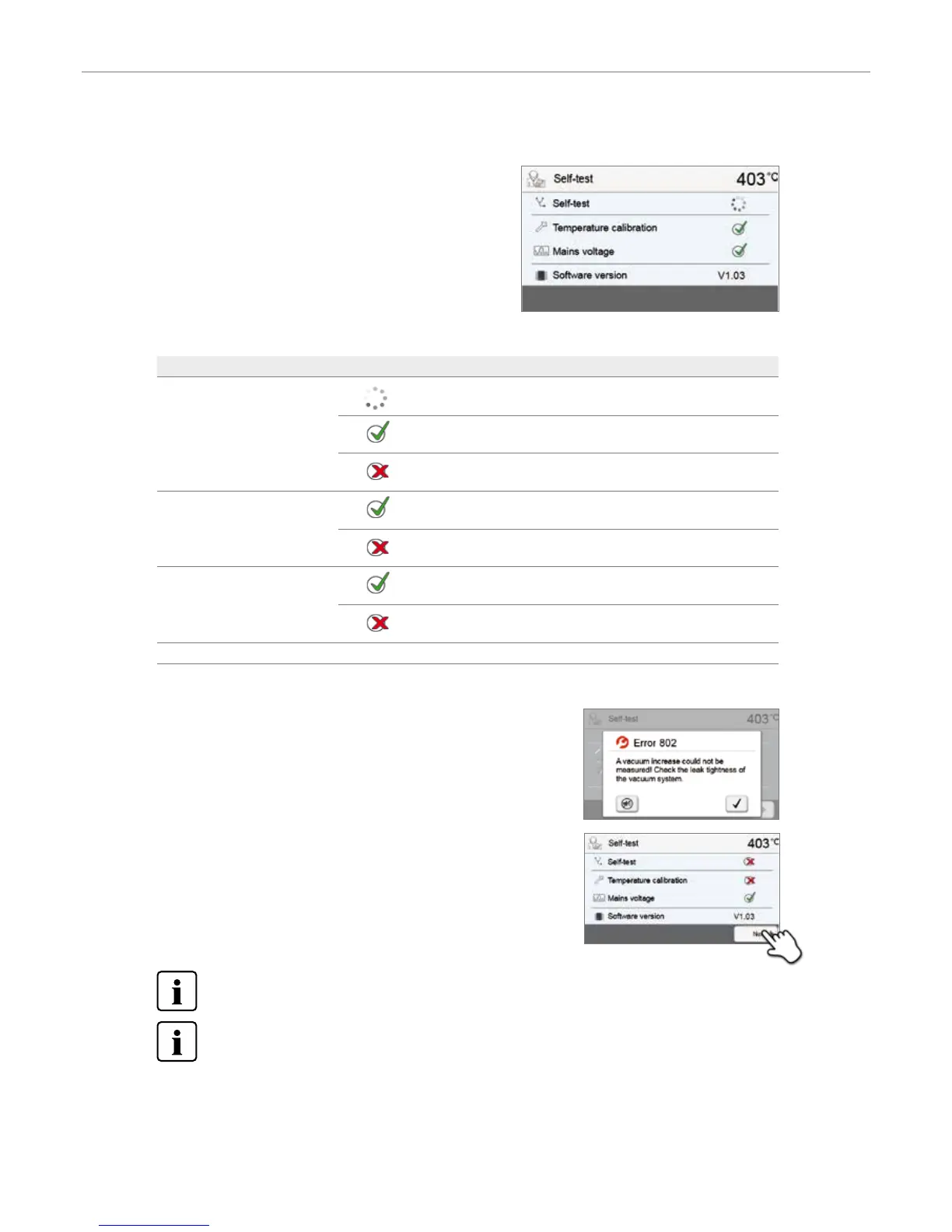
Immediately after switching on, the display shows the start screen for
a few seconds. Subsequently, the furnace conducts an automatic self-
test. The performance of all furnace components is automatically
checked.
The following information is displayed:
Information
Self-test
Automatic self-test in progress. The furnace is checking the function
of the furnace components.
The self-test was successful. No malfunctions were found.
The self-test was not successful. Please note the error message on the
display.
Temperature calibration
Temperature calibration of the furnace is not required.
Some time has passed since the last calibration. Please conduct a
calibration procedure.
Power supply
The power supply voltage is in the acceptable range.
The power supply is outside the acceptable range.
Software version The currently installed software version is displayed.
If the self-test has been successful, the furnace will automatically display the home screen.
If the program recognizes a malfunction during the test, a corresponding error
message with the corresponding rectification information appears on the display.
The acoustic signal and the error message can be acknowledged with the
corresponding buttons.
Press the [Next] button to confirm the self-test.
Before the first firing, the firing chamber should be dehumidified using the dehumidification program
(see Chapter 5.3 for details).
Please note that the furnace may require a certain acclimation time after it has been set-up. Particularly if the
furnace was exposed to considerable temperature differences (water condensation).
4. Installation and Initial Start-Up


 To Next Page