41
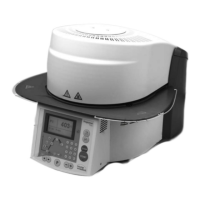
2. Start the calibration
The display shows the latest calibration value and the date of the
latest calibration.
Press the START key on the membrane-sealed keypad to start the
calibration.
3. Place the calibration sample
Follow the instructions on the display and place the Ivoclar Vivadent
sample holder with the silver strip in the centre of the firing plate
(without firing tray) and press the START key.
5.3.3 Temperature calibration
The sheathed thermocouple and heating muffle of the furnace may be subject to changes which affect the furnace tem-
perature, depending on the mode of operation and the frequency of use. Check furnace temperature with the “Silver
Test” at least every six months and adjust if necessary.
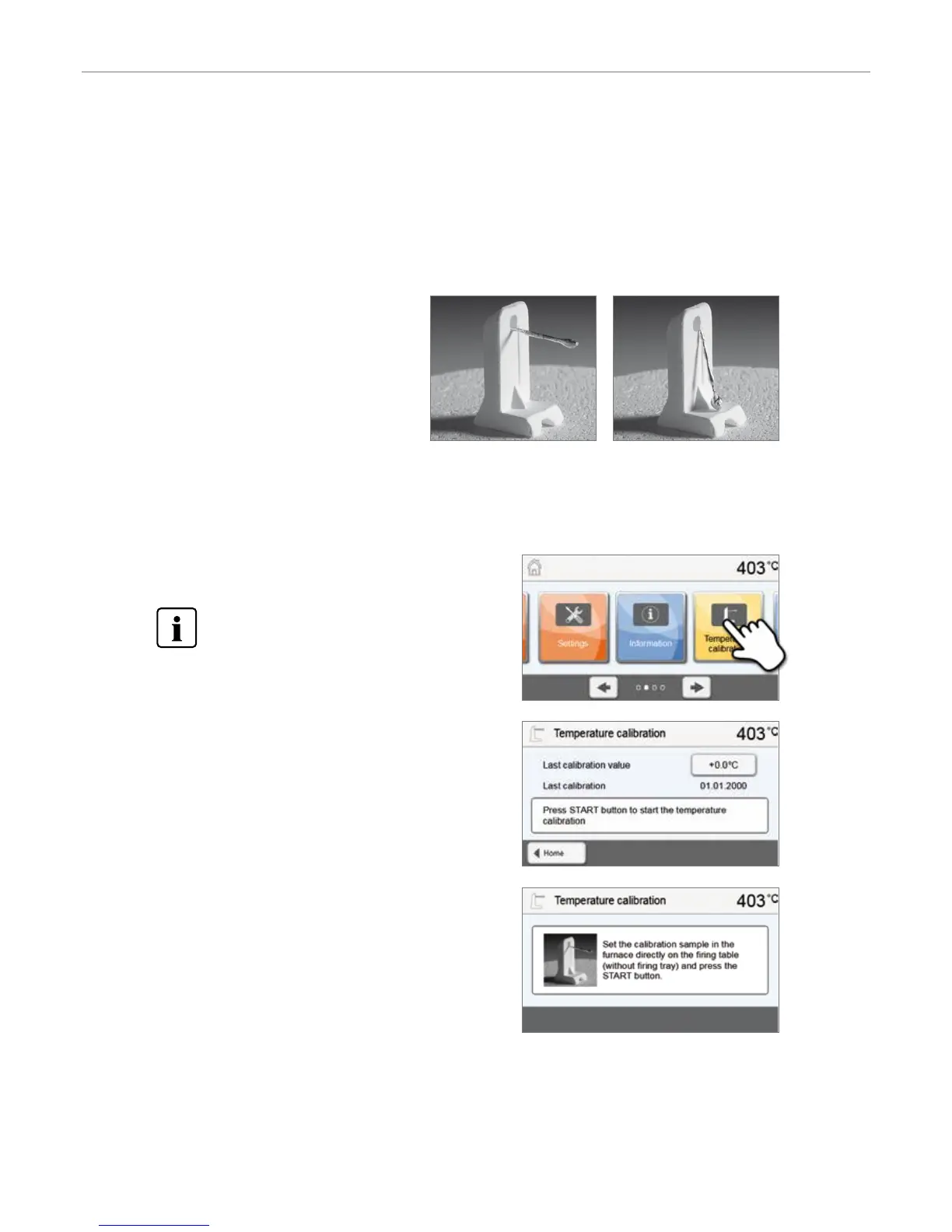
In manual temperature calibration, the melting point of silver (961 °C) is used as a reference. For this purpose, the melting
condition of a silver wire must be visually assessed and the calibration value adjusted depending on the result.
If the silver wire has:
– started to melt: Temperature ideal (Fig. 1)
– not started to melt: Temperature too low –
increase calibration value
– melted down to a ball: Temperature too high
(Fig. 2) – reduce calibration value
Experience has shown that a recalibration of
+/– 5 °C / 9 °F is appropriate. After adjusting the
calibration value, run the calibration program again
until the silver wire has correctly started to melt
(Fig. 1).
Temperature calibration requires only few steps:
1. Open temperature calibration
Scroll to page 2 in the home screen and press the [Temperature
calibration] button.
The furnace must be heated up and have reached its
stand-by temperature (403 °C) before the calibration is
started.
Fig 1: Temperature ideal Fig. 2: Temperature too high
5. Operation and Configuration


 To Next Page