EasyManua.ls Logo

Jabra EVOLVE 75 - 6.1 What the buttons do; Call Management Controls; Volume and Mute Controls; Voice Assistant and Pairing

Jabra EVOLVE 75
27 pages
Print Icon
To Next Page IconTo Next Page
To Previous Page IconTo Previous Page
Loading...
17
ENGLISH
Jabra Evolve 75
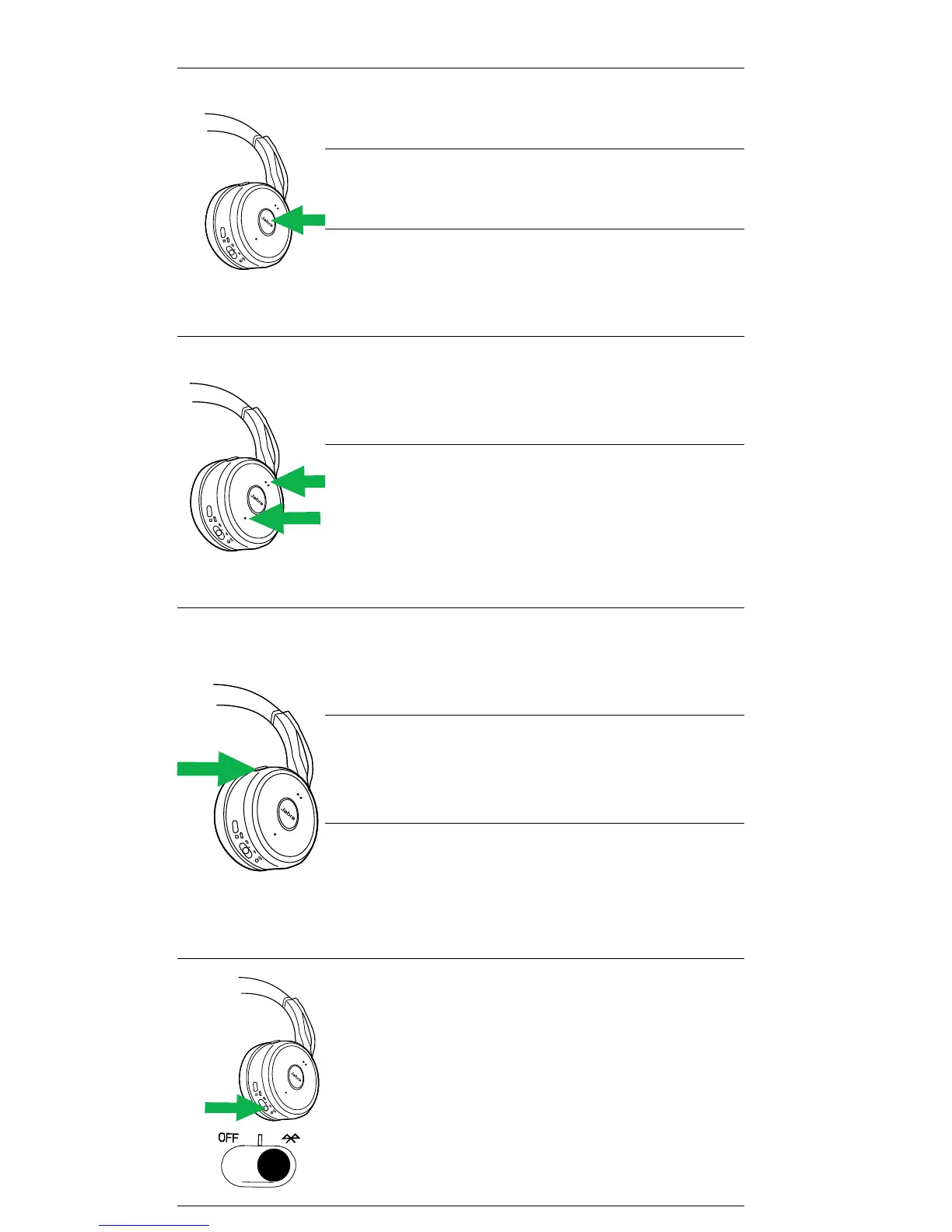
Answer call
Press the Answer/End
call button
End call
Press the Answer/End
call button
Reject call
Double-tap the
Answer/End call
button
Volume
up/down
Press the Volume
up or Volume down
button
Battery
status
Press the Volume
up or Volume down
button, when not on
a call or listening to
music
Mute/
un-mute
microphone
Press the Mute
button, or rotate the
microphone up/down
Turn voice
guidance
on/o
Hold (5 secs) the
Mute button
Siri/Cortana/
Google Now
Press the Mute
button, when not on
a call or listening to
music
Pair
Bluetooth
device
Slide and hold (3
secs) the On/O/
Bluetooth switch
in the Bluetooth
position

Other manuals for Jabra EVOLVE 75

Related product manuals