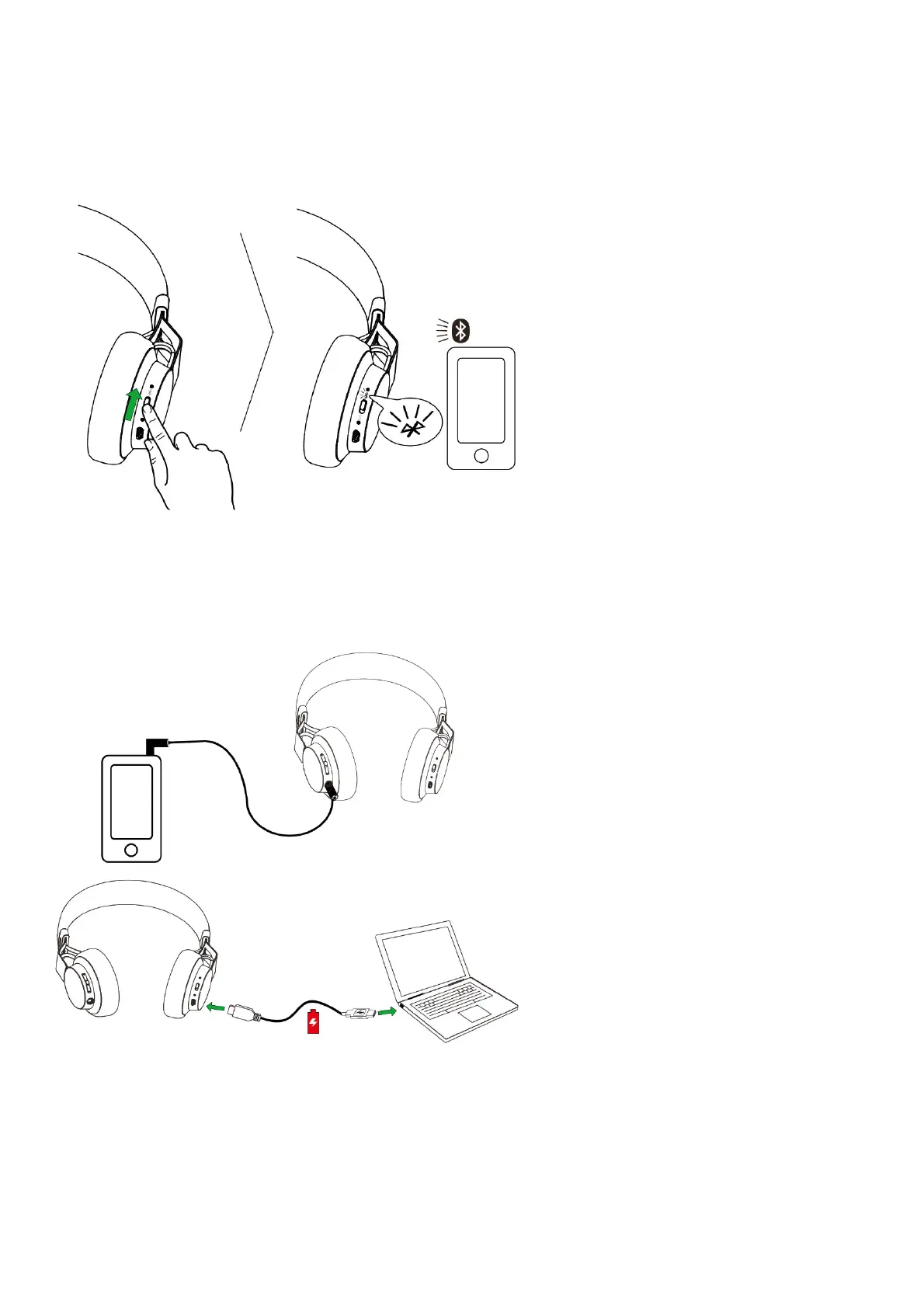
The Jabra Move Wireless will automatically attempt to Bluetooth connect to a mobile device whenever it is powered on (unless already connected to
a Bluetooth device). Simply follow the voice-guided connection instructions.
BLUETOOTH CONNECT TO A NEW OR SECOND MOBILE DEVICE
1. Hold the On/Off/Pairing switch in the Pairing position for 3 secs.
2. Pairing mode will be announced in the headphones, and the Bluetooth light will flash blue.
3. Follow the voice-guided instructions to connect to your Bluetooth device.
NOTE: If two mobile phones have been connected to the Jabra Move Wireless, you may need to select which phone will be used for calls/music.
Simply open the Bluetooth menu on the mobile phone you wish to use for calls/music and select Jabra Move Wireless from the list of devices.
5.2 CONNECT TO 3.5 MM JACK CONNECTOR
Connect the headphones to a 3.5 mm jack connector on your mobile device or PC using the supplied audio cable.
NOTE: Bluetooth connections are disabled when connected to the 3.5 mm Jack Connector.
HOW TO USE







 To Next Page