- 39 -
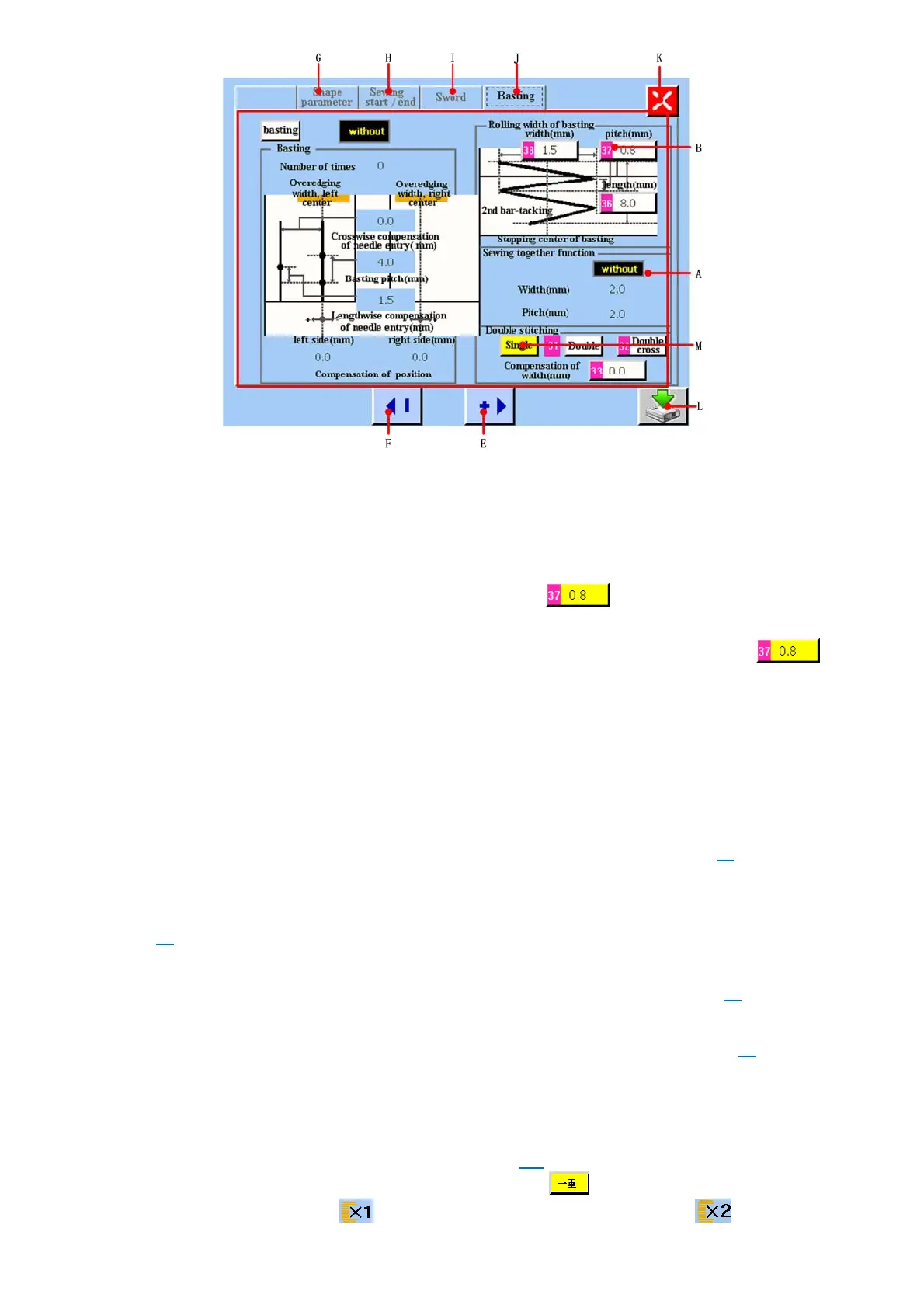
图/figure 5.6
A 平锁底缝关联参数显示区域
Basting parameter display area.
B 底缝关联参数显示和更改按键。当触摸该按键时,该按键显示为黄底 ,表示当前选中需要更改的参数,然
后通过 E、F 按键就可以进行该参数的更改。
Basting parameter display and changing button. When you press this button, it will display yellow color , it
shows the parameter which you select want to change. Then you can press E and F button to change this parameter.
E 更改底缝关联参数,根据编辑单位进行数字递加。
Change basting parameter. You can increase the value according to editor unit.
F 更改底缝关联参数,根据编辑单位进行数字递减。
Change basting parameter. You can decrease the value according to editor unit.
G 设置形状参数按键。触摸该按键,可进入<形状参数>画面(图 5.3)。
Set shape parameter button. Press this button, it can enter <shape parameter> screen(refer to figure5.3)
H 设置缝制开始/结束参数按键。触摸该按键,可进入<缝制开始/结束>画面(图 5.4)。
Set sewing start/end parameter button. Press this button, it can enter <sewing start/end parameter>screen (refer to
figure5.4)
I 设置刀动作等参数按键。触摸该按键,可进入<刀动作等>画面(图 5.5)。
Set sword parameter button. Press this button, it can enter < sword parameter>screen (refer to figure5.5)
J 设置底缝关联参数按键。触摸该按键,可进入<底缝关联>画面(图 5.6)。
Set basting parameter button. Press this button, it can enter < basting parameter> screen(refer to figure5.6)
K 放弃该画面参数修改,退出该画面,返回主菜单画面。
Give up parameter changing value in this screen and return to main menu.
L 保存参数修改并新建登记文件。触摸该按键,进入新建登记文件命名画面(图 5.12)。
Save parameter changing and build new register file(refer to figure5.12)
M 重缝参数显示区域。双重缝制的有无设定按键。当为黄色的方块时,如 ,表示当前重缝参数设置的状态为一重
缝。设置好的参数在主菜单会显示为 ;如果选中普通二重或交叉二重,在主菜单会显示为 。



 To Next Page