- 40 -
Double stitching display area. Single or double stitching button. When the button turns into color, such as , it
shows you select single stitching. It will display in main menu; if you select double stitching or double cross
stitching, It will display in main menu.
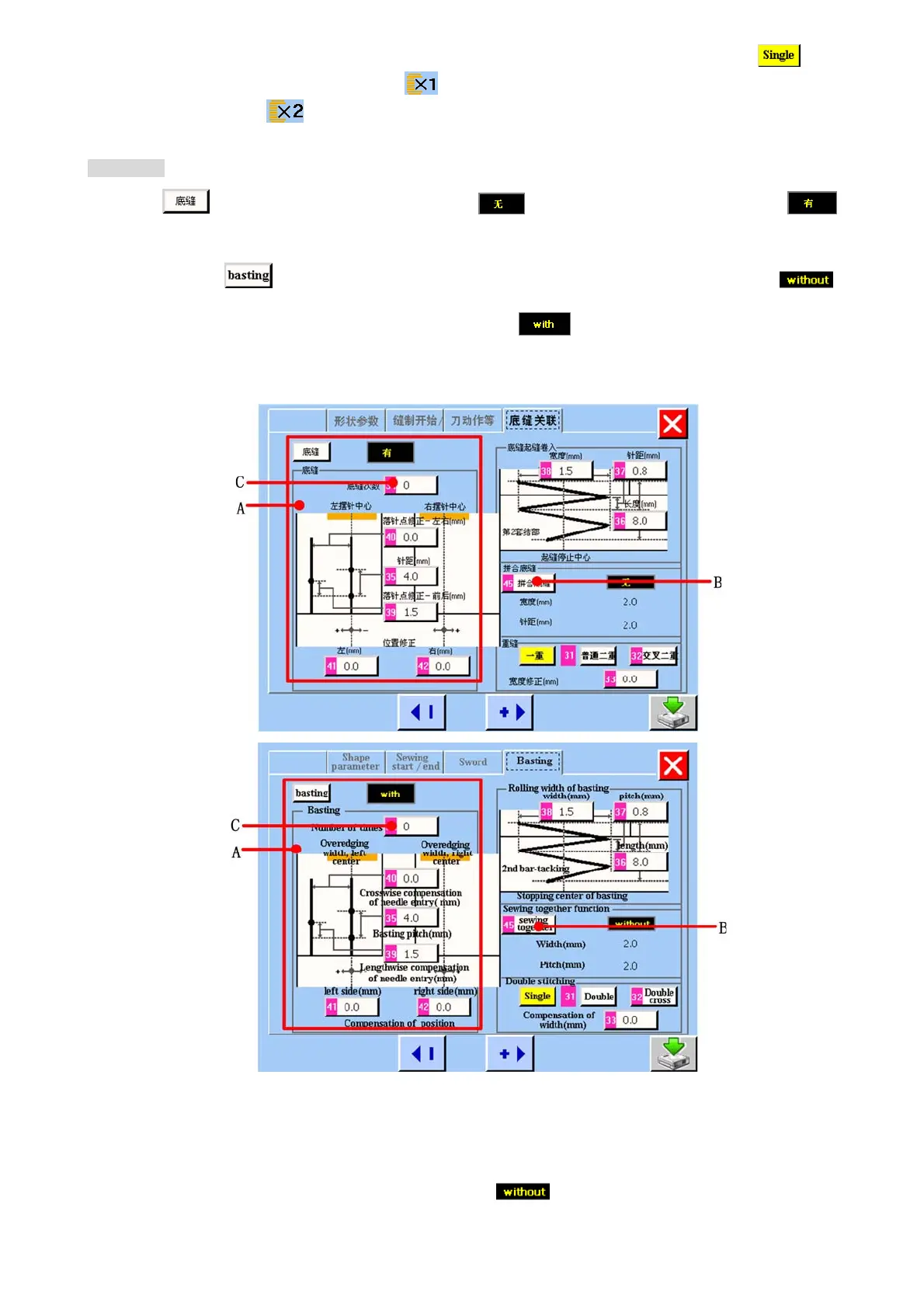
底缝 Basting
当触摸 按键时,底缝可以在有和无中转换。当底缝为 时,<底缝关联>画面如 4.6 所示。当底缝为
时,<底缝关联>画面如图 4.7 所示。
When you press
button , the basting will switch “with” to “without”. When the basting is shown as ,
the <basting>screen is as figure 4.6 shown. When the basting is shown as
, the <basting>screen is as figure 4.7 shown.
图/figure 5.7
A 底缝参数显示区域。当底缝为有时,底缝参数的设置才有效。
Basting parameter display area. When the basting is shown as , the setting of basting parameter is effect.
B 拼合底缝按键。当底缝为“有”时,拼合底缝按键才有效。此按键可以使拼合底缝在有无之间转换,当为“无”时,



 To Next Page