43
notes and recommendations
on sound system
Bluetooth®
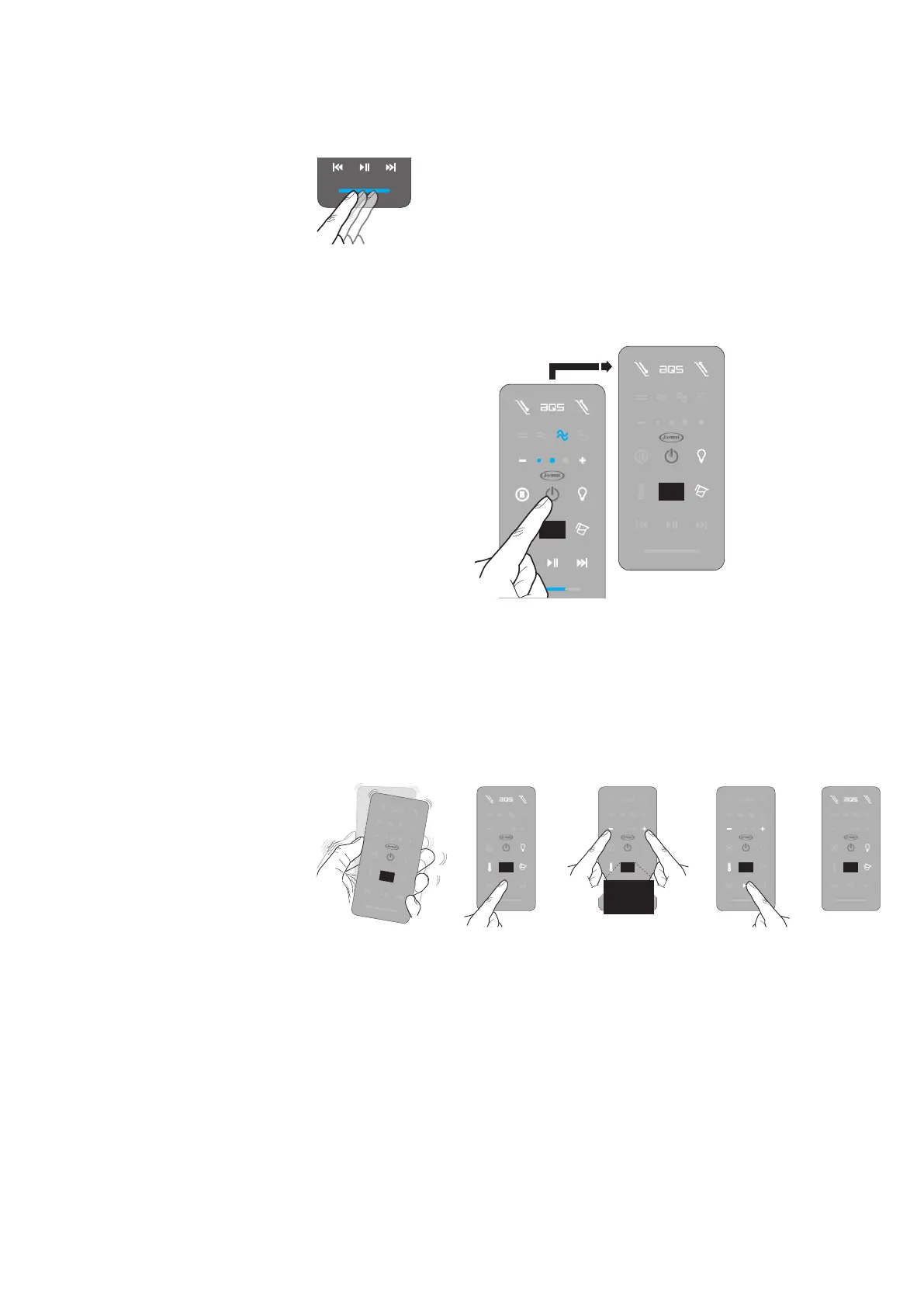
To adjust the volume, slide your nger across the bar under the controls: right to in-
crease the volume, left to decrease it (the intensity value, ranging from a minimum of 1 and
a maximum of 32 will appear on the display).
QThe waves transmitted by a Bluetooth® device may interfere with the operation of
electro-medical appliances or other electronic devices.
QThe maximum communication distance may vary if there are obstacles or electromag-
netic appliances between the MP3 player and the tub's sound system.
QThe use of the MP3 player in proximity of a cordless telephone, a microwave or WLAN
appliances may result in the deterioration of the audio quality and/or connection inter-
ruptions.
QBluetooth® and the Bluetooth® logo are registered Bluetooth SIG, Inc. brands
The names of other companies and products mentioned are brands of respective companies.
Q Turn on the J.touch remote control and keep the "play/pause" key held down until
the"+" and "-" keys and the thermometer symbol light up.
Within 15 seconds, use the keys to change the gures which appear on the display
(keep the key held down until the value remains the same).
Keep the "play/pause" key held down to save the selected value (the available function
keys light up again).
01
00...99
73
The audio system will remain active
for approximately one hour (it is how-
ever possible to turn it on again by
re-connecting the device)
The tub must be powered (the main
switch must be positioned to "on")
it is possible to only change the last
two gures of the standard code
(0000)
To switch o the audio system, simply disconnect the Bluetooth® connection, or hold
down the "on/o" key (this however switches o all active functions at the same time).
35
stopping
the function
change
the access code
If you are listening to tracks which are
streamed (for instance some web ap-
plications) the volume is the only con-
trol available



 To Next Page