CONNECTING DEVICE / INDICATIONS OF BLUETOOTH
28
WAITING MODE
If you connect the power cable with CLUSTER TALK2, it turns
on and enter to the pairing mode automatically. When CLUSTER
TALK2 is searching the bluetooth device, if there is no device to
connect, it enters to the waiting mode. And the LED lamp turns
red.
PAIRING MODE
If CLUSTER TALK2 has the connected bluetooth device, it doesn’t
enter to the pairing mode. So you have to disconnect the connect-
ed device and CLUSTER TALK2. Press the button for 3 seconds,
then the LED lamp turns red and blue.
AUTO-CONNECTING
If the connected bluetooth device is out of the bluetooth range,
CLUSTER TALK2 try to connect to the lastest connected blue-
tooth device. If the device is in the bluetooth range, it will connect
to CLUSTER TALK2 automatically. (Despite the latest connected
bluetooth device is in the bluetooth range, if it doesn’t connect to
CLUSTER TALK2 automatically, press the button once.
Then it will connect to CLUSTER TALK2.
KO
EN
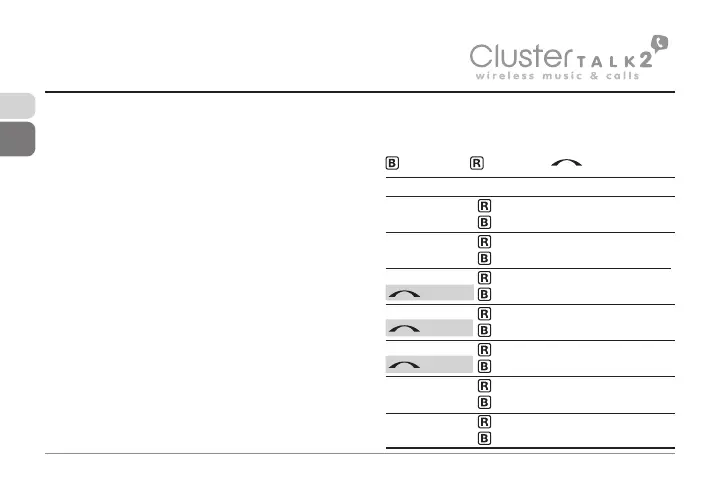
Status
Searching
Connectable
Talking
Incoming Call
Calling
Connected
Listening
INDICATIONS OF BLUETOOTH FUNCTION
: INDICATOR (BLUE) / : INDICATOR (RED) / : INDICATOR(RED)
Flashing patterns
●-●-●-●-●-●-●-●-●-●-
-●-●-●-●-●-●-●-●-●-●
●●---●●---●●---●●---
●-●-●-●-●-●-●-●-●-●-
●-●-●-●-●-●-●-●-●-●-
●●---●●---●●---●●---
●●●---●●●---●●●---●●
(slow twinkle)
(fast twinkle)
(fast twinkle)


 To Next Page