POWER CONNECTIONS
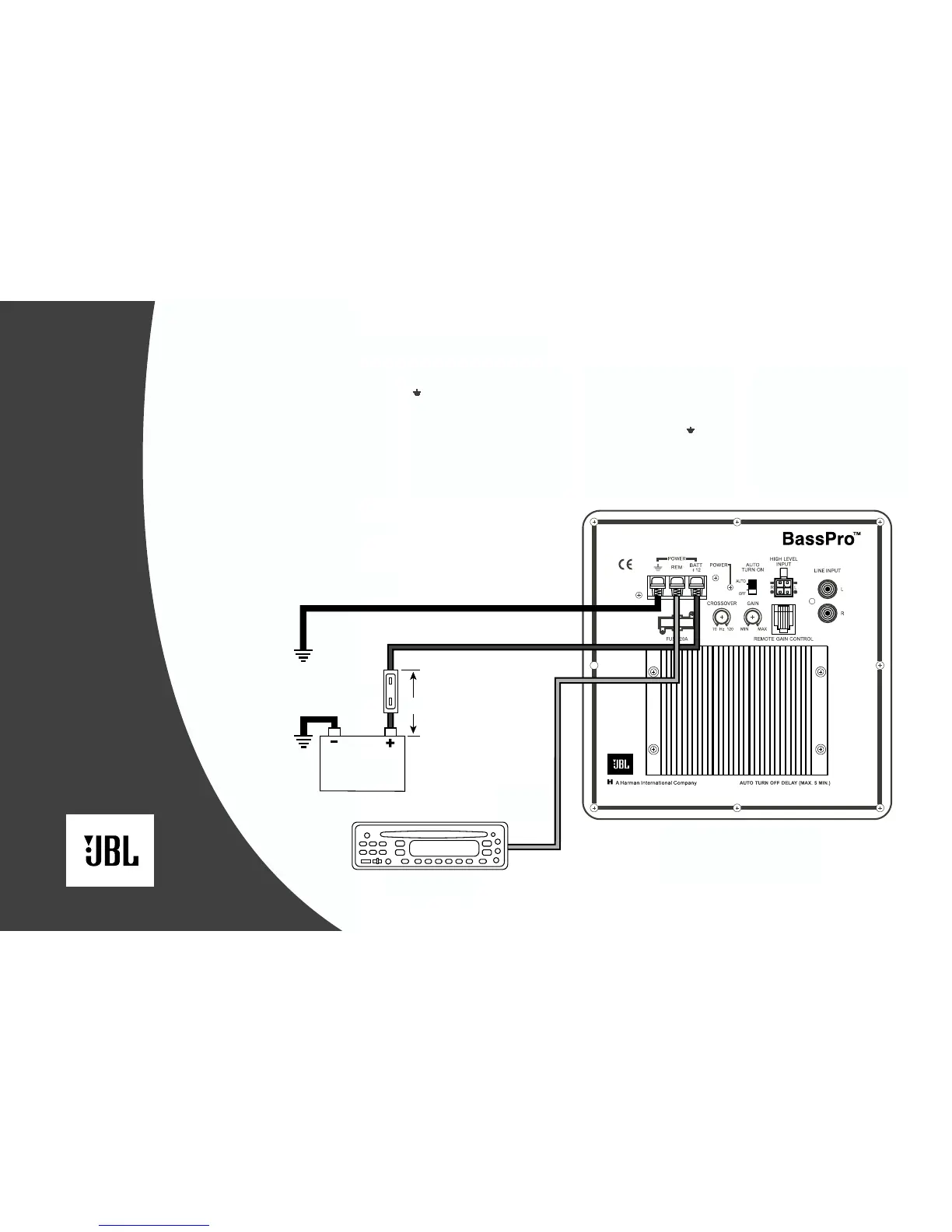
Connecting power to BassPro is
shown in Figure 7. Please observe
the following installation tips:
When using the high-level input
connections, BassPro will automatically
turn on when you turn on your radio.
In this case, the remote (REM)
connection is not needed. Use at least
#20 AWG speaker wire for speaker-level
input connections.
Use at least #12 AWG wire for the
Positive Battery (BATT +12) and Ground
( ) connections. If needed, use at least
#20 AWG wire for the remote (REM)
turn-on connection.
Connect BassPro’s “BATT +12V”
terminal directly to the battery’s positive
(+) terminal. Install a fuse holder, with a
20A fuse, within 18" of the battery’s
positive (+) terminal.
Route all power wires through a
grommet in the vehicle’s firewall. If a
factory grommet is not available, install
one.
Connect a short ground wire from
BassPro’s ground terminal ( ) to the
nearest bare metal surface. For a good
connection, use sandpaper to clear
paint from the metal surface and use
a screw with a lock (star) washer.
The remote (REM) connection requires
a +5 to +12 Vdc signal for BassPro
to turn on when using the line-level
connections. Most head units with
preamp outputs provide this remote
voltage signal. As an alternative,
connect this terminal to a switched
ignition circuit.
Figure 7.
Chassis Ground
(Bare Metal)
Battery
Source Unit
Remote
Turn-On
Fuse 20A
18"
BassPro
Connection Panel
4


 To Next Page