Service Bulletin
Service bulletin # JBL2003-10 December 2003 Warranty labor rate: MINOR repair
To: All harman/kardon Service Centers
Model: DVD600
Subject: Stays in Standby Mode
In the event you receive a DVD600 with one or more of these symptoms:
• Unit stays in Standby mode (amber indicator light)
• Unit will play for a time period, then goes into Standby mode (amber indicator light)
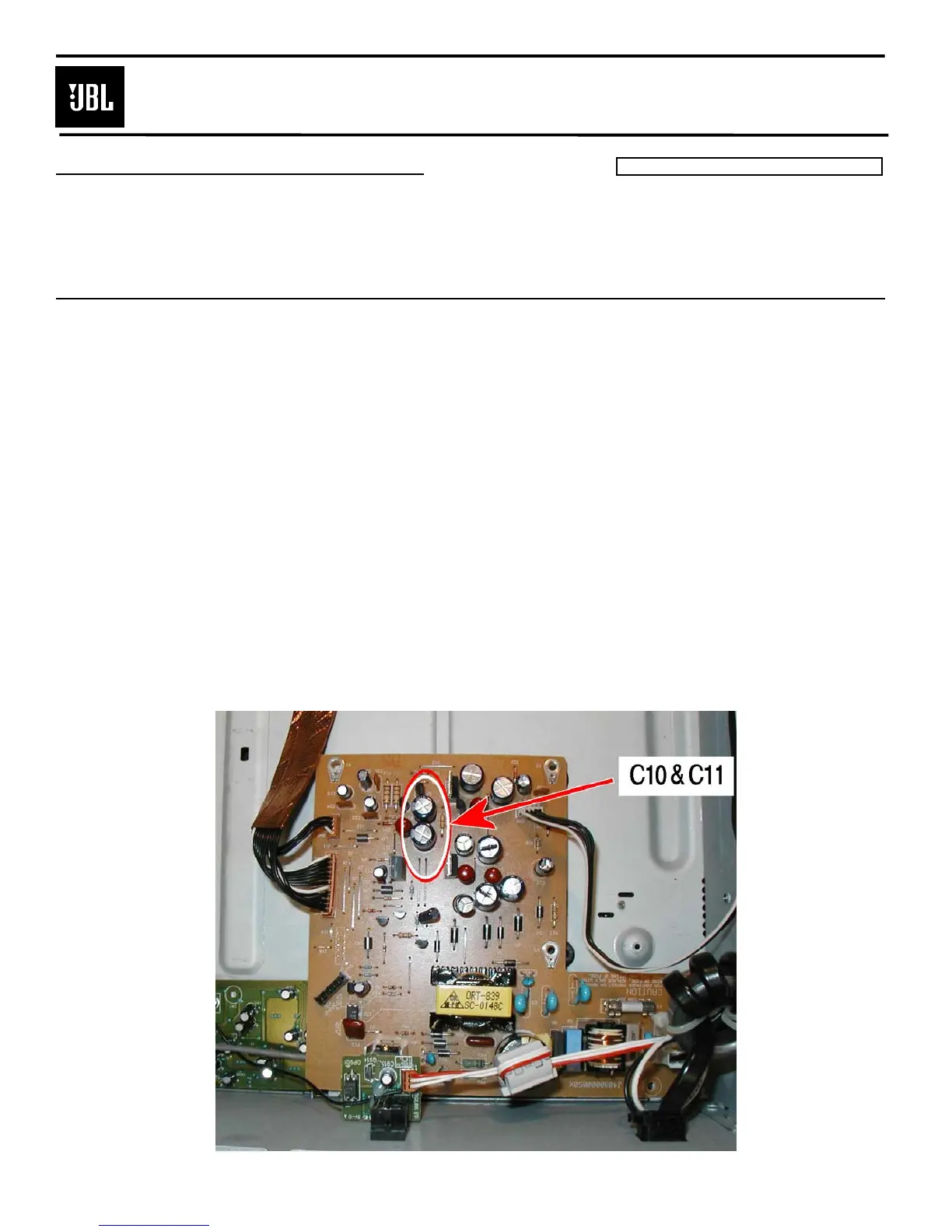
Check and replace capacitors C10 and C11 in the power supply. Defective parts may not have any visual
clues; they must be tested.
Procedure:
1) Remove the top cover.
2) Disconnect the three ribbon connectors that connect the 5 disc main assembly to the decoder PCB (2)
and power supply (1).
3) Remove the 4 screws that hold the 5 disc main assembly down to the bottom panel.
4) Pull the chassis slightly up in the rear, and pull the entire assembly out the back.
5) To access the power supply, remove the six plated screws; unplug the two large Molex 2-pin connectors.
6) Remove and replace: C10,C11: h/k part# P10248-ND ELECT 470uf 16v 105c radial capacitor
7) Reinstall in reverse order. Take care not to pinch or crush any cables; assure ground terminal is
reconnected on the front left chassis screw.



 To Next Page