EasyManua.ls Logo

JBL EON10 G2 - User Manual

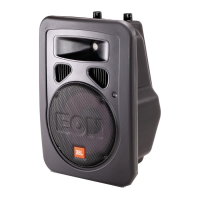
JBL EON10 G2
24 pages
Print Icon
To Next Page IconTo Next Page
Loading...
EON10 G2 User Guide
Part Number: 981-00061-01
CEV.FR

Questions and Answers

  • B
    Barbara DeanAug 17, 2025
    Why is there no sound from my JBL Speakers?
    • J
      Joseph KruegerAug 17, 2025
      If your JBL speaker powers on but produces no sound and the SIGNAL LED does not light up, the issue likely lies with the signal source or the connections. First, check the VU meters on the source mixer to ensure it is sending a signal. Verify that the tape or CD is playing, or use headphones to confirm that the instrument is actually sending an audio signal. Also, disconnect and re-seat the signal cables to ensure they are properly connected. If the problem persists, replace the cable with a known-good cable to rule out any faulty cables.
  • N
    Nancy HoldenAug 20, 2025
    What to do if no sound with microphone connected to JBL EON10 G2?
    • J
      Jason SerranoAug 20, 2025
      If you're not getting any sound when connecting a microphone directly to the MIC / LINE 1 input of your JBL speakers, and the SIGNAL LED doesn't illuminate, it might be because the microphone requires phantom power, which the EON10 G2 does not supply. Consider switching to a dynamic microphone, using a battery in the microphone (if possible), or using an external phantom power supply.
  • A
    Anthony CabreraAug 23, 2025
    What to do if JBL EON10 G2 Speakers signal sounds distorted and very loud?
    • D
      Douglas WellsAug 23, 2025
      If the signal from your JBL speakers sounds distorted and very loud, and the PEAK light is frequently lit, it indicates that the input signal is too high for the speakers to handle. Try reducing the output level from the source. Also, turn down the LEVEL controls on the speaker. If the issue persists, consider using additional EON speakers.
  • S
    Sean NelsonAug 26, 2025
    Why do my JBL Speakers hum or buzz?
    • M
      Michael PrattAug 26, 2025
      A hum or buzz in your JBL speakers can stem from several causes. It could be due to improper A/C grounding or ground loops. To resolve this, connect all speakers to a common power circuit. You can also try 'telescoping' the audio ground using an XLR/F to XLR/M adapter with Pin 1 disconnected, and re-route audio cables away from AC power and lighting cables. Another cause may be excessively long unbalanced cable runs. If so, use the balanced outputs (if available) of your mixer or source equipment or use a “DI” (direct injection) box to convert your unbalanced equipment output to a balanced output. Finally, it might be due to an improper system gain structure. In this case, reduce the INPUT 1, LINE 2, and LINE 3 controls and increase the output level of your source devices.
  • R
    Rodney TylerAug 28, 2025
    How to stop JBL EON10 G2 Speakers from feedbacking and howling?
    • S
      Scott NicholsonAug 28, 2025
      Speaker feedback and howling occur when the microphone picks up the speaker's output, creating a loop. To resolve this with your JBL speakers, first, move the speakers so they do not point into the microphone’s pick-up pattern. Also, locate the feedback frequency and reduce it using the mixer EQ or an external equalizer. Finally, reduce the gain at the mixer and move the microphone closer to the sound source.
  • T
    Timothy AdkinsAug 31, 2025
    Why is there so much hiss in my JBL Speakers?
    • C
      Cynthia CarlsonAug 31, 2025
      Excessive hiss in your JBL speakers, even with low mixer settings, often points to an improper gain structure or a noisy source device. Ensure that the MIC/LINE switch is in the LINE (disengaged) position. Reduce the LEVEL settings at the speaker. Additionally, review the Owner’s Manual for your mixer and adjust controls as needed.
  • K
    Kyle BrightSep 3, 2025
    What causes distortion in JBL EON10 G2 Speakers even at moderate volumes?
    • A
      Anthony CooperSep 3, 2025
      Distortion in your JBL speakers, even at moderate volumes without the PEAK light illuminating, suggests that the mixer or another source is overdriven. Review the Owner’s Manual for your mixer and adjust controls as needed, paying attention to input sensitivity (gain), channel faders, and master faders. Once this is done, review the instructions in the Quick Start section of this guide.
  • M
    markburnsSep 5, 2025
    How to fix noise or hiss heard at JBL EON10 G2 output?
    • A
      Andrea CardenasSep 5, 2025
      If you're hearing noise or hiss from your JBL speaker's output, it's likely due to a noisy source device. Disconnect the devices that are connected to your speaker one at a time. If the noise goes away, the problem is with the source or the connecting cable.
  • J
    Joseph HillSep 8, 2025
    Why does hum or buzz change with mixer level controls on my JBL Speakers?
    • N
      Nicholas CastroSep 8, 2025
      If you're experiencing a hum or buzz that changes in intensity as you adjust the mixer level controls on your JBL speakers, it could be due to an improper A/C ground or faulty equipment connected to the mixer input. Try disconnecting or muting channels one at a time to isolate the problem. It also can be a faulty cable between source equipment and mixer, try substituting a known-good cable for the suspected faulty cable. Refer to the Owner’s Manual of the faulty equipment for troubleshooting help.
  • A
    Adam FieldsSep 12, 2025
    Why aren't inputs from INPUT 2 & 3 coming out of the OUT connector on my JBL Speakers?
    • T
      Todd MorrisSep 12, 2025
      If the inputs from INPUT 2 & 3 aren’t coming out of the OUT connector on your JBL Speakers, the MIX/LOOP SWITCH may be set improperly. Set the MIX/LOOP SWITCH to the MIX OUT position (depressed). See the CAUTION in the “Switches” section of this manual.

Summary

EON10 G2 Product Overview

Applications of the EON10 G2

Discusses the various uses for the EON10 G2 speaker system.

Key Features of the EON10 G2

Lists the key characteristics and technological advancements of the EON10 G2 speaker.

EON10 G2 Specifications

Performance Specifications

Details frequency response, coverage, SPL, and driver information.

Physical and Electrical Data

Covers dimensions, weight, power ratings, and input sensitivities.

EON10 G2 Accessories

Available Accessory List

Lists optional accessories like tripod stands, suspension kits, and bags.

EON10 G2 Block Diagram

EON10 G2 Signal Flow

Illustrates the internal signal path and component connections within the EON10 G2.

EON10 G2 Quick Start Guide

EON10 G2 Setup and Volume

Guides users through the basic steps for setting up and adjusting volume on the EON10 G2.

EON10 G2 Controls and Connections

EON10 G2 Input Controls

Explains the function of INPUT 1 and INPUT 2 & 3 level controls for signal adjustment.

EON10 G2 Connectors and Switches

EON10 G2 Input;Output Connectors

Describes the XLR and 1/4" connectors for inputs and outputs on the EON10 G2.

EON10 G2 MIC;LINE and MIX;LOOP Switches

Details the function and usage of the MIC/LINE and MIX/LOOP switches.

EON10 G2 Indicators

EON10 G2 LED Indicators

Explains the meaning and function of the PEAK/SIGNAL and MIC indicator LEDs.

EON10 G2 Voltage and Fuses

EON10 G2 Voltage Selection

Provides instructions on how to select the correct voltage for the EON10 G2.

EON10 G2 Fuse Information

States that fuses are not user-serviceable and require professional attention.

EON10 G2 Application Examples

EON10 G2 PA System Setup

Demonstrates a basic PA setup using the EON10 G2 with a microphone and other sources.

EON10 G2 System Configurations

EON10 G2 Basic PA with Monitors

Illustrates a basic live sound system setup with EON10 G2s as main speakers and monitors.

EON10 G2 with EONSUB G2 System

Shows a system configuration integrating EONSUB G2 for enhanced low-frequency performance.

EON10 G2 DJ System Examples

EON10 G2 DJ System with Passive Subs

Describes a DJ setup combining EON10 G2 with external powered subwoofers.

EON10 G2 Troubleshooting

EON10 G2 No Sound Issues

Addresses common causes and solutions for scenarios where the speaker produces no sound.

EON10 G2 Troubleshooting Common Problems

EON10 G2 Distortion and Hiss

Provides solutions for distorted sound, excessive PEAK light, and noise/hiss.

EON10 G2 Troubleshooting Audio Issues

EON10 G2 Hum, Buzz, and Feedback

Offers remedies for hum, buzz, feedback, and incorrect gain structure.

EON10 G2 Reference

EON10 G2 Gain Structure

Details a step-by-step process for optimizing system gain structure for best performance.

EON10 G2 Connections

EON10 G2 Balanced vs. Unbalanced

Explains the differences between balanced and unbalanced audio signal types.

EON10 G2 Placement and Mounting

EON10 G2 Speaker Positioning

Provides guidelines for positioning speakers to achieve the best sound quality and avoid feedback.

EON10 G2 Cables and Connectors

EON10 G2 Cable Types and Uses

Lists various audio cables and their typical applications with EON speakers.

EONSUB G2 Product Overview

Applications of the EONSUB G2

Explains the purpose of the EON SUB G2 in supplementing speaker systems.

Key Features of the EONSUB G2

Highlights the key design elements and capabilities of the EON SUB G2.

EONSUB G2 Specifications

EONSUB G2 Performance Specs

Details frequency range, SPL, dimensions, weight, and driver information.

EONSUB G2 Accessories

EONSUB G2 Accessory List

Lists optional accessories designed for the EON SUB G2 subwoofer.

EONSUB G2 Controls and Connections

EONSUB G2 Input;Output Connectors

Describes the XLR LINE LEVEL INPUT and LOOP THRU OUTPUT connectors.

EONSUB G2 Controls and Indicators

EONSUB G2 Volume and Polarity

Explains the function of the VOLUME and POLARITY controls on the subwoofer.

EONSUB G2 LED Indicators

Describes the meaning of the PEAK, POLARITY REV, and SIGNAL indicator lights.

EONSUB G2 Block Diagram

EONSUB G2 Signal Path

Illustrates the internal signal flow and component connections within the EON SUB G2.

About Subwoofers

Understanding Subwoofer Basics

Provides fundamental information about low-frequency sound reproduction and subwoofer applications.

EONSUB G2 Application Examples

EONSUB G2 Stereo System Setup

Shows a stereo system configuration using EON10-G2 speakers and EON SUBs.

EONSUB G2 Mono Subwoofer Setups

EONSUB G2 Driving Subs from Mono Output

Details how to use a mixer's mono output to drive subwoofers for separate volume control.

EONSUB G2 Driving Subs from Aux Output

Explains using a mixer's auxiliary buss for dedicated subwoofer mixes and low-frequency content.

EONSUB G2 System Configurations

EONSUB G2 with Passive Speakers

Illustrates adding EON SUB G2s to systems with passive 2-way speakers.

EONSUB G2 Voltage and Fuses

EONSUB G2 Voltage Selection

Instructions for selecting the correct voltage for the EON SUB G2.

EONSUB G2 Fuse Information

States that fuses are not user-serviceable and require professional attention.

EONSUB G2 Troubleshooting

EONSUB G2 Power and Sound Issues

Addresses common causes and solutions for power-on and no-sound problems.

EONSUB G2 Troubleshooting Audio and Noise

EONSUB G2 Distortion, Hum, Buzz, Feedback

Provides solutions for distortion, hum, buzz, feedback, and gain structure problems.

JBL EON10 G2 Specifications

General IconGeneral
Peak Power300 W
Horizontal Coverage90°
Vertical Coverage60°
Woofer Size10 inches
Tweeter Size1 inch
EnclosurePolypropylene
Power Output125 W
Amplifier Power125 W
LF Driver10" woofer
HF Driver1" compression driver
Input ConnectorsXLR, 1/4" TRS
OutputsXLR thru
Speaker Type2-Way Powered Speaker

Related product manuals