Service Bulletin
Service Bulletin JBL9808 rev1 - January 2004
This is considered a Major repair
To: All JBL Service Centers
Model: Harmony AM/FM, CD Compact Sound system
Subject: Loss of all Control Functions or FM station Presets
In the event you receive a Harmony sound system for the complaint “all the controls stopped working”
or “the FM station presets disappear, even though I’ve never unplugged the unit”, perform the
following modification. This should also be performed as an upgrade if a unit is serviced for any
reason in the serial number range listed below:
1) To access & detach the CD assembly, obtain JBL Service Bulletin #JBL9804 (Harmony Disassembly
Procedure) and follow steps 1 − 7.
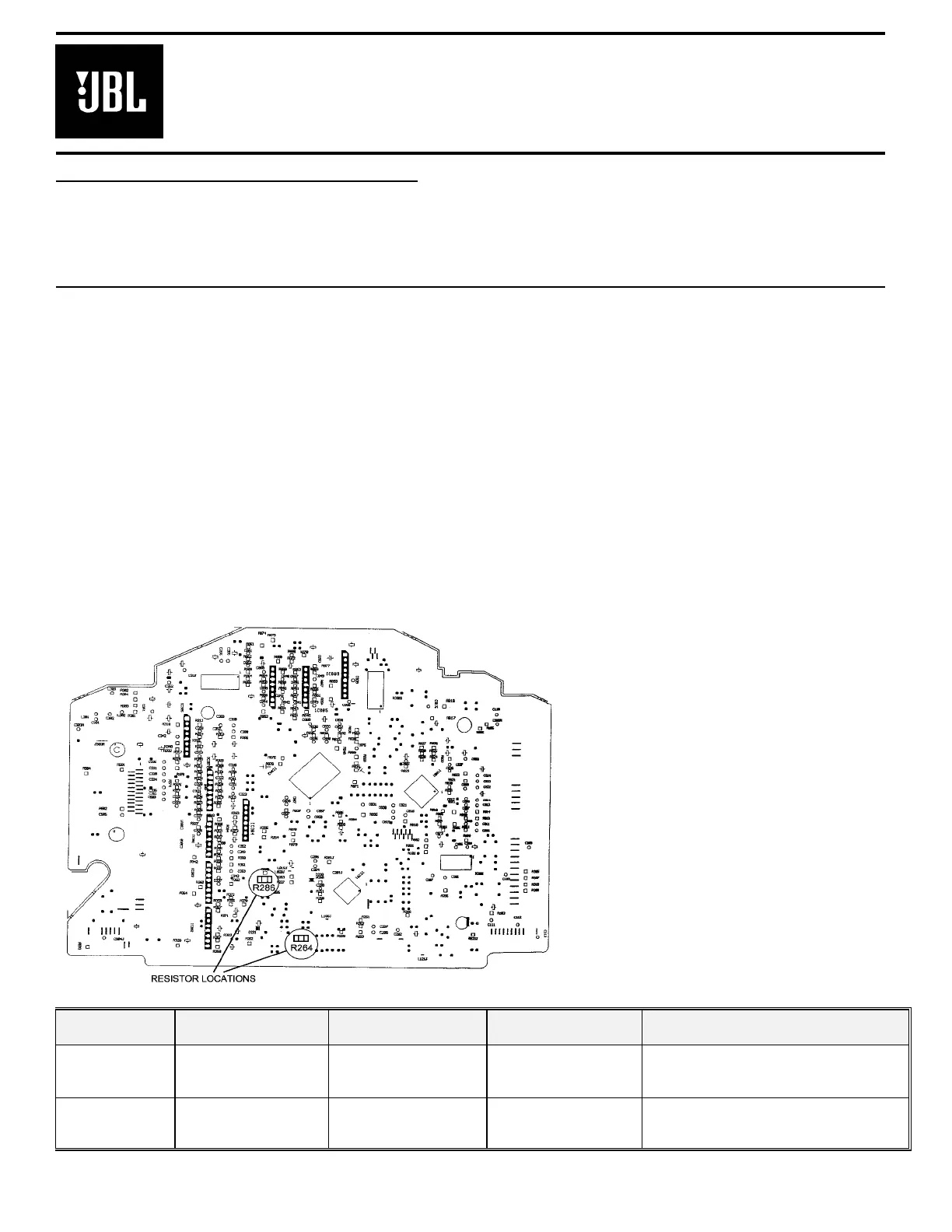
2) Locate R264 and change from a 4.7kΩ to a 2.2kΩ SMD resistor − JBL part #QCF6A53-222.
3) Locate R286 and change from a 82kΩ to a 68kΩ SMD resistor − JBL part #QCF0851-683.
4) Continue with step 8 of the Harmony Disassembly Procedure to remove the CD assembly from the Main
PCB. It is not necessary to remove any cable connectors to perform the next step.
5) Locate Lithium Battery BT201 located at the edge of the Main PCB; replace with JBL part # FBE0030-
001. Battery with clips must be replaced on Main PCB.
6) Attach CD assembly back onto Main PCB, and replace assembly back into unit following all disassembly
instructions in reverse order.
7) Test unit by confirming all controls work and FM station presets hold their memory.
NOTE:
The R286 silkscreen on the Main
PCB may be illegible or mismarked as
“R73S”.
Model Serial number
120V
Serial number
230V
Status Action
Harmony
AC0022-01001
to
AC0022-36021
AC0023-01001
to
AC0023-15720
Lithium battery
circuit failure
Change R264 from 4.7K to 2.2KΩ
Change R286 from 82K to 68KΩ
Replace battery BT201
Harmony
AC0022-36022
and above
AC0023-15721
and above
Modified by factory NONE REQUIRED
8


 To Next Page