Subwoofer is not loud enough
• Use MSC1 Control Center software to adjust subwoofer level and Bass
Management Crossover settings.
• If your system incorporates different models or brands of speakers and subwoofer
it may be necessary to adjust the subwoofer level or Left and Right Speaker
levels to balance the Sub in the system.
No difference in sound when the RMC control is activated or deactivated
• Using the supplied MSC1 Control Center software, conrm that RMC calibration
has been performed.
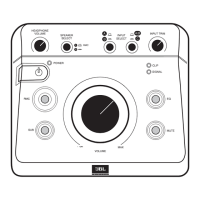
• Conrm that the SPEAKER SELECT switch is set to "A". (RMC processing is
available when the "A" SPEAKER OUTPUTS are selected.)
No difference in sound when the EQ control is activated or deactivated
• Using the supplied MSC1 Control Center software, conrm that an EQ setting
has been made. (See MSC Control Center Software User’s Guide.)
• Conrm that the SPEAKER SELECT switch is set to "A". (EQ affects only signal
sent to "A" SPEAKER OUTPUTS.)
RMC, EQ, and SUB buttons ash when pressed instead of illuminating steadily
• The SPEAKER SELECT switch is set to "B". (Processed signal (RMC
and/or EQ) and subwoofer signal is heard only when routing signal to
"A" SPEAKER OUTPUTS. Only at, unprocessed signal is routed to
"B" SPEAKER OUTPUTS.)
The CLIP LED is illuminated consistently and/or distorted sound is heard
• Output level of the equipment connected to the selected input is too high.
To remedy this do one of the following:
1. Reduce the setting of the INPUT TRIM control.
2. Reduce the output level of the connected equipment using available output
level control on the equipment.
3. If the CLIP LED illuminates with input "C" selected, disconnect the equipment
from Input C and reconnect the equipment to Input "A" or "B", which are
designed to accept greater signal levels.
If the above measures do not correct the problem, please contact JBL Professional
Customer Service (see page 26 in this manual for more information).


 To Next Page