28
Section 9: Troubleshooting
Sub Level 0 dB
Bass Management Crossover 80 Hz
Sub Polarity 0 degrees
Delay 0 Inches / mm
Restoring Factory Settings
Some MSC1 features are set using MSC1 Control Center software. The Factory
Reset procedure restores the features to original default settings. Using the Factory
Reset procedure, the following features, available for speakers connected to "A"
SPEAKER OUTPUTS, are reset:
• Equalization
• Sub Bass Management Crossover
• Subwoofer Level
• Subwoofer Polarity
• Individual level trim for Left and Right Speakers
• Speaker Delay settings
To perform Factory Reset, follow this procedure:
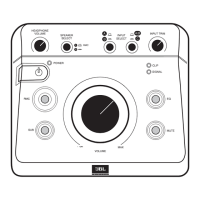
Press and hold the MSC1 front panel RMC control for 6 seconds, until the MUTE and
RMC controls begin to ash. Continue to press the RMC control, and simultaneously
press the MUTE control. Then release both buttons.
Completion of the process is conrmed when LEDs on the MSC1 illuminate in a
pattern for 15 seconds, and the power LED illuminates.
If after performing Factory Reset, the MSC1 is interfaced to a computer and MSC1
Control Center Software is launched, the software will offer the option of returning
the MSC1 to the settings last stored in software.
Note: The Factory Reset procedure erases all user settings, in the MSC1.
MSC1 Factory Settings
"A" Left and Right Speaker
Subwoofer Output
Firmware Update
From time to time, JBL may release a rmware update to correct a problem or
enhance the feature set. If a rmware update is released, the update and installation
instructions will be posted on the JBL website at www.jblproservice.com.
Feature Factory Setting
LF EQ Boost/ Cut 0 dB
HF EQ Boost/Cut 0 dB
LF EQ Frequency 580 Hz
HF EQ Frequency 7.75 kHz
Level Trim 0 dB
Delay 0 inches / mm


 To Next Page