EasyManua.ls Logo

JBL Sub 6 - User Manual

JBL Sub 6
27 pages
Print Icon
To Next Page IconTo Next Page
Loading...
SERVICE MANUALSERVICE MANUAL
/
Sub 6/10
This Service Manual covers
the Sub6 and Sub10 models
JBL Consumer Products
250 Crossways Park Dr.
Woodbury, New York 11797 RevB 7/2003
Question and Answer IconNeed help?

Do you have a question about the JBL Sub 6 and is the answer not in the manual?

Summary

Specifications

Sub6 Specifications

Detailed technical specifications for the JBL Sub6 model.

Sub10 Specifications

Detailed technical specifications for the JBL Sub10 model.

Features

Sub6;10 Key Features

Highlights of the Sub6 and Sub10 powered subwoofers.

SUB6;10 DISASSEMBLY PROCEDURE

Sub6;10 Disassembly Steps

Step-by-step guide for taking apart the Sub6/10 subwoofer.

SUB6;10 CONTROLS

Sub6;10 Control Panel Functions

Explanation of the front and rear control panel functions.

SUB6;10 POWERED SUB WOOFER TEST SETUP

Test Setup Equipment and Procedures

Equipment and procedures for testing the powered subwoofer.

SUB6;10 Block Diagram

Sub6;10 Internal Signal Flow

Visual representation of the subwoofer's internal signal flow.

SUB 6;10 EXPLODED ASSEMBLY VIEW

Sub6;10 Disassembled Parts Diagram

Diagram showing all parts of the Sub6/10 subwoofer disassembled.

SUB6 PART LISTS

Sub6 Mechanical Parts

List of mechanical components for the Sub6 model.

Sub6 Electrical Parts

List of electrical components for the Sub6 model.

SUB6 PART LISTS (continued)

Sub6 Electronic Components

Detailed list of resistors, diodes, transistors, and ICs for the Sub6.

SUB6 PART LISTS (continued)

Sub6 Miscellaneous Parts

List of miscellaneous components for the Sub6 model.

SUB10 PART LISTS

Sub10 Mechanical Parts

List of mechanical components for the Sub10 model.

Sub10 Electrical Parts

List of electrical components for the Sub10 model.

SUB10 PART LISTS (continued)

Sub10 Electronic Components

Detailed list of resistors, diodes, and transistors for the Sub10.

SUB10 PART LISTS (continued)

Sub10 ICs and Miscellaneous Parts

List of ICs and miscellaneous parts for the Sub10.

SUB 6;10 PACKAGING VIEW

Sub6;10 Packaging Details

Illustration of how the Sub6 and Sub10 subwoofers are packaged.

PRINTED CIRCUIT BOARDS #1

Input and Connector PCB Layouts

Layouts for the input and connector printed circuit boards.

PRINTED CIRCUIT BOARDS #2

Main Amplifier PCB Layout

Layout for the main amplifier printed circuit board.

PRINTED CIRCUIT BOARDS #3

Phase Switch and Control PCB Layouts

Layouts for phase switch and control printed circuit boards.

INTEGRATED CIRCUIT DIAGRAM

IC101, IC102, IC103 Diagrams

Circuit diagrams for BA4558, TL074CN, and UPC1298V integrated circuits.

INTEGRATED CIRCUIT DIAGRAM (cont.)

IC104, IC105 Diagrams

Circuit diagrams for MC78L15 and MC79L15 integrated circuits.

SEMICONDUCTOR DIAGRAMS

Transistor Pinout Diagrams

Pinout diagrams for various transistors used in the subwoofer.

SUB6 WIRING DIAGRAM

Sub6 Wiring Schematic

Wiring schematic for the JBL Sub6 powered subwoofer.

SUB10 WIRING DIAGRAM

Sub10 Wiring Schematic

Wiring schematic for the JBL Sub10 powered subwoofer.

SCHEMATIC DIAGRAM

Sub6;Sub10 Overall Schematic

Complete circuit schematic for the JBL Sub-6/Sub-10.

SCHEMATIC DIAGRAM (cont.)

Sub6;Sub10 Schematic Details

Further details and sections of the Sub6/Sub10 circuit schematic.

SCHEMATIC DIAGRAM (cont.)

Sub6;Sub10 Schematic Details

Final sections of the Sub6/Sub10 circuit schematic.

Summary

Specifications

Sub6 Specifications

Detailed technical specifications for the JBL Sub6 model.

Sub10 Specifications

Detailed technical specifications for the JBL Sub10 model.

Features

Sub6;10 Key Features

Highlights of the Sub6 and Sub10 powered subwoofers.

SUB6;10 DISASSEMBLY PROCEDURE

Sub6;10 Disassembly Steps

Step-by-step guide for taking apart the Sub6/10 subwoofer.

SUB6;10 CONTROLS

Sub6;10 Control Panel Functions

Explanation of the front and rear control panel functions.

SUB6;10 POWERED SUB WOOFER TEST SETUP

Test Setup Equipment and Procedures

Equipment and procedures for testing the powered subwoofer.

SUB6;10 Block Diagram

Sub6;10 Internal Signal Flow

Visual representation of the subwoofer's internal signal flow.

SUB 6;10 EXPLODED ASSEMBLY VIEW

Sub6;10 Disassembled Parts Diagram

Diagram showing all parts of the Sub6/10 subwoofer disassembled.

SUB6 PART LISTS

Sub6 Mechanical Parts

List of mechanical components for the Sub6 model.

Sub6 Electrical Parts

List of electrical components for the Sub6 model.

SUB6 PART LISTS (continued)

Sub6 Electronic Components

Detailed list of resistors, diodes, transistors, and ICs for the Sub6.

SUB6 PART LISTS (continued)

Sub6 Miscellaneous Parts

List of miscellaneous components for the Sub6 model.

SUB10 PART LISTS

Sub10 Mechanical Parts

List of mechanical components for the Sub10 model.

Sub10 Electrical Parts

List of electrical components for the Sub10 model.

SUB10 PART LISTS (continued)

Sub10 Electronic Components

Detailed list of resistors, diodes, and transistors for the Sub10.

SUB10 PART LISTS (continued)

Sub10 ICs and Miscellaneous Parts

List of ICs and miscellaneous parts for the Sub10.

SUB 6;10 PACKAGING VIEW

Sub6;10 Packaging Details

Illustration of how the Sub6 and Sub10 subwoofers are packaged.

PRINTED CIRCUIT BOARDS #1

Input and Connector PCB Layouts

Layouts for the input and connector printed circuit boards.

PRINTED CIRCUIT BOARDS #2

Main Amplifier PCB Layout

Layout for the main amplifier printed circuit board.

PRINTED CIRCUIT BOARDS #3

Phase Switch and Control PCB Layouts

Layouts for phase switch and control printed circuit boards.

INTEGRATED CIRCUIT DIAGRAM

IC101, IC102, IC103 Diagrams

Circuit diagrams for BA4558, TL074CN, and UPC1298V integrated circuits.

INTEGRATED CIRCUIT DIAGRAM (cont.)

IC104, IC105 Diagrams

Circuit diagrams for MC78L15 and MC79L15 integrated circuits.

SEMICONDUCTOR DIAGRAMS

Transistor Pinout Diagrams

Pinout diagrams for various transistors used in the subwoofer.

SUB6 WIRING DIAGRAM

Sub6 Wiring Schematic

Wiring schematic for the JBL Sub6 powered subwoofer.

SUB10 WIRING DIAGRAM

Sub10 Wiring Schematic

Wiring schematic for the JBL Sub10 powered subwoofer.

SCHEMATIC DIAGRAM

Sub6;Sub10 Overall Schematic

Complete circuit schematic for the JBL Sub-6/Sub-10.

SCHEMATIC DIAGRAM (cont.)

Sub6;Sub10 Schematic Details

Further details and sections of the Sub6/Sub10 circuit schematic.

SCHEMATIC DIAGRAM (cont.)

Sub6;Sub10 Schematic Details

Final sections of the Sub6/Sub10 circuit schematic.

Overview

The JBL Sub 6/10 is a powered subwoofer designed to enhance the low-frequency output of an audio system. It comes in two models, Sub6 and Sub10, which share identical controls and many features, differing primarily in woofer size, amplifier power, and physical dimensions.

Function Description

The subwoofer integrates an amplifier, crossover, and speaker into a single enclosure. It processes audio signals to reproduce bass frequencies, offloading this task from main speakers and allowing them to focus on mid-range and high frequencies. This results in a more balanced and impactful sound experience.

Key functional blocks include:

  • Pre-Amp: Processes incoming audio signals.
  • Phase Switcher: Adjusts the relative polarity of the subwoofer's output.
  • Low Pass Filter: Allows only frequencies below a user-adjustable point to pass to the amplifier, ensuring the subwoofer handles only bass.
  • High Pass Filter: (For speaker-level outputs) Filters out low frequencies from the signal sent to satellite speakers, allowing them to perform more efficiently.
  • Amplifier (AMP): Powers the woofer.
  • Speaker Relay: Protects the speaker.
  • Power Relay: Manages the power status of the unit.
  • Vol Control with Power Off: Controls the output volume and includes an auto turn-on/off circuit.
  • Multi-LED (Signal Status): Indicates the operating mode (Red/Green).
  • Compare & Speaker Safeguard: These circuits likely monitor the audio signal and amplifier output to protect the speaker from damage due to excessive power or clipping.
  • Relay Driver: Controls the speaker relay.

The subwoofer features an Auto Turn-On/Off Circuit. When the Volume knob is turned clockwise to ON, the LED lights green. If the Volume knob is turned fully counterclockwise (OFF) or the receiver/amplifier has been off for five minutes, the LED lights red, and the subwoofer enters standby. It will automatically turn on again when an audio signal is detected from the receiver/amplifier.

Important Technical Specifications

The Sub 6/10 series offers two distinct models with varying performance capabilities:

Sub6 Model:

  • Amplifier Power (RMS): 60 Watts
  • Woofer Size: 6-1/2 inches
  • Inputs: Line and Speaker Level
  • Outputs: High Pass Speaker Level
  • Crossover Frequency: Continuously variable from 90Hz to 200Hz
  • Frequency Response: 40Hz - (90Hz - 200Hz)* (determined by crossover setting)
  • External Dimensions (H x W x D): 17" (432mm) x 12-3/4" (324mm) x 11-1/8" (282mm)
  • Weight: 26 lbs (11.8 kg)
  • DC Resistance of Driver: 3.4 ohms
  • Fuse: 3.15A 250V (for 120V American version), 4A 250V (for 230V European version)

Sub10 Model:

  • Amplifier Power (RMS): 100 Watts
  • Woofer Size: 10 inches
  • Inputs: Line and Speaker Level
  • Outputs: High Pass Speaker Level
  • Crossover Frequency: Continuously variable from 90Hz to 200Hz
  • Frequency Response: 38Hz - (90Hz - 200Hz)* (determined by crossover setting)
  • External Dimensions (H x W x D): 24" (608mm) x 17-3/4" (450mm) x 13-1/2" (342mm)
  • Weight: 48 lbs (21.8 kg)
  • DC Resistance of Driver: 3.0 ohms
  • Fuse: 3.15A 250V (for 120V American version), 4A 250V (for 230V European version)

Usage Features

The JBL Sub 6/10 offers several user-friendly features for integration into various audio setups:

  • Volume/Power Knob: Controls the subwoofer's output level and acts as the main power switch, engaging the auto turn-on/off circuit.
  • LED (Red/Green): Provides visual feedback on the subwoofer's operational status (Green for ON, Red for standby/OFF).
  • Crossover Frequency Knob: Allows continuous adjustment of the highest frequency the subwoofer will reproduce (90Hz - 200Hz), enabling a seamless blend with satellite speakers.
  • Phase Switch: Used to adjust the relative polarity of the subwoofer's output, helping to optimize bass integration with main speakers and avoid cancellation issues.
  • High Level Inputs (Speaker Connectors): Designed for receivers/amplifiers without dedicated line-level "pre-amp out" or "subwoofer out" jacks. When used, the subwoofer can pass a full-range signal to satellite speakers connected to its High Level Outputs.
  • Low Level Input (RCA Connectors): The preferred connection method for receivers/processors equipped with line-level "pre-amp out" or "subwoofer out" jacks.
  • Mono/Stereo Switch: Affects the subwoofer's operation when using the Low Level Input. It should be set to "STEREO" for dual (stereo) RCA cable connections or "MONO" if a single (mono) RCA cable is plugged into the (R) Input Jack.
  • Low/High Switch: Determines the input sensitivity. Set to "LOW" for Low Level Input (RCA) connections and "HIGH" for High Level Input (Speaker) connections.
  • Rugged Molded Plastic Front Baffle: Provides durability and a robust enclosure for the woofer.

Maintenance Features

The service manual outlines detailed disassembly and testing procedures for maintenance and repair:

Disassembly Procedures:

  1. Disconnect all external cables.
  2. Place the subwoofer on a padded surface with controls facing upwards.
  3. Remove screws holding the control panel and heatsink/amplifier.
  4. Partially remove assemblies to access connectors. For full disassembly, molex connectors (CN301/CN301A, CN306, CN902A) need to be removed, cutting tie wraps.
  5. Remove the input plate by unscrewing Philips screws (S2) and (S4).
  6. Power transformer removal involves unscrewing plated screws, cutting cable ties, removing wire nuts, unplugging molex connector CN901, and removing machine bolts (S7) with nuts (N1).
  7. Reassembly: Follow disassembly steps in reverse, ensuring cable ties and wire nuts are replaced.
  8. Sub10 Specific Note: Ensure connecting cables between the heatsink/amplifier and control board are routed through the designated notch in the plastic baffle for proper seating.

Test Procedures:

  • General Function Test: Involves connecting a signal generator to the line-level or high-level inputs, adjusting frequency and voltage, and verifying the LED status and bass response from the port tube.
  • Sweep Function Test: Uses a sweep generator (20Hz to 300Hz) to check for rattles, clicks, buzzes, or other noises from the cabinet and drivers.
  • Driver Function Test:
    • Carefully remove the metal grille and mounting screws to detach the woofer.
    • Check the DC resistance of the driver (Sub6: 3.4 ohms, Sub10: 3.0 ohms).
    • Connect the driver to an integrated amplifier fed by a signal generator (5.0V output) and sweep from 20Hz to 1kHz to listen for rubbing, buzzing, or unusual noises.

The manual also provides detailed part lists for both mechanical and electrical components, including capacitors, resistors, diodes, transistors, and integrated circuits, which are essential for identifying and replacing faulty parts during repair. Exploded assembly views and wiring diagrams further aid in understanding the internal layout and connections, facilitating troubleshooting and repair.
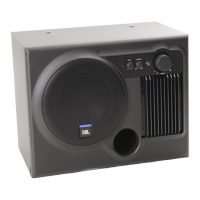
JBL Sub 6 Specifications

General IconGeneral
BrandJBL
ModelSub 6
CategorySubwoofer
LanguageEnglish

Related product manuals