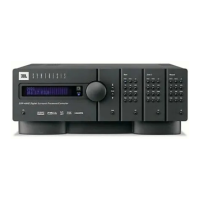
SDP-40HD Getting Started
1-5
PRODUCT REGISTRATION
Please register the SDP-40HD Digital Controller within 15 days of
purchase. Register online at www.jbl.com. Retain the original sales
receipt as proof of warranty coverage.
INSTALLATION CONSIDERATIONS
The SDP-40HD requires special care during installation to ensure
optimal performance. Pay particular attention to instructions below
and to other precautions that appear throughout this user guide.
DO install the SDP-40HD on a solid, flat, level surface such as a table
or shelf. The SDP-40HD can also be installed in a standard 19-inch
equipment rack using an optional rack-mount kit available from an
authorized dealer.
DO select a dry, well-ventilated location out of direct sunlight.
DO NOT expose the SDP-40HD to high temperatures, humidity,
steam, smoke, dampness or excessive dust. Avoid installing the
SDP-40HD near radiators and other heat-producing appliances.
DO NOT install the SDP-40HD near unshielded TV or FM antennas,
cable TV decoders, or other RF-emitting devices that might cause
interference.
DO NOT place the SDP-40HD on a thick rug or carpet, or cover the
SDP-40HD with a cloth, as this might prevent proper cooling.
DO NOT place the SDP-40HD on a window sill or any location
exposed to direct sunlight.
DO NOT obstruct the front-panel IR receiver window. The remote
control must be in line of sight with the IR receiver for proper
operation.
DO NOT install the SDP-40HD on a surface that is unstable or
unable to support all four feet, unless it is installed in an
equipment rack.
DO NOT stack the SDP-40HD directly above heat-producing
equipment such as a power amplifier.
CAUTION!
Before moving the SDP-40HD, power the unit off using
the rear-panel power switch and unplug the power cord
from the wall outlet.


 To Next Page