Setup JBL
3-50
EDIT CUSTOM NAME
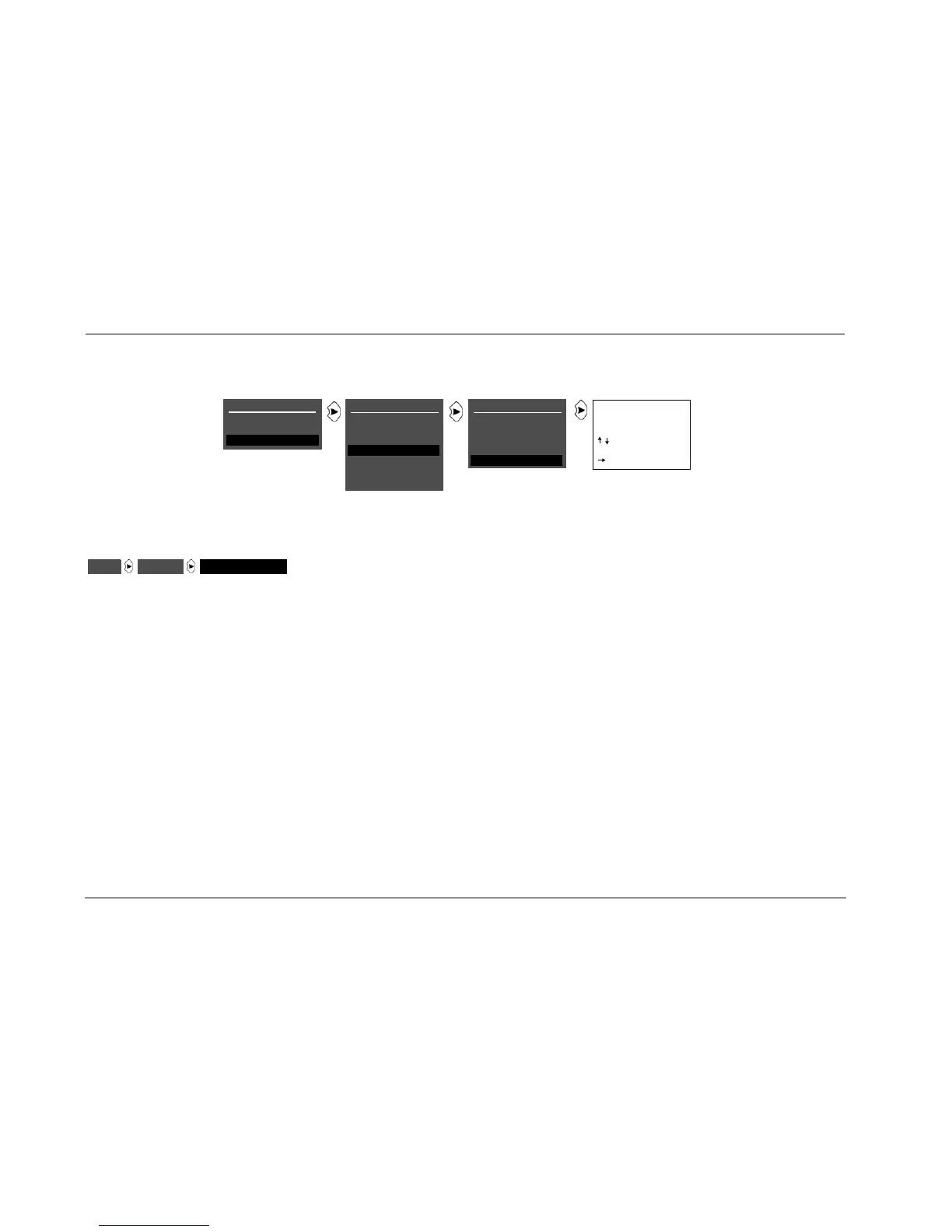
Opens the EDIT CUSTOM NAME drop-down menu shown above,
which can be used to create a custom unit name. The factory
default unit name is SDP-40HD.
To create a custom unit name:
1. Follow the EDIT CUSTOM NAME menu path shown above to
open the EDIT CUSTOM NAME drop-down menu.
2. When the EDIT CUSTOM NAME menu drops down, locate the
current unit name on the second line. The cursor automatically
appears beneath the first character in the current unit name.
3. Use the following remote control commands to enter a new
unit name:
• Press the or arrow button to change the character
above the cursor.
• Press the button to advance to the next character space.
The cursor will automatically wrap to the first character
space when the last (twentieth) character space is passed.
• Pressing will close the EDIT CUSTOM NAME drop-down
menu.
4. When the desired custom unit name has been entered, press
until the EDIT CUSTOM NAME menu closes. The new unit
name is saved automatically.
MAIN MENU
MODE ADJUST
AUDIO CONTROLS
SETUP
DISPLAY SETUP
ON-SCREEN DISPLAY
FRONT PANEL DISPLAY
A/V SYNC DELAY
CUSTOM NAME
EDIT CUSTOM NAME
OFF
OFF
EDIT CUSTOM NAME
SDP-40HD
BUTTONS TO EDIT
UP TO 20 CHARACTERS
BUTTON TO ADVANCE
>
SETUP
INPUTS
SPEAKERS
REAR PANEL CONFIG
DISPLAYS
VOLUME CONTROLS
TRIGGERS
LOCK OPTIONS
DISPLAYSSETUP EDIT CUSTOM NAME


 To Next Page