24
VTX B18 | User Manual
CAUTION: Make sure the total number of VTX B18 enclosures per circuit / amplifier does not exceed the maximum
number recommended.
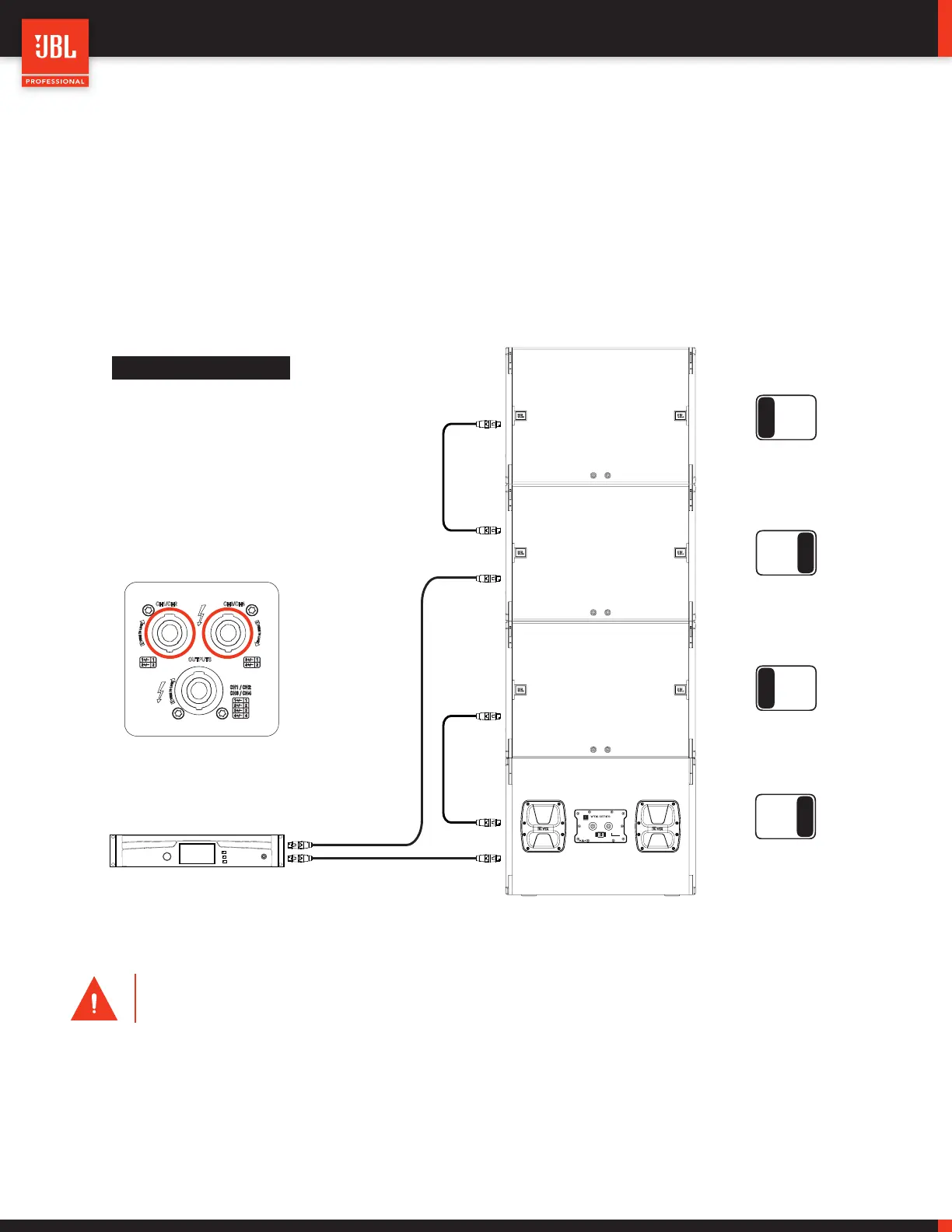
10.4 - B18 USING I-TECH 4X3500HD (CARDIOID)
Cardioid configurations can be created using Crown Audio I-Tech 4x3500HD amplifiers. In this case, anyone of the amplifier channels
can be set for cardioid using JBL Performance Manager
TM
software application. Each amplifier channel is driving a single B18 enclosure
and the channel selection switch at the back of the B18s can be used to assign B18 cabinets to the cardioid channels. In this configu-
ration, the front grill NL4 connectors are used for wiring the rear facing B18 subwoofers.
A
B
A
B
A B
A B
Channel Selection
Switch
CAUTION
Suspending this system should
only be done by qualified persons
following safe rigging practices.
B18
Compact Single 18” Subwoofer
IN/OUT IN/OUT
A
B
Channel Selection
SN
Amplifier Channels
Channel 1 B18 1
Channel 2 B18 2
Channel 3 B18 3
Channel 4 B18 4
CH1/CH2 CH3/CH4
OUTPUTS
Amplifier Rear Panel
Crown I-Tech 4x3500HD
10.5 - CROWN AUDIO V-RACK
VTX series systems are compatible with the Crown Audio V-Rack 12000HD and Crown Audio V-Rack 4x3500HD touring racks. The
number of supported cabinets per amplifier and wiring options remain the same as the Crown Audio I-Tech examples illustrated in this
document. For more information on the Crown Audio V-Rack products, refer to the V-Rack User Manuals and documentation.


 To Next Page