13
User manual
6- Daily operation
6.3 Drink delivery with pre-selections (some options not available in all markets)
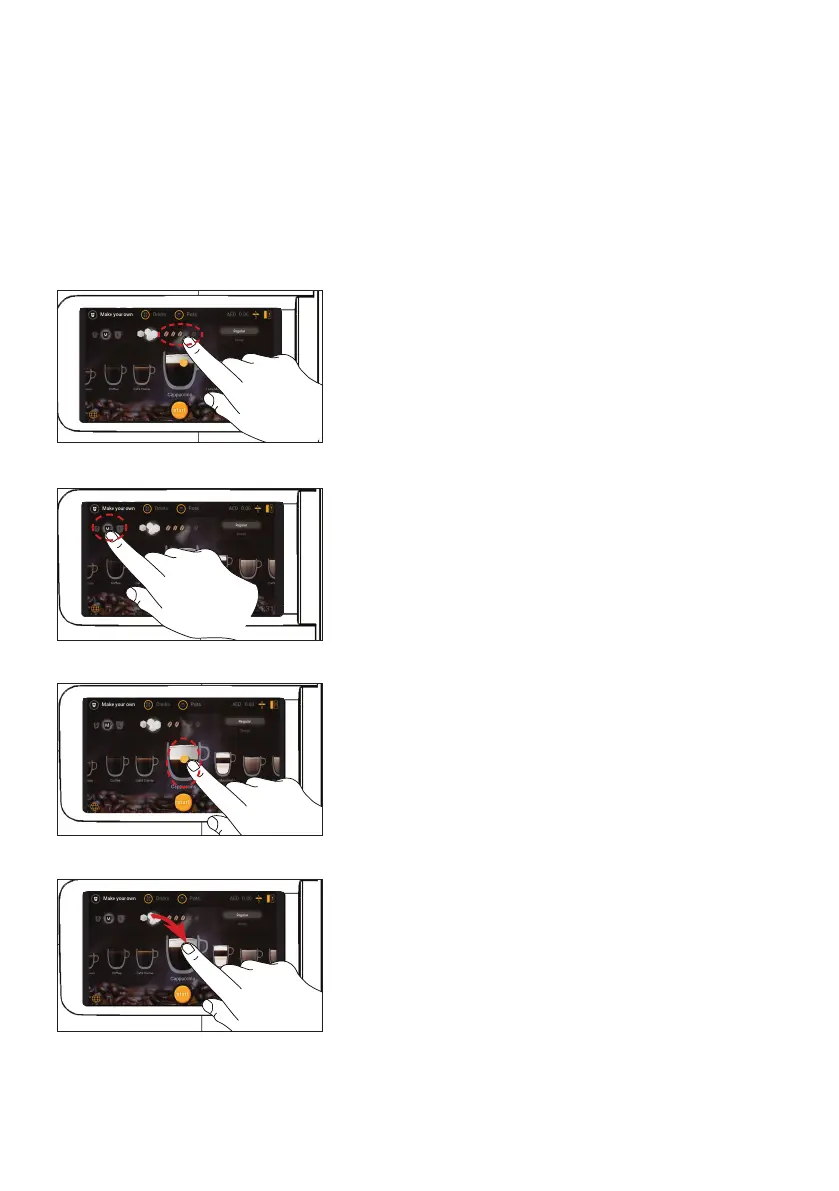
Coffee strength pre-selection
Coffee volume pre-selection
Your dispenser supports pre-selection options. The service technician may activate pre-selection options
during installation. When the pre-selection button is pressed, the following pre-selections can be activated.
• Coffee strength (mild, regular or strong drinks)
• Coffee volume (small, medium or large drinks)
• Milk volume
• Add extra sugar (3 steps)
• Place your cup. Press the desired drink button.
• Increase the STRENGTH by sliding the indicator to the right
until you reach your desired setting (number of beans shown
will indicate the strength, more beans = stronger coffee).
• Press the START button to begin dispensing when ready.
• Place your cup. Press the desired drink button.
• Swipe the VOLUME icon until you reach your desired drink size
(choose from small, medium or large).
• Press the START button to begin dispensing when ready.
Add extra sugar pre-selection
• Place your cup. Press the desired drink button.
• Drag the SUGAR icon, one cube at a time, until you reach your
desired amount (the maximum added amount is three).
• Press the START button to begin dispensing when ready.
Milk volume pre-selection
• Place your cup. Press the desired drink button.
• Slide the MILK icon up or down until you reach your desired
ratio of milk to coffee.
• Press the START button to begin dispensing when ready.



 To Next Page