Ch-B Ch-A
Ch-B
Ch-A/BRIDGED
Ch-B
Ch-B
Ch-A
Ch-B /Ch-A BRIDGED
Ch-A
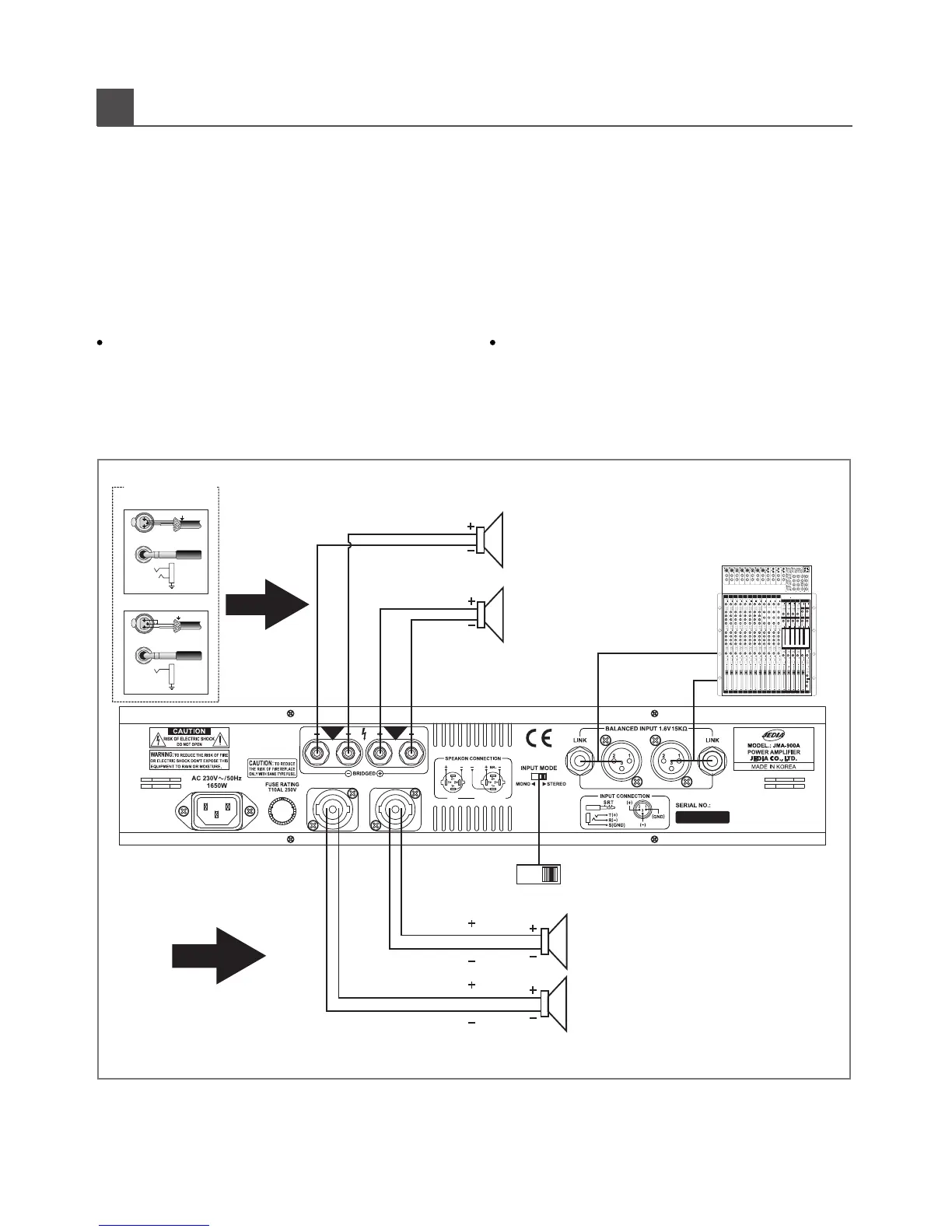
시스템연결그림은일반적인설치방법으로다음사항을주의하십시오.
1.스피커라인연결시앰프의전원스위치를꺼주십시오.
2.스피커결선은결선도를참고하여주십시오.
3.앰프는2개의모드(스테레오,브릿지모노)로전환시킬수있으며,
4.잘못된결선은스피커에치명적인손상을초래합니다.
앰프가동작중일때는전환하지마십시오.
스테레오방식
결선하십시오.
모드스위치를스테레오쪽으로전환하고스피커극성에주의하여
Wiring the following instructions describe the most common
ways to install your amplifier into a sound system.
1. First, turn off power switch befor connection.
2. Refer to wirning diagram for speaker connection.
(stereo, bridge-mono)
3. JMA-Series amplifier maybe operated in one of two modes
4. JEDIA assumes no liability for damaged loads resulting from
careless amplifier use or deliberate over powering.
How to connect stereo(2-CHANNEL) mode
connect the output wiring as shown.
To put the amplifier into stereo mode, first turn the amplifier off,
then slide the stereo-mono switch toward the left, and properly
C
ONNECTIONS
PIN1
PIN1
PIN1
PIN1
CH-A
CH-B
5
METHOD 1
CH-A
CH-B
1
2
3
-
+
INPUT
FROM
SOURCE
SHIELD
+
-
1
2
3
SHIELD
+
INPUT
FROM
SHIELD
+
BALANCED
UNBALANCED
Input Wiring Tips
SHIELD
SOURCE
METHOD 2
BRIDGE MONO
STEREO
CH-A
CH-B
PROFESSIONAL AUDIO MIXER 8.4.4.2
TRIPAC Series or
STAGE PRO MIXER
TRIPAC



 To Next Page