4
®
KDC 9520
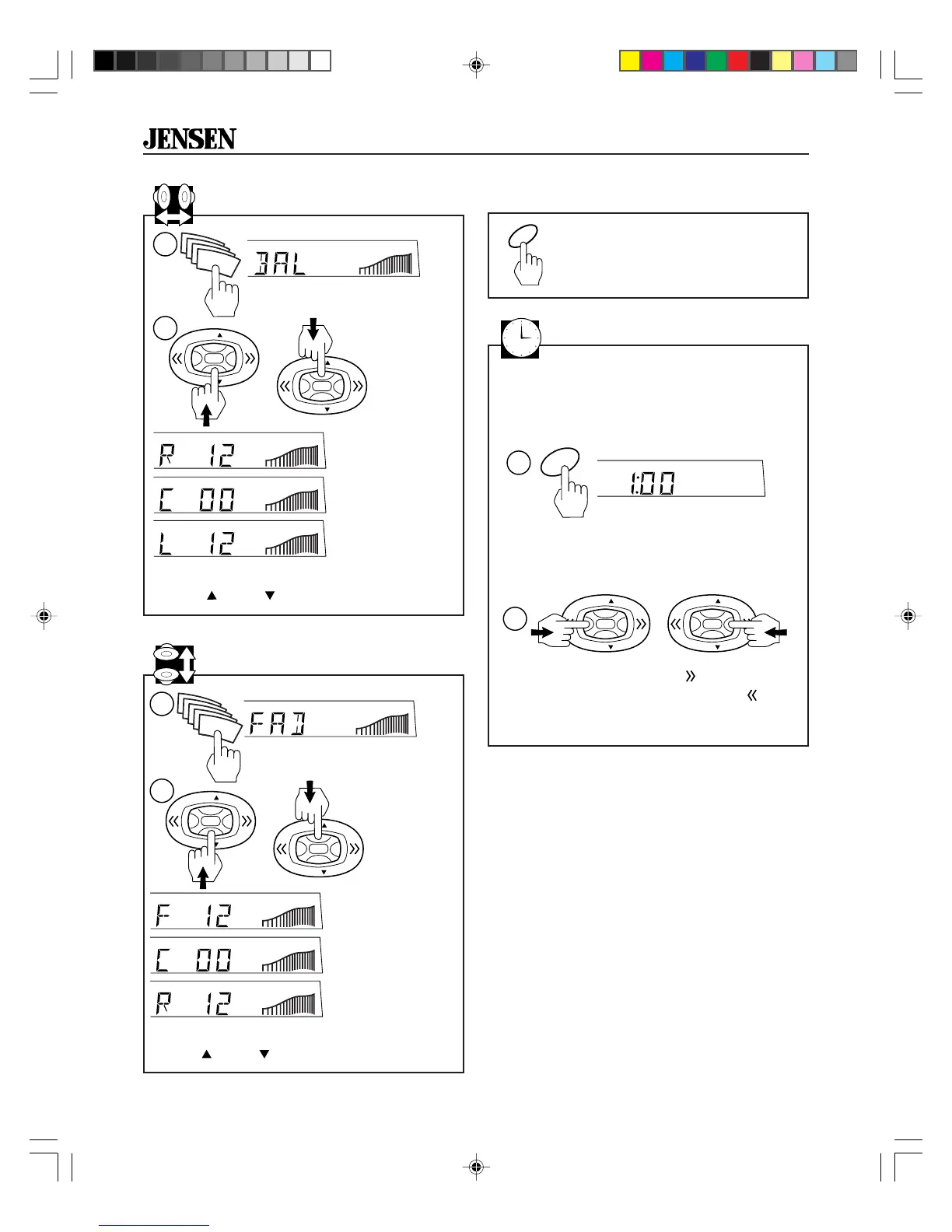
1. Press SEL button four times.
Balance
2. Adjust sound balance left and right using
VOL
or
VOL
on the control button.
Loudness
Press LOU to increase bass output.
View/Set the Clock
Press CLK button to temporarily display
clock.
CLK
1
1. Press and hold CLK button for more
than two seconds. Receiver will beep.
LOU
R12=Right
speaker only
C=Equal sound
right and left
L12=Left
speaker only
1. Press SEL button five times.
Fader
2. Adjust sound balance front and rear using
VOL
or
VOL
on the control button.
F12=Front
speakers only
C=Equal sound
front and rear
R12=Rear
speakers only
2
HM
VOL
VOL
VOL
VOL
2. Within 3 seconds, press on the control
button to change the minutes and
to
change the hours.
>2 sec
To set the clock:
1
SEL
SEL
SEL
SEL
2
or
VOL
VOL
VOL
VOL
2
or
VOL
VOL
VOL
VOL
1
SEL
SEL
SEL
SEL
KDC9520_EOP.p65 3/14/00, 1:56 PM4


 To Next Page