9
VM9022
CONTROLS AND INDICATORS
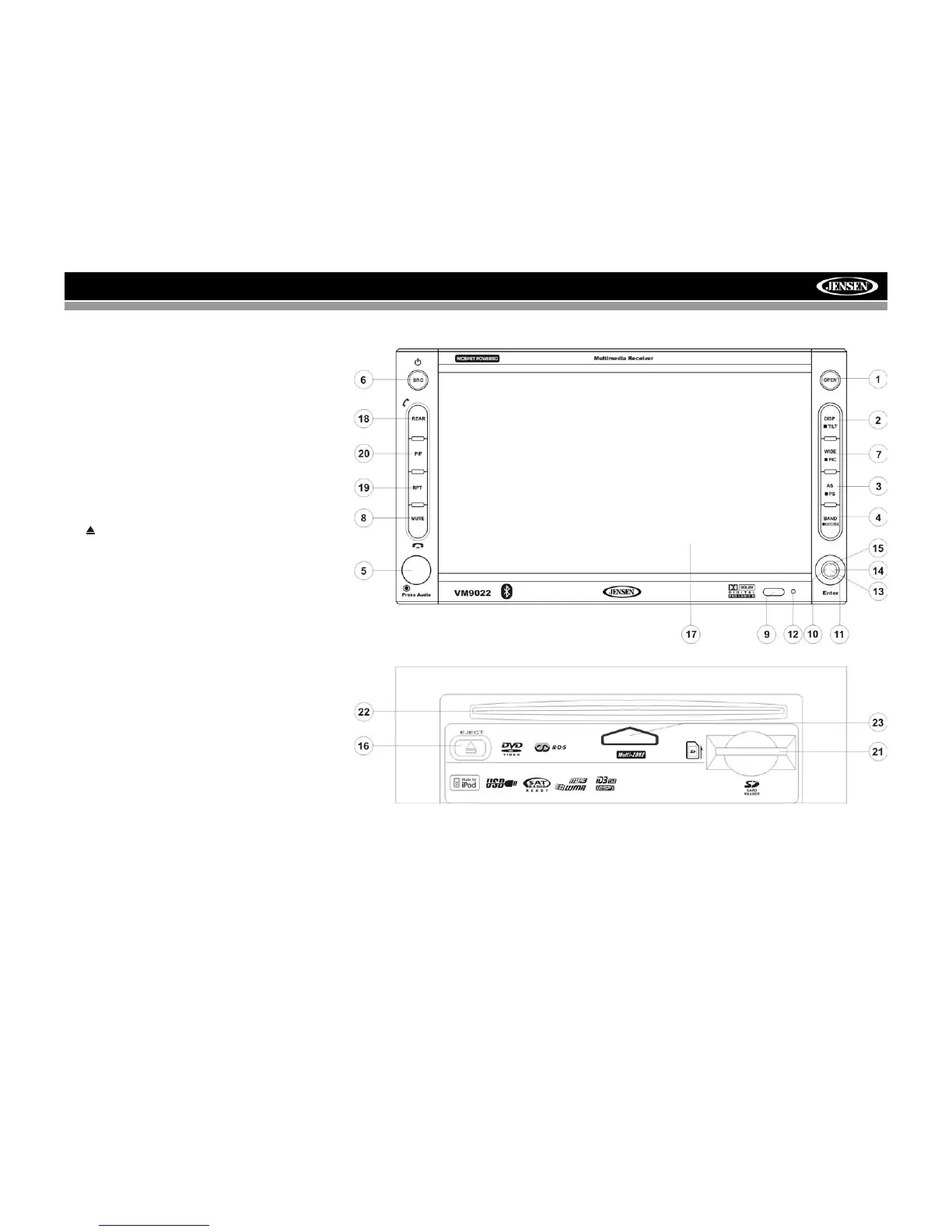
13.Pause/Play/Enter
Press to pause or resume playback or to confirm current
selection.
14. (right joystick)
DVD/Disc Mode: Press once to enter the next chapter or
track.
TUNER Mode: Press once to auto-search the next available
radio station.
MENU Mode: Press once to move the cursor to the right.
15. (up joystick)
DVD/Disc Mode: Press once for fast forward/fast reverse.
TUNER Mode: Press to go up one frequency step.
MENU Mode: Press once to move the cursor up.
16. ( )
Press once for disc insertion/ejection.
Press and hold to reset core mechanism position.
17. TFT Display
18. REAR
Select rear zone source. Allows front passengers to listen to
the radio while rear passengers listen to a CD, MP3, WMA or
watch DVDs.
BT Mode: Disconnect Bluetooth call.
19. RPT
Press to control repeat playback function.
20. PIP
Press to activate the Picture In Picture function.
NAV101 (optional): Press and hold to return to the NAV101
user interface.
21. SD Card Slot
Insert SD card for playback of audio files.



 To Next Page